TRON fee parameters describe resource prices, limits and allowances; they do not give one fixed USDT transfer price. Our Mainnet API observation on October 28, 2026 returned an Energy price of 100 SUN per unit, a Bandwidth price of 1,000 SUN per unit, a maximum fee_limit of 15,000,000,000 SUN, and a free Bandwidth allowance parameter of 600. The table below keeps those four different units separate.
This is a dated data review for readers checking a quoted fee or maintaining a read-only record. It is not an announcement of a parameter change. One observation cannot establish a previous value, a proposal’s effective time, or the charge for your next transaction. Success means reproducing the selected values and identifying what each number can actually support.
Checked October 28, 2026 by the Tronscan News editorial team, an independent publication. AI assisted drafting and diagram preparation; the response and local parser tests were checked for this review. No wallet was connected and no funded transaction was signed or broadcast. See the editorial standards through the site’s About & Standards navigation for corrections and our testing policy.
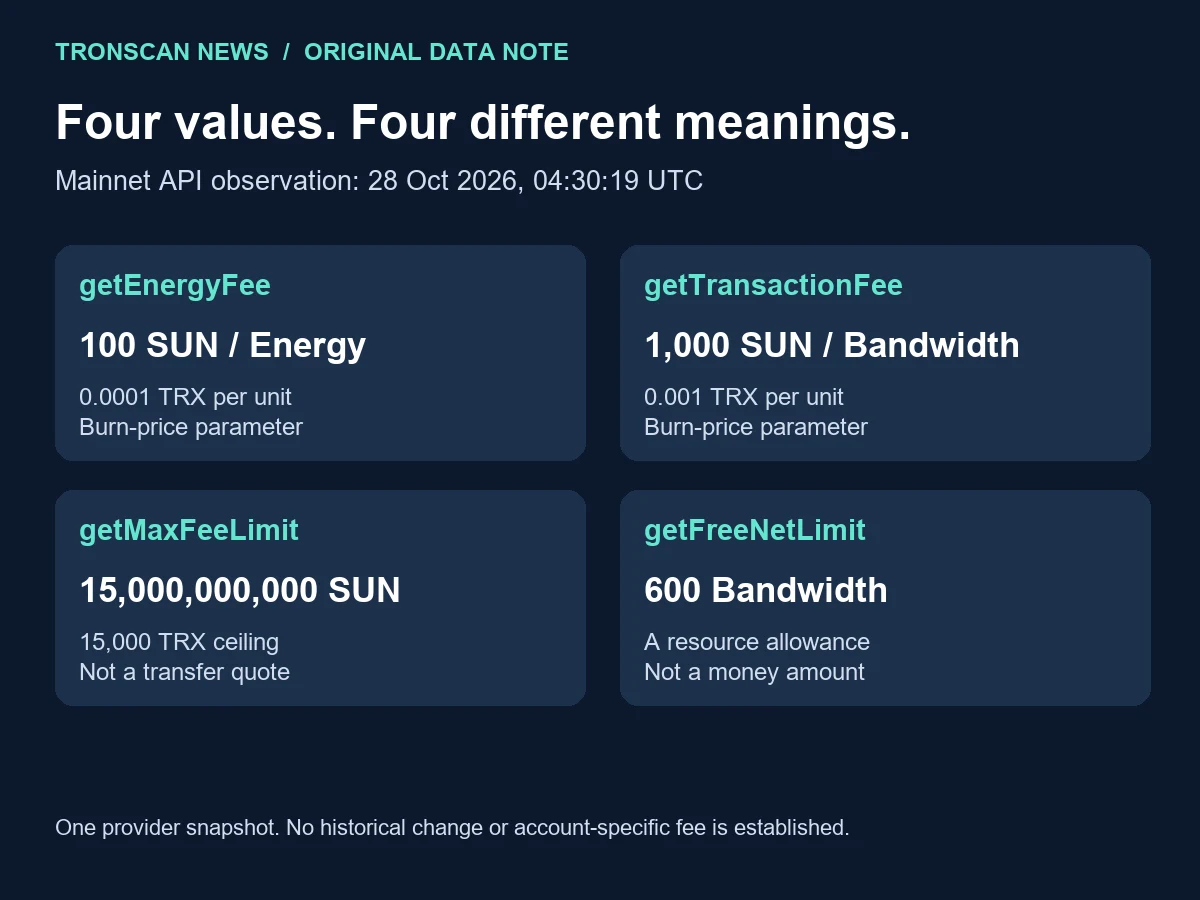
Table of Contents
1. Read the dated TRON fee parameters table
We requested https://api.trongrid.io/wallet/getchainparameters using GET. Collection began at 04:30:19.239960 UTC and finished at 04:30:19.443121 UTC on October 28. The server returned HTTP 200 and a JSON chainParameter array containing 81 entries. The four selected entries were present and carried the integer values shown here.
The official network-parameter documentation identifies the Mainnet host, parameter-key conventions and SUN conversion. One TRX equals 1,000,000 SUN. Our conversions use exact integer arithmetic before displaying a decimal.
| Exact API key | Observed raw value | Unit and interpretation | Do not conclude |
|---|---|---|---|
getEnergyFee |
100 | 100 SUN per Energy; 0.0001 TRX per burned unit | Every contract call costs 100 SUN in total |
getTransactionFee |
1000 | 1,000 SUN per Bandwidth; 0.001 TRX per burned unit | A transaction always burns this amount once |
getMaxFeeLimit |
15000000000 | 15,000,000,000 SUN; 15,000 TRX maximum fee_limit setting | Your transfer spent 15,000 TRX |
getFreeNetLimit |
600 | 600 Bandwidth; a resource allowance parameter | The account has 600 TRX or 600 transfers |
The response did not provide a block height, a block timestamp or an effective-governance timestamp for this collection. Our retrieval time belongs to our observation, not to the creation of every parameter. We did not independently establish that the provider’s node was synchronized at a particular height.
Keep the observation date beside TRON fee parameters when copying a value into a spreadsheet. Removing the date would turn a bounded observation into an unsupported current-price claim. A later reader should obtain another response before using TRON fee parameters in an operational calculation.
2. Retrieve TRON fee parameters without a wallet
- Open the official API reference and confirm the network host. The reference’s sample may show a test-network endpoint; use the documented Mainnet host for a Mainnet comparison.
- Request the read-only endpoint in a browser or a tool that can save the response. This workflow does not ask for a private key, seed phrase, signature or account connection.
- Save the complete JSON response as
chain-parameters.json. Keep an untouched copy before extracting four entries. - Write the retrieval time in UTC, endpoint, HTTP result and any response error into a separate note. Do not insert those notes into the raw response and then call it unchanged.
- Validate the response structure, exact keys and integer values. Run the local example below if Python is available.
- Compare the output with the unit table. A different later observation is a reason to investigate, not proof that this article’s observation never occurred.
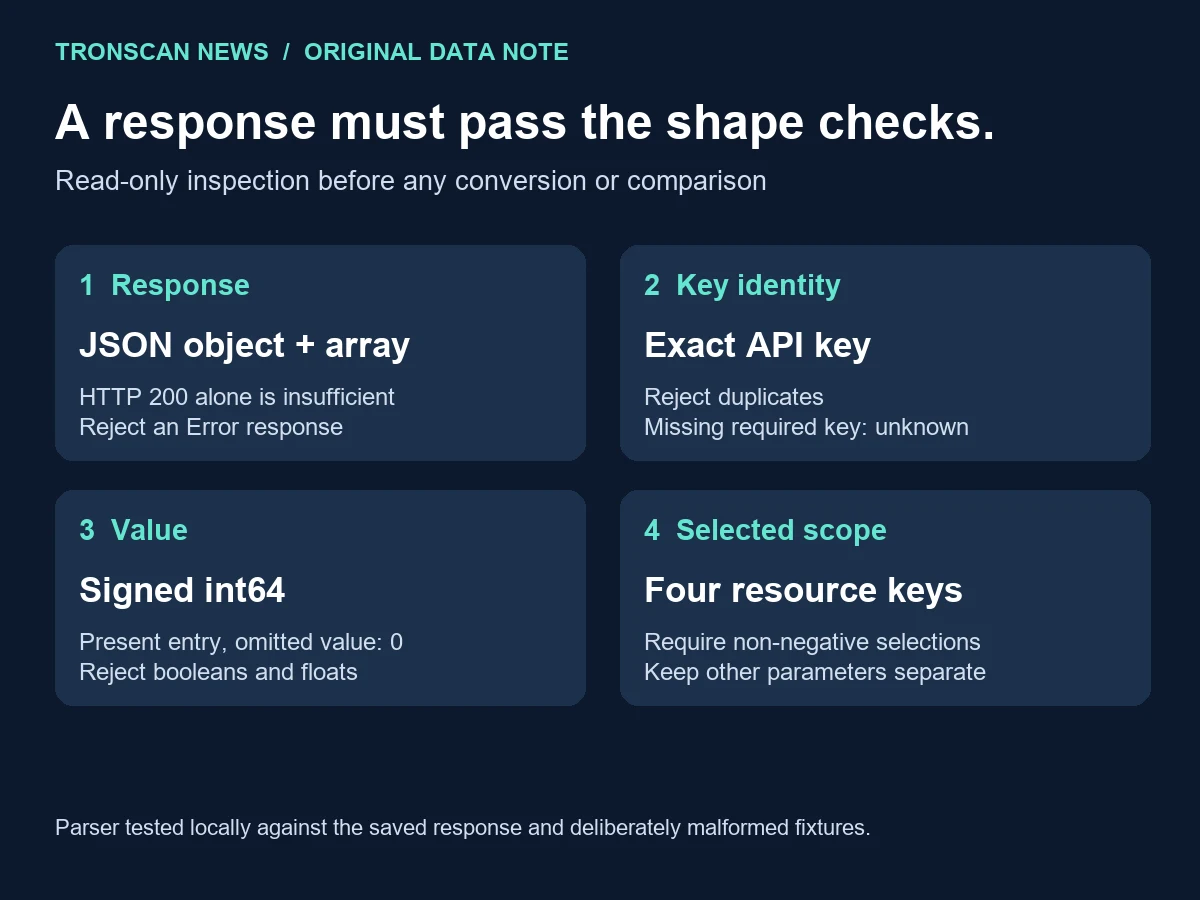
The GetChainParameters API reference explains that a successful HTTP status may still contain an error body. It also documents default-zero omission in a present parameter entry. These two details determine how our parser handles apparently empty data.
For a phone-only check, find the exact key string in the displayed response and preserve the surrounding entry. If your browser cannot save JSON reliably, record the endpoint, time, key, value and a clearly labelled screen capture. That is a manual observation with narrower reproducibility than a complete response file; do not describe it as a full export.
3. Test a local TRON fee parameters extractor
Save this example as read_parameters.py beside the JSON file, then run python read_parameters.py. It uses Python’s standard library and reads only your local file. There are no network requests, dependencies, account credentials or transaction methods in the example.
import json
from pathlib import Path

KEYS = ("getEnergyFee", "getTransactionFee",
        "getMaxFeeLimit", "getFreeNetLimit")

def select_parameters(document):
    if not isinstance(document, dict) or "Error" in document:
        raise ValueError("Invalid API response")
    rows = document.get("chainParameter")
    if not isinstance(rows, list):
        raise ValueError("Missing chainParameter array")
    values = {}
    for row in rows:
        if not isinstance(row, dict):
            raise ValueError("Invalid parameter entry")
        key = row.get("key")
        if not isinstance(key, str) or not key or key in values:
            raise ValueError("Missing or duplicate parameter key")
        value = row.get("value", 0)
        if isinstance(value, str) and value.isascii() and value.lstrip("-").isdecimal():
            value = int(value)
        if type(value) is not int or not -(2**63) <= value < 2**63:
            raise ValueError("Expected a signed int64 integer")
        values[key] = value
    missing = [key for key in KEYS if key not in values]
    if missing:
        raise ValueError("Missing required keys: " + ", ".join(missing))
    if any(values[key] < 0 for key in KEYS):
        raise ValueError("Negative selected resource parameter")
    return {key: values[key] for key in KEYS}

if __name__ == "__main__":
    data = json.loads(Path("chain-parameters.json").read_text(encoding="utf-8"))
    print(json.dumps(select_parameters(data), indent=2))
The selected TRON fee parameters from our saved observation are:
{
  "getEnergyFee": 100,
  "getTransactionFee": 1000,
  "getMaxFeeLimit": 15000000000,
  "getFreeNetLimit": 600
}
We ran the extractor against the actual 81-entry response and ten deliberately altered local fixtures. All eleven checks behaved as intended. The fixtures covered an omitted value on a present entry, a string integer, an Error-only response, an absent array, an absent required key, a duplicate key, a boolean, a floating-point number, a negative selected value and an integer outside the signed 64-bit range.
An unrelated parameter in a full response can legitimately use a signed value. The parser therefore validates signed integers throughout the array and applies its non-negative requirement only to the four resource keys selected here. Rejecting every negative value in the entire response would incorrectly reject our real collection. This is a response-shape rule for this worksheet, not a validator for every TRON protocol rule.
A present entry without value becomes zero under the documented serialization convention. An absent required key instead raises an error. The difference prevents a missing field from being silently reported as a free resource price. Zero accepted by this parser also does not prove that an unusual network configuration is correct; check the network and source before interpreting it.
The duplicate-key check intentionally stops rather than choosing the first or last occurrence. A spreadsheet that silently overwrites a duplicate might hide an inconsistent source or a damaged copy. Recollect the response and compare the raw files before deciding which value to use.
These local tests demonstrate extraction behavior, not consensus validation, node honesty or a successful payment. They also do not make a saved file authentic. If the source matters to a dispute, preserve retrieval context and seek the appropriate supporting records rather than presenting a parser pass as independent certification.
4. Convert TRON fee parameters into the right units
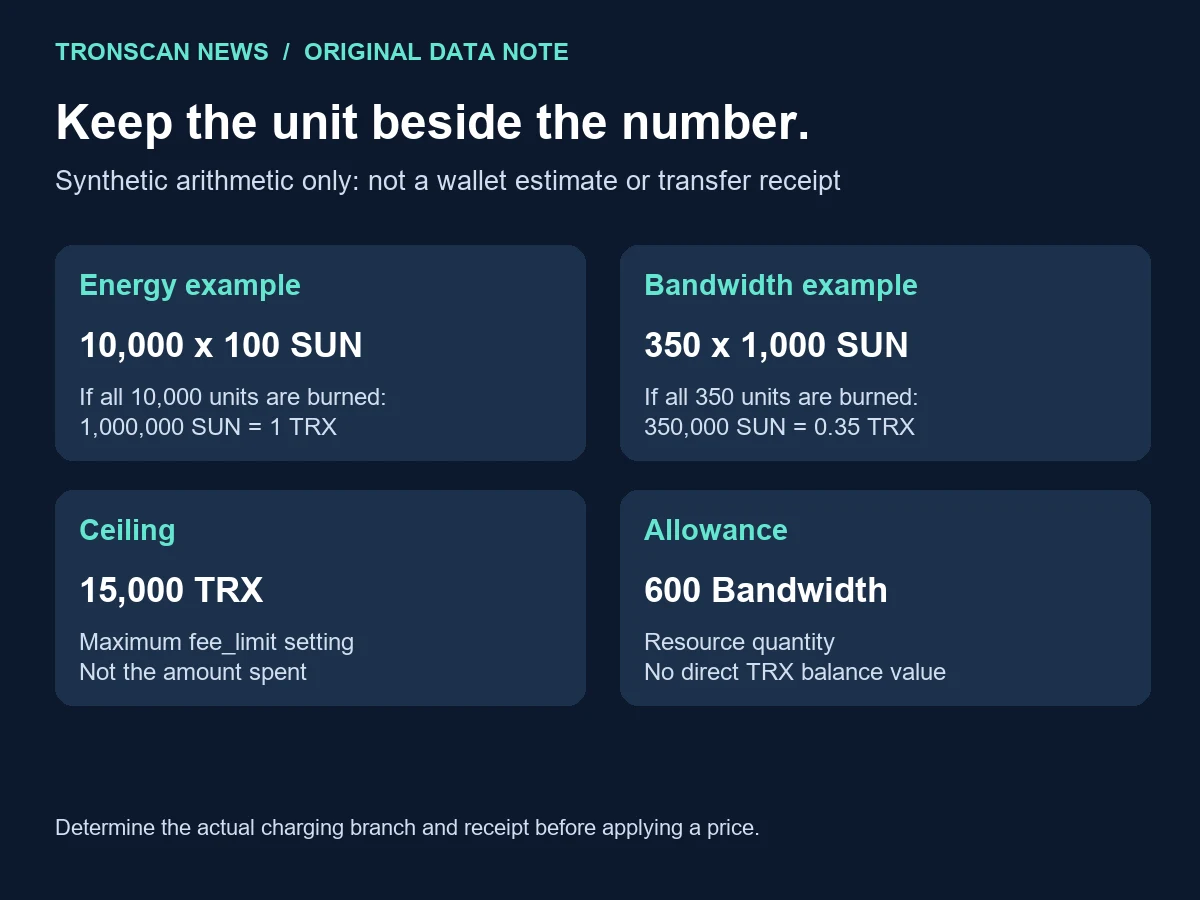
The following calculations are synthetic examples created for this review. They are not measured transfers, typical USDT fees or predictions. Each example states its assumed burned resource quantity so the arithmetic can be checked separately from the charging decision.
| Synthetic input | Integer calculation | Converted result | Unanswered question |
|---|---|---|---|
| 10,000 Energy units, all charged by burning TRX | 10000 × 100 = 1000000 SUN | 1 TRX | Was this actually the caller’s burned quantity? |
| 350 Bandwidth units, all charged by burning TRX | 350 × 1000 = 350000 SUN | 0.35 TRX | Did a resource quota cover the transaction instead? |
| Maximum fee_limit parameter | 15000000000 ÷ 1000000 | 15,000 TRX ceiling | What lower budget did the actual transaction specify? |
| Free Bandwidth parameter | No SUN conversion applies | 600 Bandwidth | How much usable quota did the particular account have? |
The official resource-payment explanation links the two burn prices to their API keys. It distinguishes ordinary Bandwidth settlement, where one eligible source must cover the whole cost, from Energy settlement that can use available resources and burn TRX for a caller-side remainder. Special transaction rules require their own checks.
Consequently, multiplying all reported Energy consumption by the unit price can overstate burned TRX when resources covered part of the execution. Adding a wallet’s two small Bandwidth counters and assuming they combine into one usable payment source can also produce a misleading estimate. First identify the relevant settlement branch; then apply the matching unit.
A fee_limit is a caller-side Energy budget, including resource-covered Energy, rather than a receipt of money already spent. The maximum parameter limits the setting; it does not instruct you to use that maximum. For the signing-stage distinction, continue to our guide to reading a transaction’s fee_limit.
5. Compare TRON fee parameters across observations
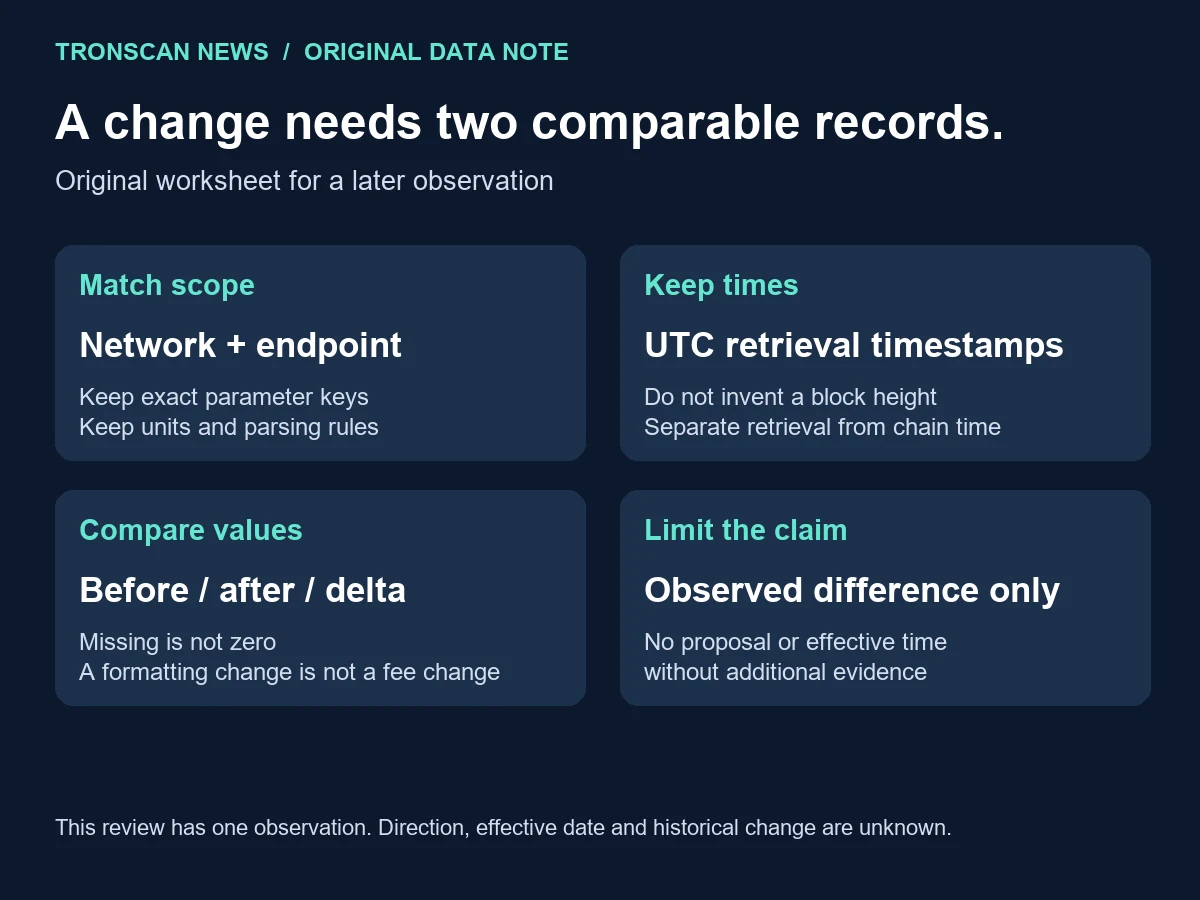
We have not established an earlier comparable observation for this review. Therefore the direction of change, percentage change and effective date are unknown. A documentation page showing the same value is useful context but does not supply a dated earlier API capture under our collection method.
Use this original TRON fee parameters worksheet when you collect another response. Fill the two observation columns before writing a conclusion. A blank is an unfinished check; do not automatically replace it with zero.
| Comparison field | Observation A: this review | Observation B: your next collection | Acceptance rule |
|---|---|---|---|
| Network and endpoint | Mainnet; api.trongrid.io/wallet/getchainparameters | Record exact host and path | Match scope before comparing values |
| Retrieval time | 2026-10-28 04:30:19 UTC | Record actual UTC time | Distinguish retrieval from chain time |
| Response shape | Valid array; 81 returned entries | Validate and record count | An entry-count difference is not itself a fee change |
| Selected keys | Four exact names in section 1 | Retain names and integer values | Do not match by approximate display labels |
| Units | SUN/Energy; SUN/Bandwidth; SUN; Bandwidth | Use the same unit per key | Convert after checking the raw comparison |
| Change evidence | No earlier comparison established | Record an observed difference, if any | Investigate effective time separately |
For each matched key, calculate the integer difference first. A later result of 100 against an earlier 100 is no observed difference for that key. An absent later key is unresolved, not a 100-unit fall. A display changing from 1000 to “1,000” is formatting, not a numerical difference.
If a real numerical difference appears, preserve both responses and verify that they came from the same network. Repeat the read-only check through a suitable documented source if available. A disagreement between providers needs reconciliation; it should not be promoted immediately into a network-wide announcement.
Synthetic comparison exercise: imagine that a later worksheet contains the same four raw values as observation A but formats 1,000 with a comma. The correct result is four unchanged integer selections, not a new price. Now imagine that the later worksheet omits getTransactionFee entirely. Three comparable selections remain; the fourth is unavailable. It would be incorrect to calculate a 100% fall for that missing entry.
Finally, imagine a later record with the same keys and values but a Shasta hostname. Mark the network mismatch before calculating any difference. Matching numbers do not repair a scope mismatch. This exercise supplies no second real observation and no evidence of a Mainnet change; it tests how to complete the worksheet honestly.
When sharing a comparison, include the unresolved fields alongside the numerical output. Another reader should be able to distinguish a verified equality, a numerical difference and an unavailable comparison without opening your working notes. Those three outcomes are useful even when there is no announcement to write.
A governance proposal, its approval and its activation are separate claims. This review does not infer any of them from the selected values. If reporting a later event, attach the relevant primary record and effective scope rather than presenting a retrieval timestamp as the change time.
6. Troubleshoot incomplete TRON fee parameters
The endpoint returns an error or a non-JSON page: preserve the failure separately, confirm the documented host and try an ordinary read-only request later. Do not parse an error message as an empty parameter list. Do not obtain new credentials or connect a wallet just to rescue this worksheet.
A required key is missing: stop that key’s calculation and mark it unavailable. Check the complete raw response rather than a cropped screenshot or copied excerpt. If a manually shortened file omitted the key, return to the untouched source before drawing a conclusion.
A wallet quote differs from the arithmetic: write down the quote’s network, asset, action, account-resource assumptions and timestamp. TRON fee parameters alone cannot settle the disagreement. A service withdrawal fee, a transaction budget and an on-chain charge need separate records. Our TRON USDT guide provides the broader asset and fee-reading path.
An old screenshot appears to show another price: first find its original date, network and field name. A cropped number without its unit is not a comparable observation. Preserve the uncertainty if those details cannot be recovered; do not choose the number that best fits a headline.
You need to preserve the response: keep the raw file, a separate observation note and the extractor output as different objects. Name derivatives clearly. For a dated example that separates a proposed value from a current read and a statistical calculation, use our multisig surcharge proposal and Q2–Q3 burn comparison.
A completed review should let another reader locate the source, reproduce the selection and understand each limitation. It should not require that reader to trust a claim of a successful transfer that was never performed. More topic paths are available from the Tronscan News homepage.
Frequently asked questions
Do these TRON fee parameters give the cost of a USDT transfer?
No. They provide selected network settings at one observation time. A particular transaction also depends on resource usage, available resources, charging rules and its actual execution. A transfer receipt is needed to establish a completed on-chain charge.
Did the Energy price change on October 28, 2026?
This review does not establish a change. It records 100 SUN per Energy in one response collected that day. There is no earlier comparable observation or effective-time evidence here from which to infer a change.
Does getFreeNetLimit equal the Bandwidth available in my wallet?
No. The observed parameter is a network allowance setting. It is not a query of your account’s remaining resource counters, and it is not an amount of TRX or a guaranteed number of free transfers.
Why does the extractor reject a missing key but accept an omitted value?
An existing entry without its integer value can represent the documented default zero. An entirely absent entry does not establish that parameter’s value. Keeping those cases separate avoids inventing zero from incomplete data.
Can I use this workflow without connecting a wallet?
Yes. The collection and local extraction steps are read-only and require no signature. They cannot approve a transaction, reserve resources or change network parameters. Stop if an unrelated page asks for a seed phrase or signing approval.
Leave a Reply