TRON Super Representatives are the 27 elected accounts that take turns producing blocks on TRON Mainnet and participate in on-chain governance. On TRONSCAN, confirm the network, voting round and role before interpreting a ranking. A high vote count tells you where an account ranked for that round. A block header is the record to use when you need to confirm who produced a specific block.
The TRON developer guide to Super Representatives describes how candidates enter the ranking and what the elected accounts do. The TRONSCAN support guide explains the three group filters and the statistics above the list.
Table of Contents
Which accounts produce blocks?
| List group | Rank | What to check |
|---|---|---|
| Super Representatives | 1–27 | The group elected to produce blocks. Open a block to verify a particular producer. |
| SR Partners | 28–127 | A separate group below the current block-producing cutoff. Older blocks in a row can reflect earlier periods. |
| SR Candidates | 128 onward | Registered candidates outside the two ranked groups above. Compare by address when reviewing rounds. |
Read the TRON Super Representatives list in four steps
- Confirm Mainnet. Open the official Super Representatives list. Check the network selector before copying any record. The TRONSCAN beginner guide explains how to pick a network and a record type.
- Write down the voting window in UTC. Look for the sentence above the table that dates the last voting round. The current-round blocks display can refer to a different time window. Save the relevant dates beside the vote count so a reader can tell which round the number describes.
- Open the right group. Use Super Representatives for ranks 1–27 and SR Partners for ranks 28–127. Copy the full address along with the display name. If an explorer name changes or is similar to another name, the full address is the better way to find the same account again.
- Open a block for a producer claim. Use the row’s Latest Block field as a pointer, then compare the producer address and timestamp on that block page. The TRON block page guide explains where to look. A later visit can show a different latest block for the same account.
A Mainnet case across ranks 27 and 28
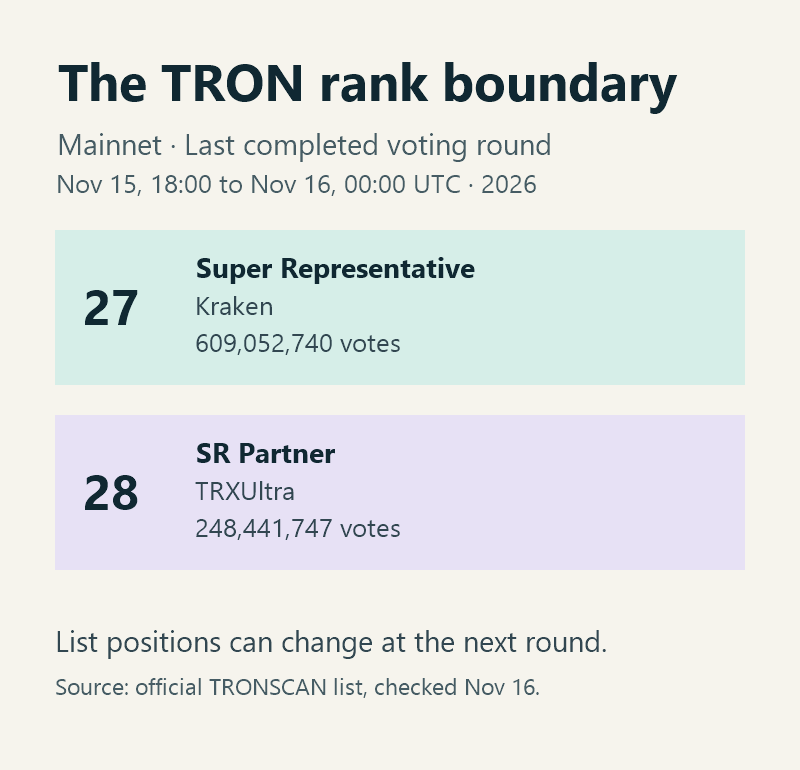
On November 16, 2026, we checked the last completed voting round dated November 15 at 18:00 to November 16 at 00:00 UTC. The TRON Super Representatives tab showed Kraken at rank 27 with 609,052,740 votes. The SR Partners tab showed TRXUltra at rank 28 with 248,441,747 votes. Those were the names and values shown in that round. The row labels give context for this observation, and the addresses are what let you identify the records again.
The rank-27 row then linked to Mainnet block 88,044,866. On November 16, the block page displayed Kraken under Producer and linked to the same address as the ranking row. It showed 05:55:27 UTC. The confirmed TronGrid header returned the same time and the matching address after conversion from Base58 to hex. That block is a separate observation made after the voting round ended. It illustrates why the ranking window and the block time should be recorded separately.
The rank-28 row pointed to Mainnet block 41,857,315. The public block page showed TRXUltra under Producer and dated the block to June 25, 2022 at 05:59:30 UTC. The confirmed TronGrid header matched the producer address and UTC time. The 2026 vote table therefore shows a historical latest-block entry for this account while listing it as an SR Partner for the observed round. To compare how an organization describes its role with what the list and block records show, see the Tron Inc. verification example.
Repeat the block check without a wallet
For either block, open the explorer link and compare its height, UTC timestamp and producer. Then send the height as num to TronGrid’s /walletsolidity/getblockbynum endpoint to check the node response. The TRON confirmation guide explains why this endpoint reads the solidified chain. The header carries the height in number, the production time in timestamp and the producer in witness_address.
TRONSCAN displays a Base58 address starting with T. The raw header may return its hexadecimal form. Compare the two in the same address format before calling them different. For this check, the rank-27 address matched the 2026 block and the rank-28 address matched the 2022 block. If the displayed height changes when you reopen the list, return to the original block link to reproduce this comparison.
Reproduce the confirmed block lookup
Use the GetBlockByNum method with the Mainnet host shown below. The public method reads a record and does not submit a transaction. Change the height to 41857315 to repeat the check for the earlier block.
curl -s https://api.trongrid.io/walletsolidity/getblockbynum -H 'Content-Type: application/json' -d '{"num":88044866}'In the Mainnet response for 88,044,866, we read 1794808527000 from timestamp and 4114f2c09d3de3fe82a71960da65d4935a30b24e1f from witness_address, both inside block_header.raw_data. The timestamp is in milliseconds since the Unix epoch. It converts to November 16, 2026 at 05:55:27 UTC. To compare the producer with the ranking row, you can convert the full hexadecimal value to Base58 with the documented TronWeb address conversion.
If the response lacks the expected header, save the error or empty result with the network, endpoint and height. Leave your producer comparison unresolved until you have a matching header with all three fields. If a browser record and a node field disagree, check the network and height before comparing address encodings.
Why the published ranking and live votes can differ
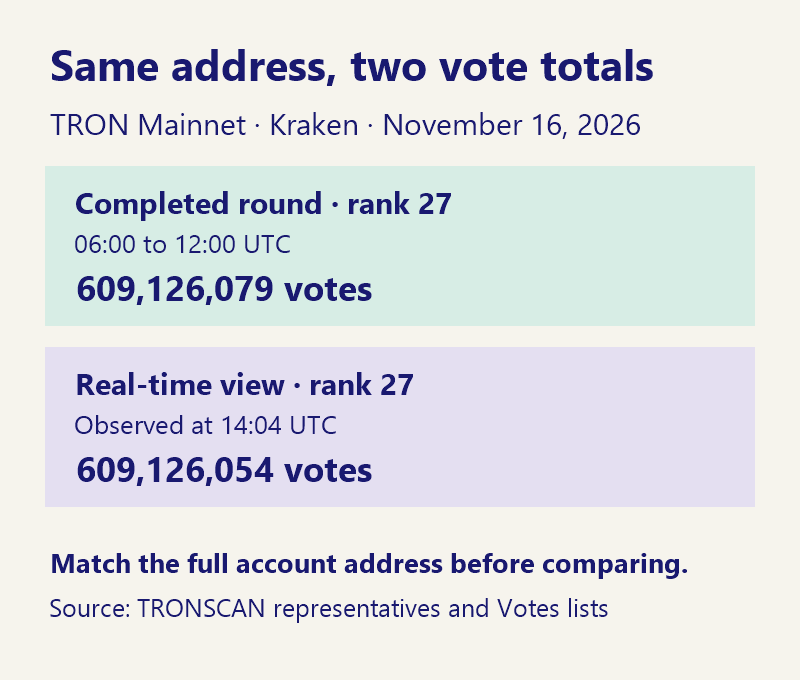
At 14:04 UTC on November 16, 2026, we opened the Super Representatives list and the real-time Votes page on TRON Mainnet. We matched the full Kraken account address from the block example above. On the representatives list, the completed 06:00–12:00 UTC round showed rank 27 and 609,126,079 votes. On the Votes page, the same address showed real-time rank 27 and 609,126,054 votes. The Votes page displayed a change of minus 25.
To repeat the comparison, find TBsyKdNsCKNXLgvneeUJ3rbXgWSgk6paTM on both pages. Write down the completed round from the representatives list and the time you checked the Votes page. The names are useful for finding a row, while the full address confirms that both rows describe the same account.
When does a new Super Representatives lineup take effect?
The explorer gives the completed round an end time. The protocol applies the tally and active-set update when a block reaches the scheduled maintenance boundary. On November 17, a read of getMaintenanceTimeInterval on Mainnet returned 21,600,000 milliseconds, or six hours. That is a chain parameter. Check the TRON consensus documentation and the current network value before applying the same interval to another network or a later observation.
We checked three consecutive confirmed Mainnet blocks around the close of the November 16 round. Block 88,052,143 was timestamped 11:59:57 UTC. Block 88,052,144 reached the 12:00:00 UTC boundary. The next height, 88,052,145, was timestamped 12:00:09 UTC. There was no intervening block height at 12:00:03 or 12:00:06. The observed gap is consistent with the two post-maintenance slots described in the protocol documentation.
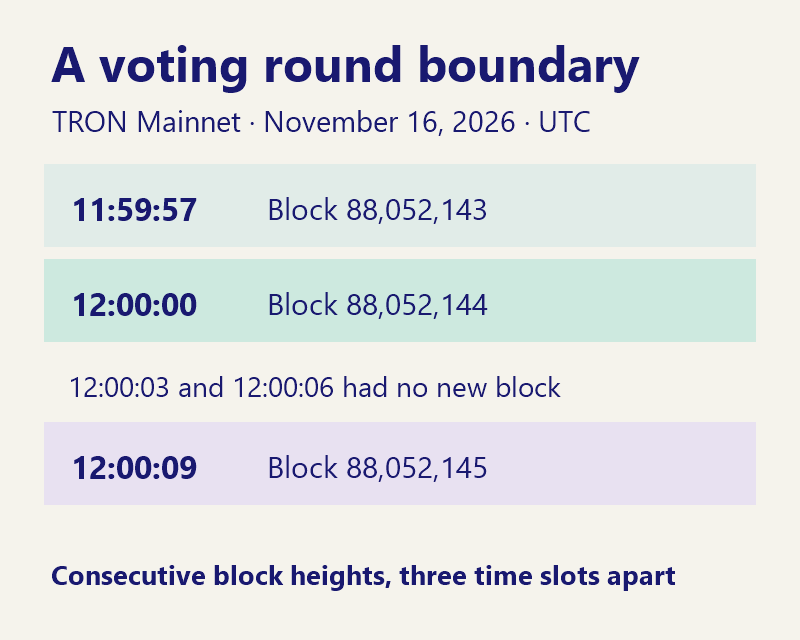
If you are comparing the Super Representatives list near that boundary, first save the last-round label. Then refresh the page and check whether it has advanced. A countdown reaching zero does not give you the new list by itself. If the label stays the same, keep that observation with its time and compare again once the explorer shows the new round. For a block-producer question, open the specific height and check its producer address regardless of what the ranking says now.
What to check when a rank crosses the cutoff
If a row is in the top 27 on the Votes page, check the completed-round group on the representatives list before describing the account as an active Super Representative. It may still appear under SR Partners there. After the next maintenance update, use the new round label to confirm the resulting group. A rank of 27 in both views, as in our Kraken check, can still come with different vote totals.
If your question is who produced a block, start with its height instead. In the TRXUltra example, TAHg5zi2ejWeWiE6bqtDT9vfbH3zNTWrfA matches the producer of block 41,857,315. That match answers a question about the 2022 block. To check the account’s 2026 role, use the dated representatives list or the earlier round record you saved. Keep the block height in your notes so readers can check the historical claim after the ranking changes.
A worksheet for comparing two voting snapshots
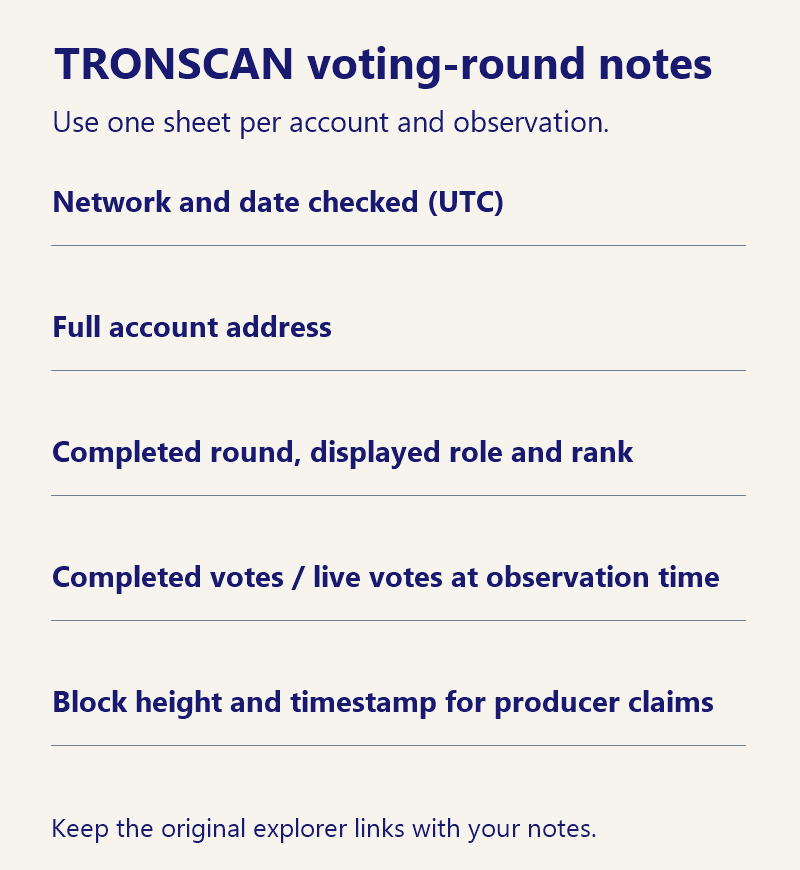
Copy this field list into your notes if you want to check whether the same account moved between groups. Keep one line per observation so each line can be reproduced independently.
- Ranking line: network, exact voting window, explorer link, full account address, listed role, rank and vote count.
- Block line: network, block height, producer address and the UTC timestamp in the block record.
- Result line: state whether the full address matched and what changed between the two voting windows. If the window or address is missing, record the comparison as incomplete.
For example, you can save a ranking line with rank 27 and the completed window above, then save the separately dated block line for 88,044,866. If a later screenshot shows another vote figure, check its round before interpreting the difference. If a new position appears beneath the cutoff, look in SR Partners instead of assuming the account disappeared. Neither rank nor votes predict how much any individual voter will receive.
How to write a claim someone else can check
Start by naming the record you used. If you are writing a support note or reviewing someone else’s screenshot, separate the claim about the Super Representatives lineup from the claim about a specific block. The same address can appear in evidence collected at different times. Leave the two dates visible so the next reader can reproduce your reasoning.
- For a lineup claim, include the round. A complete example is: “In the Mainnet Super Representatives list for November 16, 2026, 06:00–12:00 UTC, the Kraken row was rank 27 with 609,126,079 votes.” Give the full address from the worked example and label those votes as the completed-round total. The live number from 14:04 UTC belongs in a separate line.
- For a block claim, give the height and time. For the earlier Kraken observation, use block 88,044,866, its November 16, 05:55:27 UTC time, and the matching producer address. The block is older than the completed round in the first example. Keep that chronology explicit when sharing both records.
- For a role change, collect evidence from both rounds. Open the Super Representatives and SR Partners groups and find the same address in each dated capture. If you only have a live ranking, describe it as a live observation. Ask for the missing completed-round evidence before treating a position change as an active-set change.
If all you have is a copied name, an unlabeled vote count or a time in your local zone, flag that field as incomplete. Find the address or original public link first. Supply the UTC timestamp once you can verify it from the source. This keeps a later change in the Super Representatives list from obscuring what you checked.
Frequently asked questions
How many TRON Super Representatives produce blocks?
The elected group has 27 accounts. TRONSCAN lists ranks 1–27 under Super Representatives and the next group under SR Partners.
Is rank 28 also a Super Representative?
For the round shown, rank 28 is an SR Partner. Use the group and round displayed in the list when checking any specific account.
Can I inspect the list without connecting a wallet?
Yes. The list, account addresses and public block records used for this check were available without making a transaction or signing a message.
Why does a candidate outside the top 27 have a Latest Block value?
Block production fields can describe activity from another time. Compare the block’s own timestamp with the round on the voting table.
Do votes tell me the producer of a specific block?
Votes establish the ranking for the selected window. Read the producer address in the block record to check a specific block.
AI assisted with drafting and organization. Tronscan News is an independent publication.
Leave a Reply