TRON Energy measures the computation used by smart-contract execution. Before sending USDT on TRON, check the exact sending account, available Energy, Bandwidth, spendable TRX and the wallet’s current estimate. A USDT balance alone does not show whether the operation can complete. Afterward, use the TxID to verify the result and actual resource consumption.
This TRON Energy guide helps mobile readers interpret resource information without treating every number as the same kind of fee. It does not provide a universal transfer price or tell you to stake, rent resources or sign an unfamiliar transaction. Tronscan News is an independent educational publication, not the official explorer or a wallet recovery service.
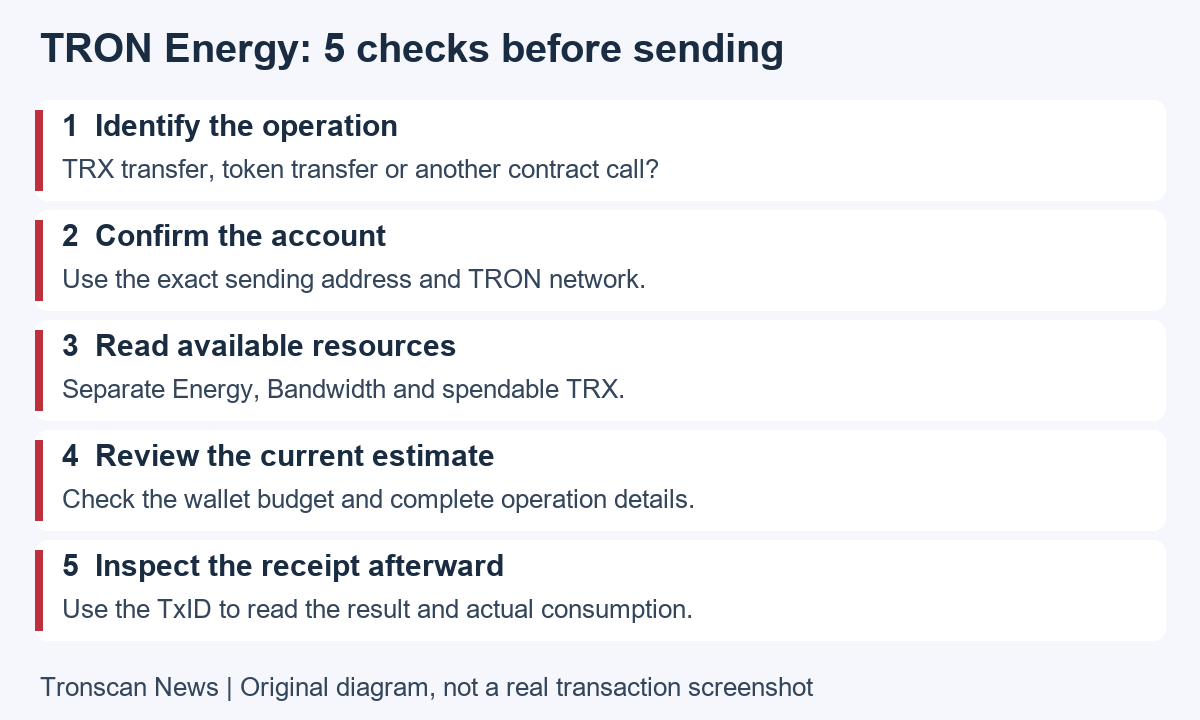
Table of Contents
TRON Energy, Bandwidth and TRX: what each means
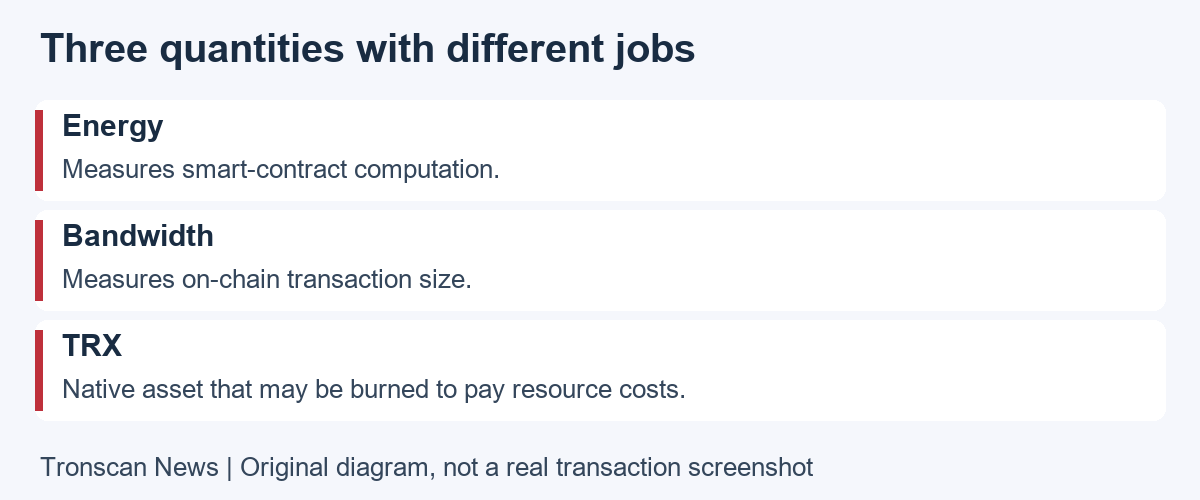
The official resource model distinguishes Energy for smart-contract computation from Bandwidth for transaction size. TRX is the native asset, not another name for either resource. A TRC20 transfer calls a token contract, so its cost questions differ from an ordinary native-asset transfer.
Read the unit beside each figure. A token quantity tells you about that asset holding. An Energy figure is a resource measurement. A TRX amount may describe a balance, estimate or actual charge, depending on the field. A currency conversion adds another layer and should never replace the original units in your notes.
For example, do not compare a number labelled Energy with a USDT amount and conclude that one should equal the other. Start by writing three separate labels: asset sent, resources used, and fees paid. This makes later comparisons much easier and avoids treating a large resource count as a large payment.
5 easy TRON Energy checks before a transfer
- Identify the operation. Decide whether you are inspecting a native TRX transfer, a TRC20 token transfer, an approval or another contract interaction. Do not use the estimate for one operation as the price of another.
- Confirm the sending account. Compare the full address and network with the wallet you intend to use. Resource information for a different account cannot answer whether your actual sender can complete the operation.
- Read the available quantities. Check remaining resources and spendable TRX separately from total or staked amounts. Do not interpret a resource limit as the amount still unused.
- Review the current wallet estimate. Inspect the token, recipient, quantity, estimated cost and budget before signing. If the estimate changes or the action is unclear, pause and investigate instead of repeatedly confirming.
- Check the completed record. Save the TxID and inspect the receipt after execution. Record the result and actual usage rather than assuming the pre-send estimate was the final charge.
Mobile layouts differ between wallets and explorer versions. Look for the purpose of a field rather than a fixed button position. Expand a collapsed resource panel if needed. A missing field on the first screen is not proof that the relevant resource is zero or that a fee was not charged.
Where to inspect TRON Energy on a phone
Copy the public sending address and search it on the official TRONSCAN explorer. Open the matching account and inspect its resource information. This public lookup is separate from connecting a wallet to submit a transaction; reading records does not require your recovery phrase or private key.
Our TRON address balance guide explains how to select the correct account and separate holdings from estimated portfolio value. Use the same account throughout your resource check. Switching between accounts halfway through is a common way to compare unrelated figures.
Note the time of the observation. Resources available before one operation may differ from those available afterward. A screenshot is a record of a moment, not a promise about the account’s state when you next sign. Reopen the relevant account and review the wallet’s new estimate when the context changes.
How TRON Energy is available and recovers
The Bandwidth and Energy documentation describes obtaining resources through staking or delegation. It also explains gradual recovery over a rolling 24-hour window and that Energy has no per-account free quota like Bandwidth. Further activity affects the available amount, so do not assume a fixed midnight reset.
This is an explanation of the mechanism, not a recommendation to commit funds or use a rental provider. If considering a resource service, inspect its actual transaction and terms independently. A claim about cheaper transfers does not justify handing over a private key or granting an unexplained permission.
Keep resource availability separate from ownership of staked TRX. A resource display does not mean the underlying asset is immediately withdrawable or that all advertised capacity is currently unused. Consult the current wallet instructions before making a staking or unstaking decision.
TRON Energy shortfalls and the TRX fallback
The official charging guide explains that available Energy can cover part of the caller’s execution cost, with TRX burned for the caller-side remainder. Bandwidth has different settlement rules: its sources are not simply combined to pay a transaction’s byte cost. Read the two resource charges separately.
Resource prices and relevant limits are chain parameters. This article deliberately does not turn a historical transfer or advertised quote into a permanent price for USDT. A current estimate for the exact operation is more useful than a remembered number from another account or an old screenshot.
When comparing costs, distinguish a network charge from a platform’s withdrawal or service fee. A provider’s quote may describe a service rather than the exact charge recorded in your own transaction receipt. Ask which fee is being quoted before comparing two numbers as if they represented the same thing.
What fee_limit means for TRON Energy
The FeeLimit and Energy cost reference describes fee_limit as the caller’s transaction-level Energy budget expressed in sun. It applies to the caller’s usable Energy, not only the TRX-burn portion. A low budget can constrain a call even when staked resources are available.
A budget cap is not a prediction that the full amount will always be charged. It also is not a balance top-up. Increasing a limit does not create resources or make an untrusted contract safe. Review the operation and the wallet’s explanation before changing any budget setting.
If technical information expresses a value in sun, remember that one TRX equals one million sun. Keep the units visible and avoid copying raw numbers between fields with different units. This guide does not prescribe a universal fee_limit, because the appropriate budget depends on the actual operation.
When a TRON Energy error appears
TRONSCAN’s transaction failure explanation says to examine fee_limit, available Energy and available TRX together when diagnosing an out-of-Energy result. Contract revert and other execution errors need their own investigation. Repeating the same action is not a diagnosis.
Copy the exact error text and save the transaction link. Then identify what changed between the estimate and execution, if anything can be established. Do not guess a cause solely from the wallet’s brief notification. If the explanation depends on an application, use that application’s official support channel.
For a TRON Energy failure, avoid blind retries while the cause remains unresolved. Each new submission is a separate action. Review the asset, contract, destination and budget again, especially if the page now asks you to approve permissions or perform an operation different from the one originally intended.
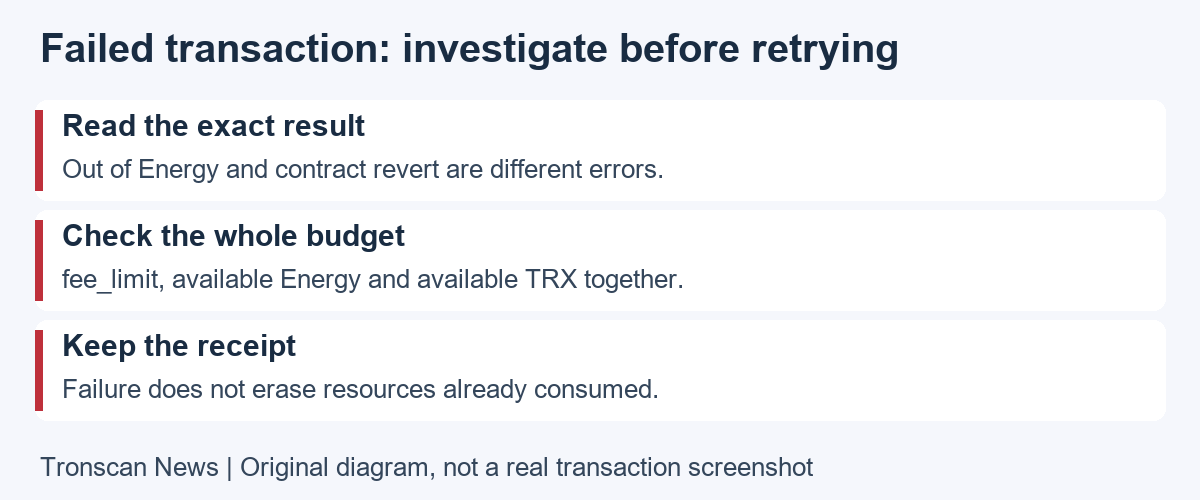
Why a failed operation can still have a TRON Energy cost
TRONSCAN’s failed-transaction fee explanation states that validation and execution consume resources even when the operation fails. Those consumed resources are not erased by failure. The explorer displays the record; it does not process refunds or reverse transactions.
Inspect the execution result and fees as separate facts. A failed token operation and a resource charge are not necessarily contradictory. Avoid describing a cost as a successful transfer to the intended recipient unless the transfer details establish that conclusion.
Use our mobile transaction lookup guide to read the result, recipient and transfer record. If token identity is unclear, compare the full contract with the issuer reference before interpreting a resource charge. Resource analysis is more useful after confirming what transaction and asset you are actually reading.
Three hypothetical TRON Energy checks in practice
Example 1: the wallet holds USDT but cannot complete an operation. The token quantity alone is insufficient evidence about execution capacity. Compare available resources, spendable TRX and the actual estimate. Do not interpret the inability to send as proof that the displayed token balance is missing.
Example 2: a large resource total looks reassuring. Suppose a screen displays a limit and a separate used quantity. Check what remains rather than treating the entire limit as unused. Also confirm that the account and operation match the transaction you intend to investigate.
Example 3: a failed result appears beside a cost. Preserve both fields and their units. Read the error, then investigate why the execution failed. Do not replace that investigation with a promise that a retry will succeed or that every failure should produce a refund.
These situations are invented to explain a checklist, not records of real wallets or transactions. They provide no recommended transfer amount, staking amount or guaranteed saving. Apply the method to your own public records and keep any unresolved fact labelled as unresolved.
A practical TRON Energy cost record
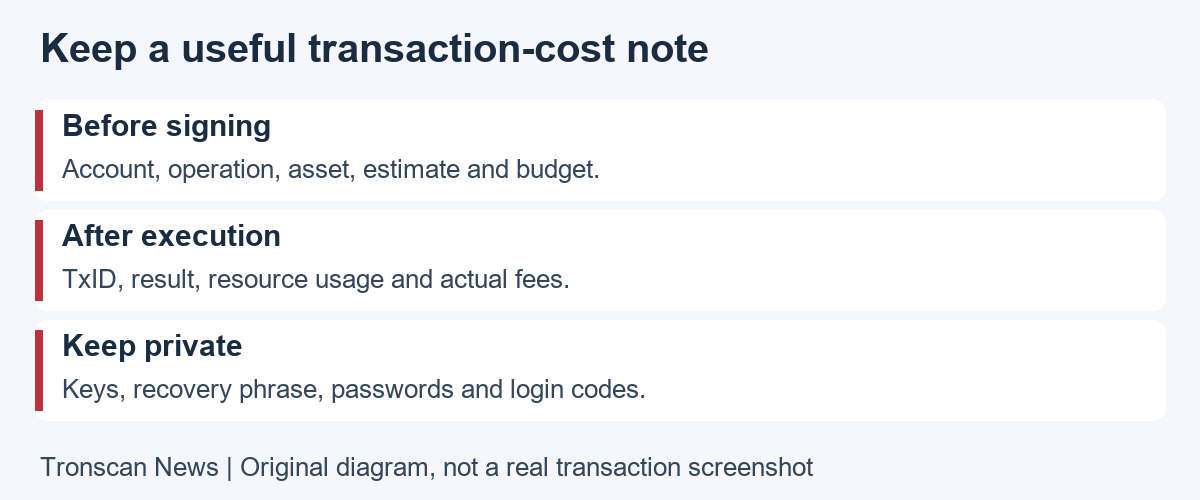
Before an action, record the network, sending account, operation, asset, intended recipient and estimate. After execution, add the TxID, result, actual resource consumption and fee fields. Use separate lines for before and after observations so a budget is not accidentally presented as an actual payment.
Record a timestamp and timezone. If you compare two operations, note whether the account, contract, action and settings were the same. A difference in the final fee is a reason to inspect those variables, not immediate proof that the explorer or wallet is wrong.
For a support request, ask one specific question. For example, ask which budget setting the application used or why the displayed estimate differs from a particular receipt. Include relevant public links and redact unrelated personal information from screenshots. Avoid uploading your complete wallet history when one record will answer the question.
Never add recovery phrases, private keys, passwords or login codes to a TRON Energy worksheet. Resource troubleshooting is not a reason to import secrets into a website. If a helper requires a new permission or payment, evaluate it as a separate request rather than a routine part of reading the receipt.
Frequently asked questions
1. Is TRON Energy the same as TRX?
No. Energy measures contract computation, while TRX is the native asset. Read resource usage and TRX charges separately. A token holding, resource allowance and budget cap also describe different quantities.
2. Does a USDT balance guarantee I can send it?
No. Check the correct account, operation, available resources, spendable TRX and current estimate. Token identity and recipient details also need verification before signing. The asset quantity alone does not establish execution capacity.
3. Does raising fee_limit automatically charge that full amount?
No. It is an Energy budget cap rather than a fixed invoice. Review actual consumption afterward. A higher cap does not supply missing funds or prove that the underlying contract operation is appropriate.
4. Does TRON Energy reset at midnight?
The official documentation describes gradual recovery over a rolling window, not a universal midnight refill. Check current available resources and account activity instead of assuming yesterday’s screenshot describes what is available now.
5. Can TRONSCAN refund a failed transaction fee?
The explorer displays on-chain information and does not execute refunds. Already-consumed resources are not undone simply because an operation failed. Inspect the exact receipt and use official application support for a specific execution problem.
Before closing a TRON Energy investigation, confirm that each saved link opens the intended account or transaction. If you changed a wallet setting during troubleshooting, record its name and the reason for the change. A clear record helps you avoid carrying an unexplained setting into a later, unrelated operation.
Continue learning
For a provider planning screen, follow the Buy Energy estimate and address-role walkthrough, checked November 2, 2026. Its three observed form states separate per-entry quantities from an empty order total; they are not completed purchases or final transfer fees.
If your source is a contract leaderboard rather than an individual receipt, use the dated contract Energy data reconciliation. It checks aggregate units, component totals and reporting scope; it does not quote a fee for your next transfer.
Use the related English guides for holdings and transaction status, and the asset-and-resource guide below for the wider context. Visit the Tronscan News homepage for further mobile tutorials. Our editorial standards explain source checks, AI assistance and corrections.
If you are still mixing the token quantity with the TRX needed for a future operation, use our TRON USDT guide to assets, resources and receipts. Its comparison worksheet separates USDT holdings, spendable TRX and resource estimates before you return to this Energy check.
Leave a Reply