To check a TRON address balance on your phone, copy the public receiving address, search it on the official TRONSCAN explorer, and open the matching account. Read TRX separately from each TRC20 token, then verify the token contract before interpreting a balance. Public lookup does not require a wallet connection, signature or recovery phrase.
This TRON address balance guide helps you answer a practical question: what does this specific address currently show on TRON? It also explains why a wallet display, a portfolio estimate and an exchange account may show different figures. Tronscan News is an independent educational publication, not the official explorer or a wallet recovery service.
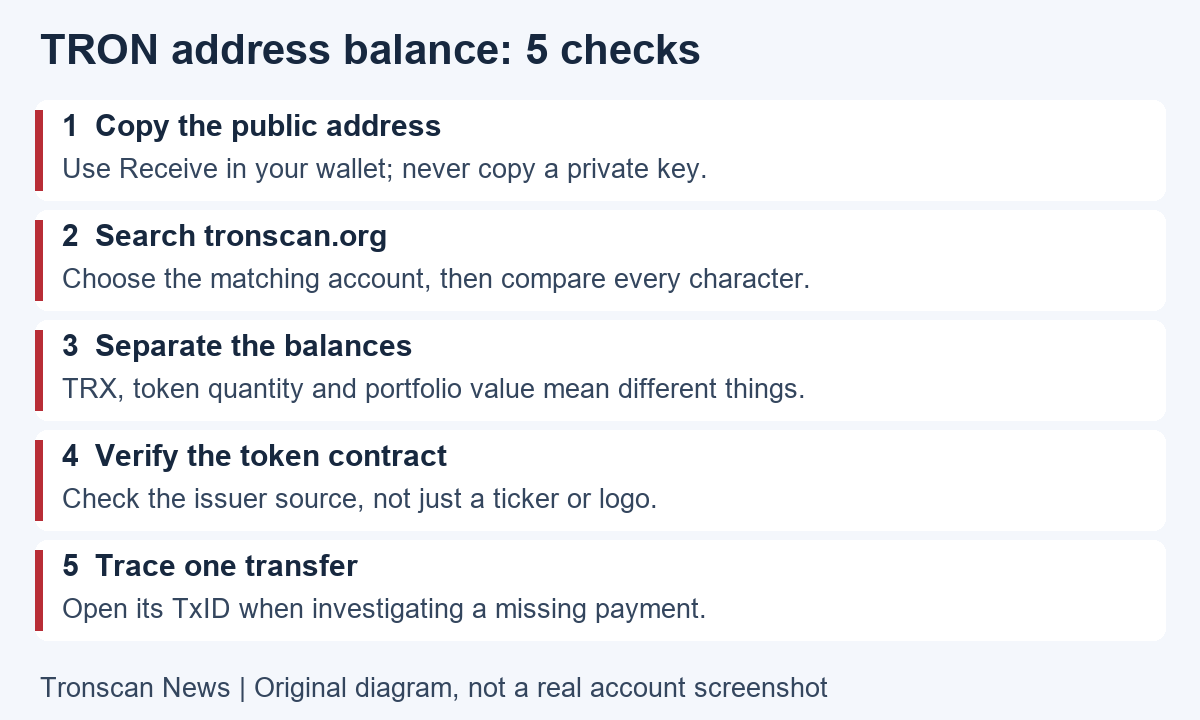
Table of Contents
Choose the right TRON address balance check
A TRON wallet balance check answers what an address holds now. To check a TRON wallet token balance, select the verified token contract separately from native TRX. Use the next step that matches your question.
| What you see | What to check next |
|---|---|
| Zero TRX | Check TRC20 token holdings separately; zero TRX does not establish a zero token balance. |
| A token appears on the explorer but not in your wallet | Compare the same address, network and contract, then consult the wallet’s official display instructions. |
| A successful deposit has not been credited | Check the specific transfer and the receiving service’s rules with our USDT not received checklist. |
Before checking a TRON address balance
Start in the wallet you actually use. Open its receiving details for the TRON network and copy the public address. Do not copy a transaction hash, exchange withdrawal order number, token contract or recovery phrase instead. Each identifies something different, even when it appears beside the same payment.
According to the official TRON account documentation, the Base58Check address commonly displayed by wallets contains 34 characters and begins with T. A matching format alone does not establish ownership or trust. Contract accounts also use this address format, so you still need to select and understand the actual record.
If somebody sent you an address, treat it as a reference to inspect, not an instruction to pay. Avoid retrieving a recipient from an unfamiliar transaction in your history. Copy the intended address from the original trusted source and compare the complete string when accuracy matters.
5 easy steps to check your TRON address balance
- Open the correct explorer. Type tronscan.org into your phone browser and check the domain. A TRON address balance lookup should not begin with a request to import your wallet.
- Search the complete public address. Paste it into the search field. Remove accidental spaces and choose the matching account result rather than a similarly named token or transaction.
- Verify the account. Compare the displayed address with the one you copied. Expand or copy a shortened address if necessary; a matching first and last few characters is not a full check.
- Inspect native and token holdings separately. Read the TRX quantity, then find the relevant token in the holdings or token section. Mobile layouts may collapse details, so look for an expansion control or token search before concluding that a row is missing.
- Confirm identity and save the context. Open the token details, compare its contract with an issuer source, and note the time of your check. When investigating one payment, open its transaction hash rather than relying only on the account total.
Interface labels can change. Follow the purpose of each step instead of expecting a button to remain at a fixed screen position. If the page is partly loaded, refresh once and check that the complete account and token sections are visible before interpreting the result.
Understand the TRON address balance fields
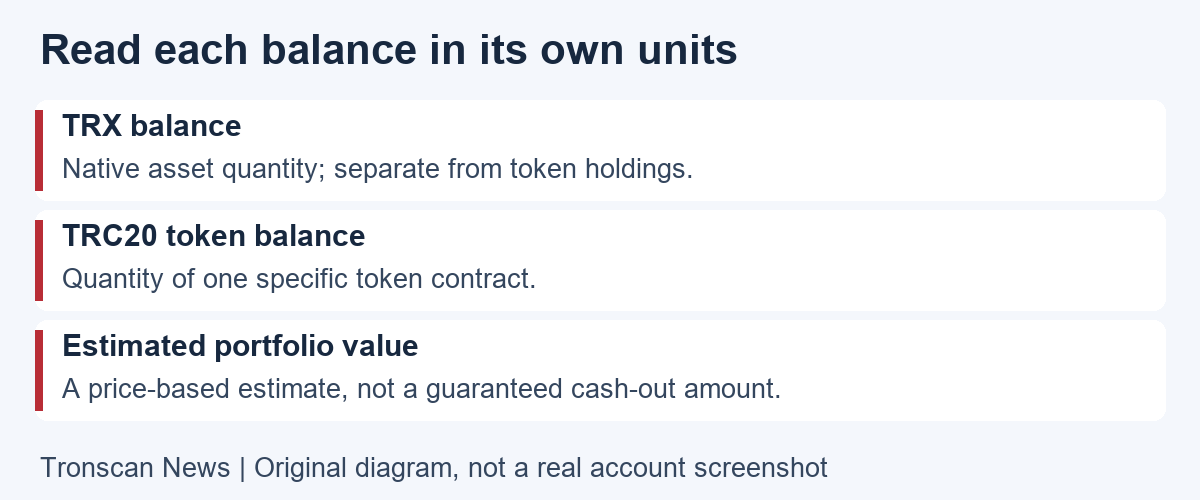
Keep asset quantity, estimated value and resource information in separate columns of your mental checklist. The TRONSCAN account detail documentation distinguishes the native balance, staking information, token holdings and resource counters. They describe different aspects of an account, not interchangeable amounts available to send.
- TRX quantity: the native asset amount shown for the account. Do not read it as a USDT quantity.
- Token quantity: the units of a specific token contract, such as a particular TRC20 asset. Check the contract as well as its display name.
- Estimated portfolio value: a price-based display. It is not a guaranteed sale price, bank balance or promise that every listed token has liquidity.
- Staked or unstaking amounts: read the associated status and withdrawal conditions. Do not assume a total including locked positions equals immediately spendable TRX.
- Energy and Bandwidth: resources used by network operations. These are not extra USDT tokens or another cash balance.
The official resource model explains that Bandwidth covers transaction size and Energy covers smart-contract computation. A token holding alone does not show whether an account has the resources or TRX needed for its next operation. Check a wallet’s current transaction estimate separately; this article does not quote a fixed transfer fee.
For a clear TRON address balance comparison, write down the asset name, full contract address and token quantity first. Only then compare an optional currency estimate. This order prevents a changing price display from being mistaken for a change in the number of tokens held.
How to identify USDT in the token list
A familiar ticker or logo is not enough. For USD₮ on TRON, use Tether’s supported protocols page as the issuer reference, select the TRON information, and compare the full contract shown there with the contract in the explorer. Do not choose a result solely because it says USDT.
Make this comparison directly between the two pages. Do not rely on a contract copied from a comment, search advertisement or private message. If you cannot establish the token identity, describe the balance as an unverified token quantity rather than calling it genuine USD₮.
Also separate the network from the asset label. A balance on another blockchain is not a TRON address balance. If the wallet’s original receiving or sending record names another network, use that network’s explorer and documentation for the investigation.
Why your TRON address balance may differ from a wallet
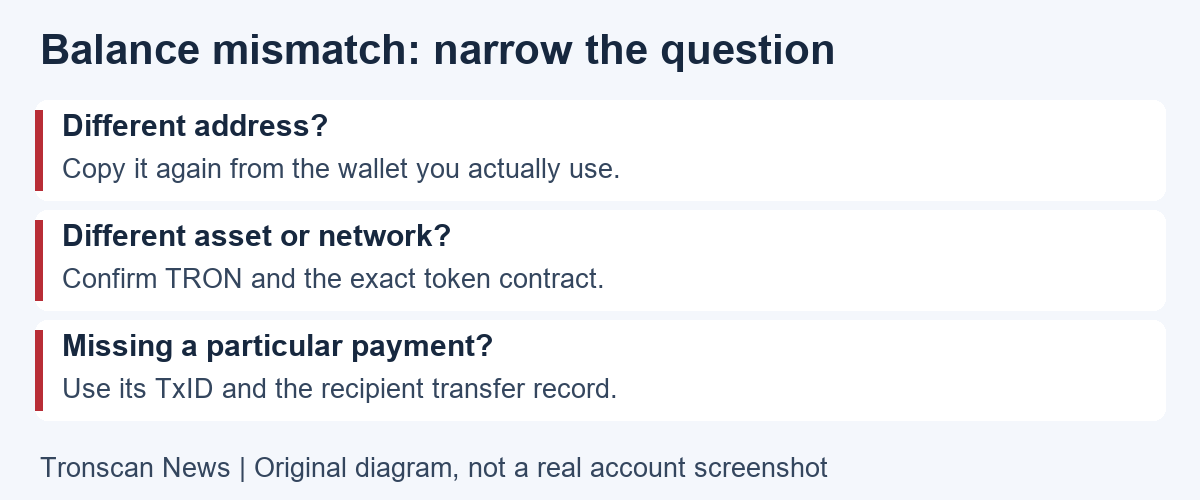
First compare like with like: the same network, complete address, token contract and moment in time. A wallet may have multiple accounts, while an exchange may show an internal customer balance that is not simply the public balance of one deposit address. A screenshot taken yesterday is also not a live comparison.
Next check whether the token is hidden or filtered in the wallet. If the correct contract and quantity appear in the explorer but not in the app, consult that wallet’s official display instructions. Do not import your recovery phrase into a new website merely to make a token visible.
For one missing payment, switch from the account total to the specific transaction. Use our mobile TRON transaction lookup guide to check execution, recipient and token transfer details. The TRON address balance page answers what is shown now; a TxID helps explain what happened to a particular transfer.
A zero TRON address balance needs context. Zero TRX does not by itself tell you whether a particular TRC20 token is held. Likewise, an empty token row is not proof that a payment failed. Verify the identity and transfer record before deciding which service needs to investigate.
Three examples of reading a TRON address balance
Hypothetical example 1: the wrong number is being compared. Imagine a token row shows 40 units while a portfolio card shows a different currency value. Record the 40-unit holding and the currency estimate separately. The two figures are not supposed to be identical, and neither figure alone establishes whether the token is authentic.
Hypothetical example 2: the right payment, a later balance. Suppose a transfer record shows 25 units arriving, but the current token holding is lower. Look for later outgoing transfers or other relevant activity. Do not label the original payment unsuccessful simply because the address no longer holds the same amount.
Hypothetical example 3: an exchange balance differs. Suppose a deposit address shows a public holding while the exchange app shows no credit. Verify the payment against the exchange’s current deposit rules and contact its official support with the TxID. The explorer cannot update an exchange ledger or guarantee a credit.
All numbers above are invented solely to explain the reading process. They are not live accounts, observed transactions or evidence about any particular platform. Apply the checklist to your own records without treating an example amount as a required payment or fee.
What to save about a TRON address balance issue
Prepare the full public address, network, asset, contract, approximate time and the transaction hash if one payment is involved. Explain exactly which two displays differ. For example, say that the wallet token row is missing while the explorer lists a quantity, instead of saying only that money disappeared.
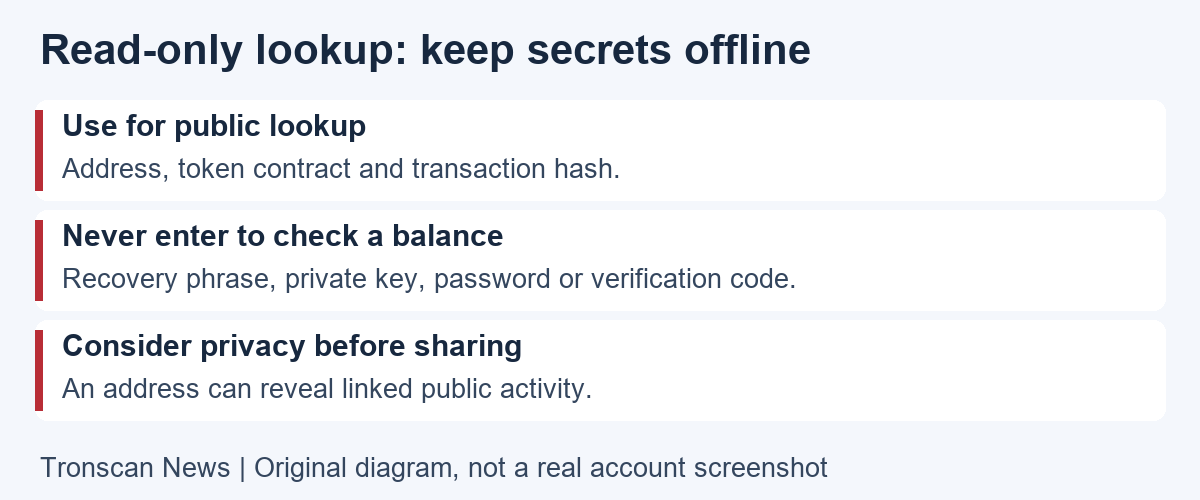
Include a timezone when recording a time. If you share screenshots, hide unrelated account identifiers, email addresses and other unnecessary personal information. A public address can expose linked public activity, so use an official support ticket instead of posting a complete financial history in public comments.
Do not pay an unsolicited helper an activation or recovery charge just to read an account. Checking public information cannot prove that you control the address, reverse a transfer or unlock someone else’s assets. Any action involving signing or changing permissions is a separate task from this read-only guide.
A TRON address balance record for comparisons over time
A useful TRON address balance record should let you repeat the same check later. Create a short note with the date and timezone, network, full public address, token contract, token quantity and the source page. If you also save a currency estimate, label its currency and keep it beside the quantity rather than replacing it.
When you return, copy the same address from your note and compare the same asset. If you are now using a different wallet account, label that as a separate check. Mixing two accounts in one running note can create an apparent discrepancy even when each screen is correct.
For a change in quantity, examine the interval between the two observations. Locate the relevant incoming and outgoing records, and open the individual transactions for context. Do not assume that the visible first page of history is the complete period you need. Check the selected filters and date range before drawing a conclusion.
A transfer history and a current holding also answer different questions. The sum of incoming amounts is not automatically the amount still held. Outgoing activity matters, and contract interactions may require reading more than one displayed row. If the records remain unclear, preserve the links and describe the unresolved difference rather than forcing the numbers to match.
For privacy, keep this note in a place you control. Sharing one relevant TxID through an official support channel is usually more focused than posting a spreadsheet of every address you use. Never add a recovery phrase or private key to the note; neither belongs in a public-lookup worksheet.
Finally, write down what you have actually established. A precise conclusion might be that a verified token contract shows a particular quantity at the time checked. That is more useful than saying the wallet is completely safe, the exchange must credit immediately, or every token listed can be sold. Those broader claims require evidence beyond a TRON address balance.
Frequently asked questions
1. Can I check a TRON address balance without connecting a wallet?
Yes. Public explorer lookup uses the address. You do not need to connect a wallet, sign a message or enter a recovery phrase to read public holdings. Stop if a page makes those actions a condition of a simple balance check.
2. Does zero TRX mean there is no USDT?
No. Check the relevant TRC20 token holding separately and verify its contract. TRX is the native asset, while the USDT quantity is associated with its token contract. A zero native balance also does not settle whether a future transfer can be executed.
3. Why is my exchange balance different from the address?
An exchange’s customer ledger and a public blockchain address represent different records. Compare the specific deposit’s network, token, recipient and TxID, then use the platform’s official support for internal crediting questions. Do not infer your entire customer balance from one public address.
4. What if the address cannot be found?
Check the copied string and selected network first. TRON’s account documentation also explains that a newly generated address is not queryable on-chain until activation. An unsuccessful search alone does not identify the cause, so confirm the context before attempting any payment or account action.
5. Does a token balance prove that the asset is valuable or safe?
No. A listed quantity does not prove token authenticity, market liquidity or safety. Compare its contract with the issuer’s official information and investigate unfamiliar assets before interacting with them. A balance lookup is an observation, not an endorsement or investment assessment.
Continue learning
For the next step, use the transaction guide linked above when you need to explain an individual payment. Browse the Tronscan News homepage for upcoming TRONSCAN guides and network updates. Our editorial standards explain source checks, AI assistance and corrections.
Not sure whether to search an address, a transaction hash or a token contract? Use the record-selection table in our TRONSCAN guide to choosing the right record, then return here to compare holdings for the correct account. Verify any USDT contract against the issuer reference linked above.
Leave a Reply