TRON transaction errors need a diagnosis before another payment. A wallet timeout, a rejected broadcast and a contract that failed after entering a block are different situations. This mobile guide shows how to sort those situations, read the available evidence and decide which question to take to your wallet or receiving platform.
Quick answer: find the original TxID, verify the network, inspect the execution result and copy the exact error. If the result is unknown, keep investigating the original operation. If execution failed, resolve the recorded cause before considering a new transaction. A larger fee limit does not repair every error.
This guide was checked against TRON developer documentation on October 23, 2026. The workflow and diagrams are independent explanations. We have not tested a customer’s wallet, executed a payment or inspected a private account. Any example below is hypothetical.
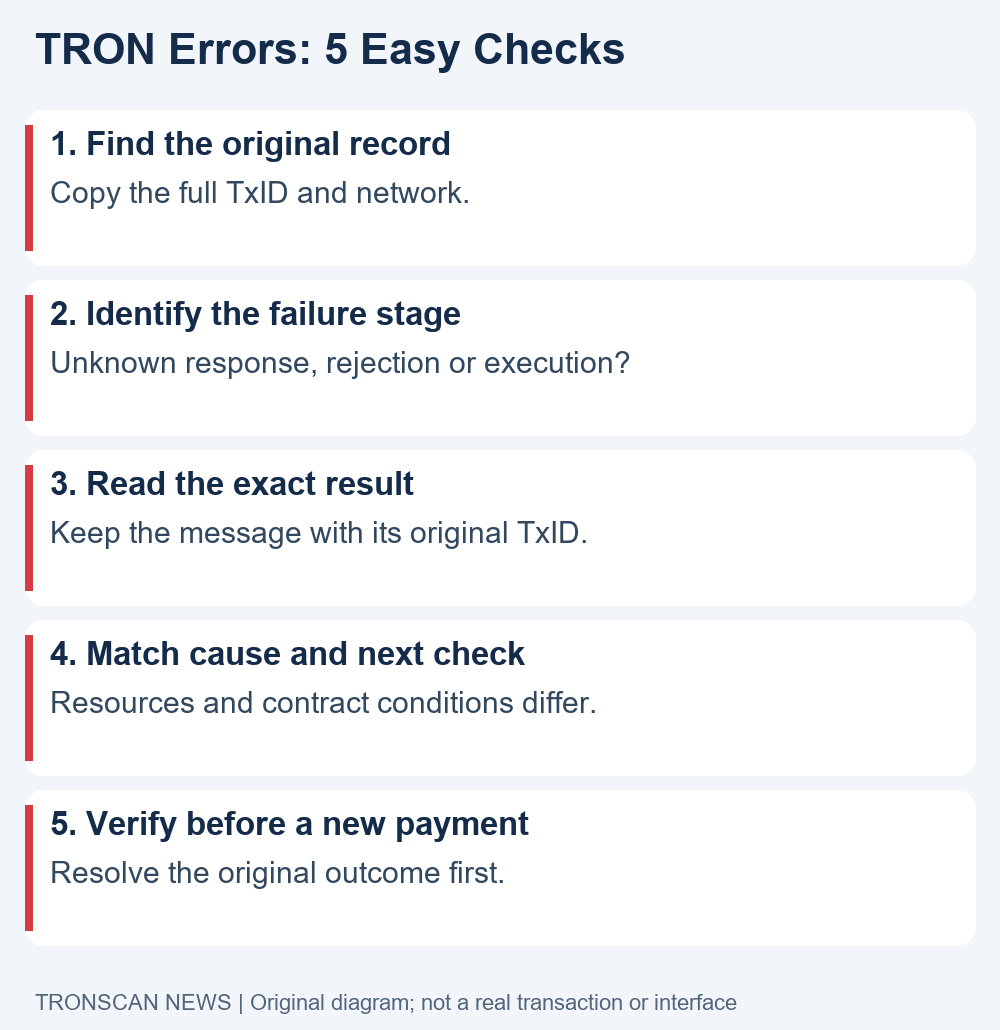
Table of Contents
Understand three kinds of TRON transaction errors
The official errors and debugging reference distinguishes validation problems from execution failures. A smart-contract transaction can enter a block and still fail when its contract runs. A transaction hash therefore identifies a record; its presence alone does not establish that the intended transfer completed.
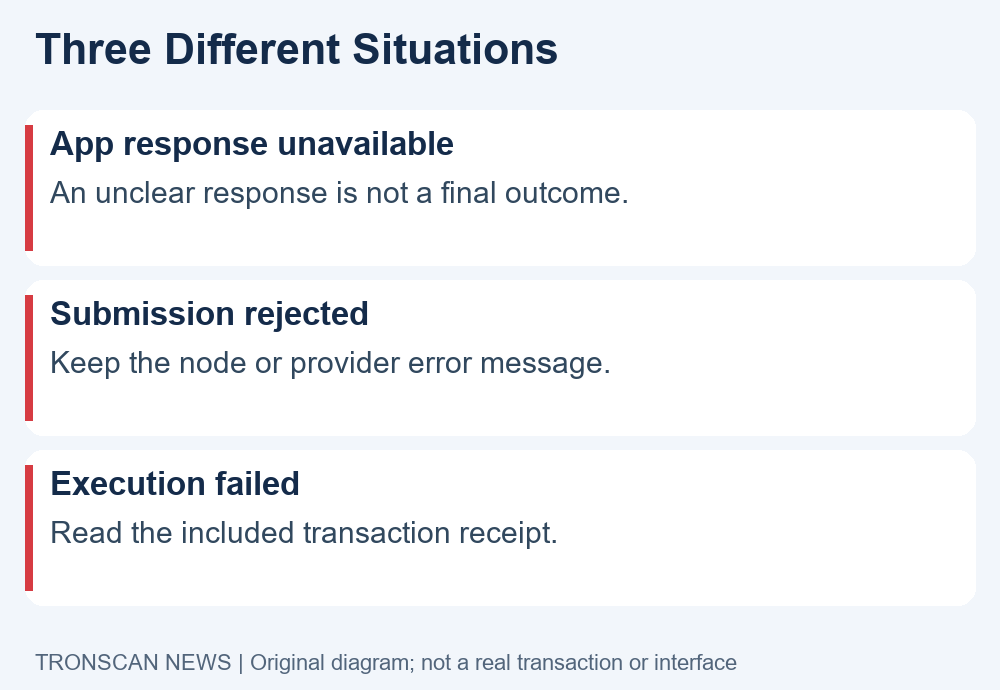
For a phone user, begin with three practical buckets: the app could not show a result, the node rejected a submission, or an onchain receipt reports failed execution. These buckets tell you what evidence to collect. They are not interchangeable explanations for an unchanged balance.
A fourth situation sits outside that failure list: an onchain transfer appears successful, but a receiving platform has not credited its customer account. That requires the receiving platform’s deposit records and rules. Calling it a failed contract without checking the receipt can send your investigation in the wrong direction.
1. Locate the original record before retrying
When TRON transaction errors appear, return to the sending app’s original activity entry. Copy the complete transaction identifier if one is available. Keep the app’s internal order number separately: an order reference is not automatically a blockchain TxID.
- Record the time and action you attempted, such as a token transfer or contract interaction.
- Copy the full TxID and the network shown by the sending service.
- Open a known explorer address and search for that complete identifier.
- Compare the sender, destination, token and amount with your intended operation.
- Keep an unavailable result marked unknown while you verify it.
Use the public TRONSCAN explorer through its known domain. Reading public records should not require connecting a wallet or entering recovery words. If a search result asks for a signature to reveal a public transaction, stop and check the destination you opened.
Our TRON TxID guide covers finding the identifier on a phone. Follow that lookup process before assuming the original operation disappeared. A copied address, an incomplete hash or a provider order number can all produce an unhelpful search.
For TRON transaction errors involving a missing result, ask the sender which identifier it generated and whether it actually broadcast the operation. This is especially important when an exchange or payment app controls the sending process. A customer-facing status does not expose every processing stage.
2. Separate a timeout from a failed execution
A connection problem tells you that the app did not receive or display a satisfactory response. It does not, by itself, tell you what happened on the blockchain. Refresh the original activity entry and review the existing TxID rather than opening a second send form immediately.
The official broadcast and RPC error reference treats submission responses separately from onchain contract execution. Wallet developers may need to examine node responses and their submission history. Ordinary users should preserve those responses when visible, without attempting to edit signed payloads or node settings.
When describing TRON transaction errors to support, use the exact visible wording. “The app timed out after I confirmed” is more useful than “the chain rejected it” if you have no rejection record. Similarly, “explorer search returned no result” is an observation, not proof that the transaction can never appear.
Check the network selection and complete identifier again. If a service supplies inconsistent information, ask it to reconcile its own sending record with the public result. Do not send funds to a support agent’s personal address as part of that investigation.
A hypothetical example: a user confirms a transfer, the app loses its connection, and the activity entry later supplies a TxID. The next step is to inspect that original TxID. Creating a second independent payment just to see whether the app responds could leave two separate payments to investigate.
3. Read the exact error in the receipt
TRON transaction errors become more actionable when a receipt provides a specific result. Save that result and any accompanying message. A generic red “failed” badge is a useful alert, but it is not a complete diagnosis.
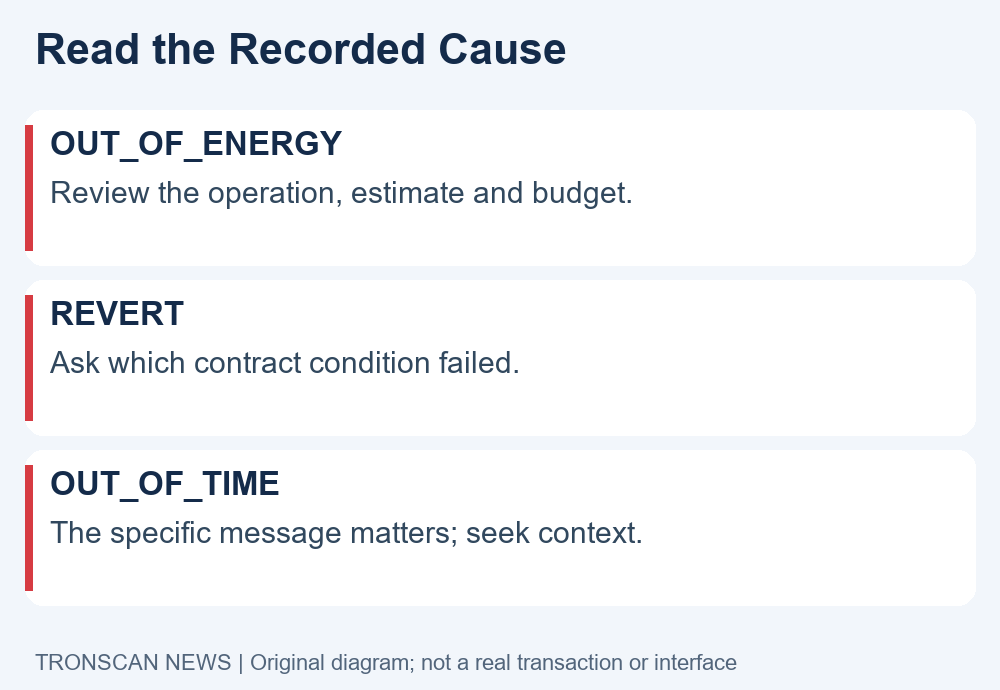
The official debugging reference identifies OUT_OF_ENERGY as execution running out of Energy, REVERT as a contract reverting, and OUT_OF_TIME as a result that can involve execution timing or a specific protocol check. These labels should not be collapsed into one instruction to buy more TRX.
The official smart-contract error guide explains that the accompanying message matters, particularly for OUT_OF_TIME. For a revert, a contract’s conditions and inputs can matter. An application developer may need the contract interface or source to interpret an error correctly.
For TRON transaction errors on mobile, your useful job is evidence collection: capture the TxID, result, message, action and relevant resource fields. You do not need to decode unfamiliar hexadecimal data on an untrusted website or install a recovery tool to perform that basic review.
Keep a screenshot for context, but also copy text where possible. A screenshot may crop the network, contract or error message. A clear support note should make it possible to open the same public record and compare the exact details.
4. Match the next check to the recorded cause
With TRON transaction errors, the next check should answer the receipt rather than repeat a generic fix. For an Energy-related failure, review the estimate, available resources and the budget for that exact contract call. For a revert, ask which contract condition was not satisfied.
Our TRON fee limit explanation distinguishes a caller-side spending ceiling from actual usage. Raising a ceiling is not the same as supplying resources, and neither change proves that the contract’s other requirements are satisfied.
The TRON troubleshooting FAQ notes that Energy spent on an out-of-Energy execution is not refunded. It also explains that a revert rolls back contract state changes while charging the Energy used before the error. Consequently, a failed intended action and a resource charge can coexist.
Do not quote a universal refund, charge or recovery amount from this guide. Read the actual record and your provider’s explanation. A wallet’s resource display before an operation and a completed receipt after it answer different questions.
For TRON transaction errors that mention a contract precondition, record the exact operation and inputs. Ask the app’s official support team what condition prevented completion. Do not change a recipient, grant a larger allowance or approve an unfamiliar spender merely because someone suggests it in a private message.
For an unexplained execution result, pause. A public explorer can show a result without providing enough application context to explain it. It is reasonable to ask the wallet or application developer to interpret its own proposed call before you authorize a replacement.
5. Verify the outcome before making a new payment
The final check for TRON transaction errors is whether you know the original operation’s outcome. Separate “not yet established” from “included and failed.” If the sender cannot explain the state, keep the original references and ask it to investigate rather than treating uncertainty as permission to pay again.
The official debugging reference says resubmitting the same TxID cannot produce a second execution of an already included transaction. That developer-level distinction does not mean a phone’s send-again button is harmless: a new authorization can create a different transaction. Read the proposed action carefully.
When a new transaction is appropriate after a diagnosed failure, verify the destination and operation from the beginning. Compare any estimate and proposed spending with your intention. The old receipt documents the old attempt; it is not an approval for a changed address or contract.
If the onchain result is successful but the receiving service is still pending, switch to that service’s deposit investigation. Our USDT not received checklist helps separate public transfer evidence from an internal account credit. Keep the platform reference alongside the public TxID.
For TRON transaction errors involving a custodial sender, the service may control whether an operation is recreated or refunded. Ask it to explain the transaction state and its policy. Do not assume you can repair its outgoing transaction by changing settings in a separate personal wallet.
A support note for TRON transaction errors
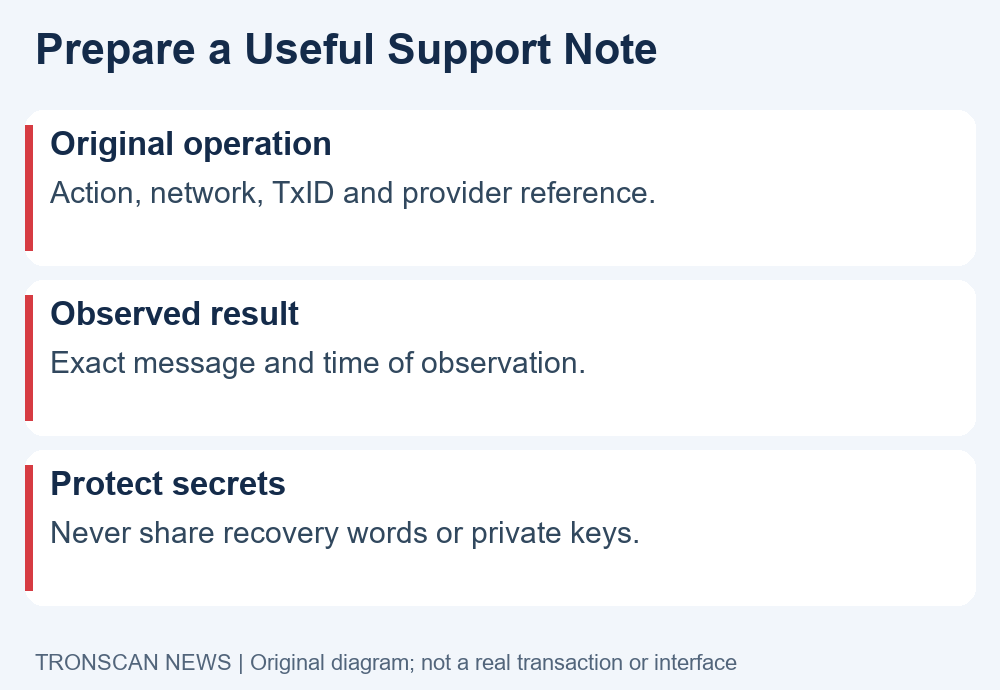
Use this compact format to make a support request specific. Fill only what you can verify and label missing details unavailable. Share account-specific information only through the provider’s normal private support channel.
- Action: what you attempted and the app or service used.
- Original record: the complete public TxID and selected network, plus a separate provider order reference.
- Observed result: the exact receipt result, error message or connection problem.
- Expected outcome: the token, destination and action you intended.
- Open question: whether support needs to investigate submission, execution or account credit.
For TRON transaction errors, one well-organized note is better than several messages with different hashes and cropped images. Record which screenshot belongs to which attempt. If you made more than one independent payment, list them separately so support does not mistake one attempt for another.
Never attach a seed phrase, private key, password or sign-in code. Someone can review a public transaction without those secrets. If a support conversation moves toward remote control, a secret recovery form or an extra payment to unlock funds, verify the request through the service’s established channel.
Keep transaction history separate from today’s balance
An account balance is a current observation. A receipt is evidence about a particular operation. When reviewing TRON transaction errors, compare the specific attempt rather than using one balance screenshot to explain every recent movement.
For example, a hypothetical user may see a lower TRX balance after several contract interactions while still holding the token they intended to transfer. That observation alone does not identify which operation charged resources or which execution failed. Open each relevant record, note its timestamp and keep the amounts and resources attached to the correct TxID.
This approach also avoids an incorrect recovery promise. A failed contract action does not give an independent publication the ability to reverse charges, restore wallet access or alter a receiving platform’s ledger. The useful outcome of this guide is a clearer diagnosis and a better support question.
For more independent explanations of public blockchain evidence, visit Tronscan News. We are not the official TRONSCAN explorer, TRON, Tether or your wallet provider. Our instructions explain how to review records; they do not authorize transactions on your behalf.
Frequently asked questions
Does a TxID mean my TRON transaction succeeded?
No. A TxID identifies a transaction. Inspect the available record and execution result, then compare the operation with what you intended. A receiving platform’s account credit is a separate question.
Do all TRON transaction errors mean I need more TRX?
No. A connection problem, submission rejection and contract execution failure require different checks. Read the exact message before changing resources, a fee limit or any contract input.
Can a failed contract transaction still consume resources?
Yes. Failure of the intended contract action does not imply that no execution resources were used. Review the receipt and the official documentation for the particular result; do not assume every error has the same charging behavior.
Should I send again when my wallet times out?
First investigate the original activity entry and any existing TxID. A timeout alone does not establish the outcome. Creating a new payment while the first remains uncertain can create a separate problem.
What should I give support for TRON transaction errors?
Provide the public TxID, network, provider reference, exact result and a short description of the intended operation. Keep wallet secrets, passwords and verification codes out of the request.
Editorial note: AI assisted with drafting and original explanatory diagrams. Technical statements were checked against the linked official references on October 23, 2026. Examples are hypothetical; no real account, transfer or wallet interface is fabricated. Material corrections should identify the changed claim and supporting evidence.
Leave a Reply