TRON account permissions decide which keys can authorize an account’s operations. Owner permission has broad authority; Active permissions allow the operations configured for a particular signer group. To understand either one, read its keys, weights, threshold and allowed operations together. A familiar permission name or a visible balance does not establish who can spend.
This is a read-only guide for mobile users reviewing an account or trying to understand a signing problem. It explains Owner versus Active, weighted multisignature settings and the difference from token approval. It does not ask you to change permissions, import credentials or connect a wallet to this website.
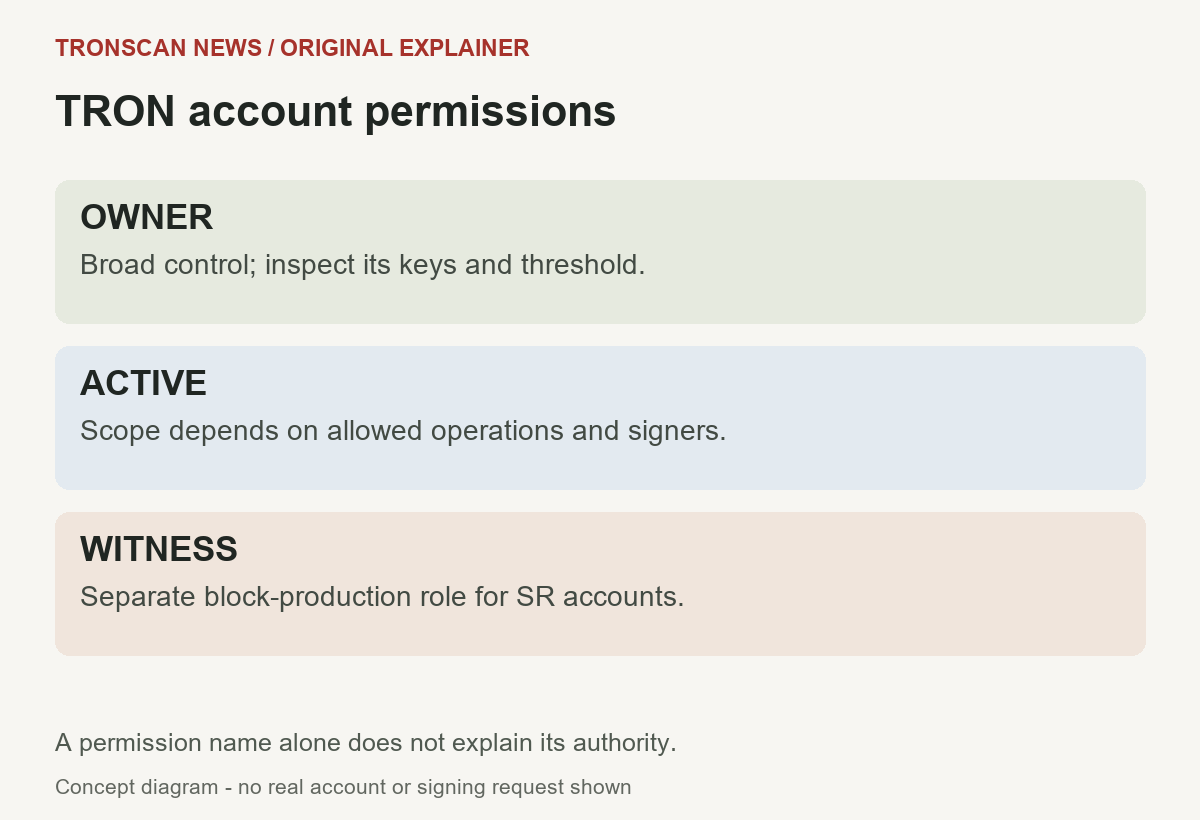
Table of Contents
TRON account permissions: Owner vs Active at a glance
The official Account Permission Management guide describes Owner, Active and Witness roles. Owner is the broad account-control role. Active authority depends on the operations enabled for that permission; it is not automatically harmless simply because its label says Active.
| Role | Read first | Important distinction |
|---|---|---|
| Owner | Keys and threshold | Broad account authority, including permission changes |
| Active | Keys, threshold and operations | Only its permitted operation types; scope can still be broad |
| Witness | Its block-production role | Separate role for Super Representative accounts |
Do not confuse an account’s Owner permission with a displayed token’s owner or an application’s administrator. Read which account the record describes. A page can contain several addresses serving different purposes, and copying the wrong one can produce a technically correct lookup of an unrelated account.
5 easy checks for TRON account permissions
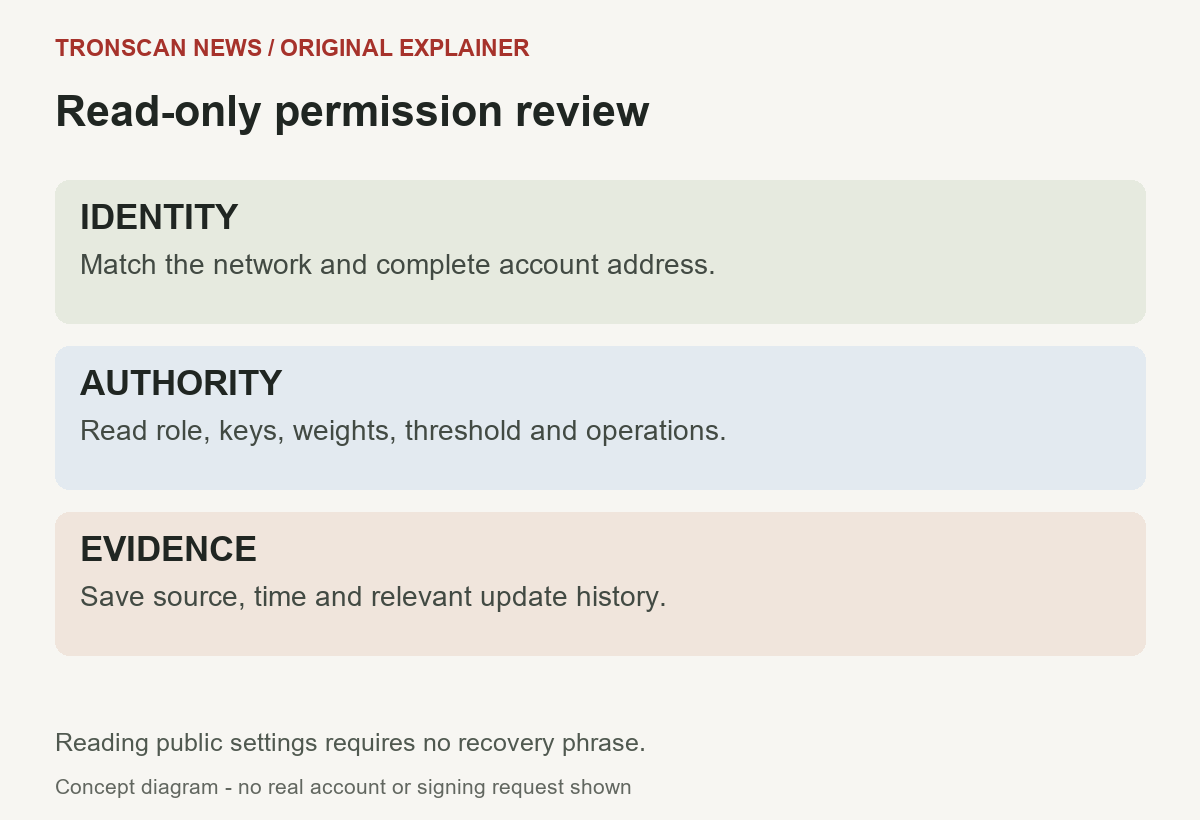
- Match the account and network. Open the full public account address on the appropriate official explorer. Compare the complete address with your own receiving or account record. A shortened beginning and ending is insufficient for a security review.
- Read each permission separately. Identify the Owner permission and every Active entry shown. Record its name and ID alongside its role rather than assuming two similarly named entries have the same authority.
- Compare keys, weights and threshold. List the authorized signer addresses and the weight assigned to each. Determine which combinations can reach that permission’s threshold. Do not substitute the number of listed addresses for the authorization calculation.
- Inspect Active operations. Check which operation types the permission allows, using the official reference for an unfamiliar type. A low signing threshold and a broad operation scope need to be considered together.
- Preserve the evidence. Save the account URL, observation time and relevant permission-update record if you are investigating a change. Describe what is known and what remains unresolved before considering any separate account action.
Viewing TRON account permissions is different from submitting a permission update. If a page asks for a signature, identify the exact proposed operation before proceeding. An instruction to repair a wallet does not explain what authority a transaction would change.
How weights and thresholds work
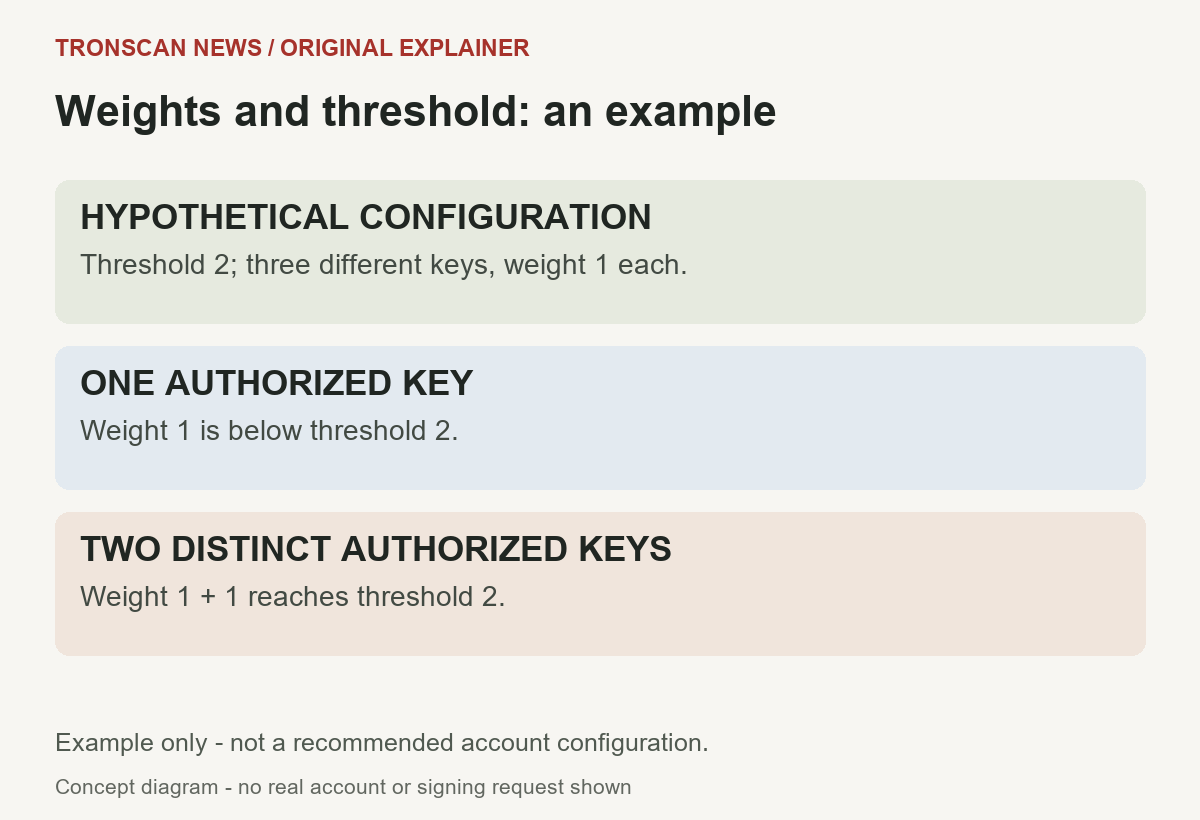
A threshold is the authorization target for one permission. Weights describe how much each recognized signer contributes. The official signature-validation reference explains how the network evaluates signing authority. Validity requires more than a collection of signatures that happen to look different.
Hypothetical example: imagine a permission has three distinct authorized keys, each assigned weight one, and a threshold of two. One of those keys alone contributes one and falls short. Two distinct authorized keys contribute two and reach the target. This is an arithmetic illustration, not a recommended account configuration.
Now change the hypothetical weights: one key has weight two, another has weight one, and the threshold is two. The first key can meet the threshold alone. Calling the account multisignature would not, by itself, tell a reader that two people must cooperate for every operation.
Keep the calculation inside the permission selected for the transaction. Do not add Owner weights to Active weights, or combine unrelated Active groups, as if all visible entries formed one shared total. A signer can have different authority in different entries.
TRON account permissions IDs are not a safety ranking
The protocol identifies Owner as permission ID zero, reserves ID one for Witness, and assigns Active entries IDs beginning at two. An ID identifies the selected permission; a larger number does not mean more security, and a low number does not describe the token value involved.
For an operation that failed, compare the permission selected by that transaction with the current account configuration and the relevant historical context. Do not conclude that a signer has no authority anywhere merely because one attempted operation was rejected.
Likewise, a permission name such as active0, daily or safe is a label. It does not replace the key list, threshold or operations field. A careful TRON account permissions note preserves both the human-readable label and the actual fields needed to understand the entry.
Active operations: scope matters as much as signers
Active permissions define which types of account operation their signer group may authorize. The java-tron permission reference describes this functional separation. An operations field is a compact representation of allowed contract types, not a plain-language promise about every future transaction. To interpret its bytes, use the tested read-only operations-bitmap decoder, with a dated Mainnet example and explicit unknown-type handling.
Read a documented explanation rather than guessing from a long hexadecimal value. If an interface translates that value into named operations, preserve the original scope and the source of the interpretation. An unfamiliar operation should remain an unresolved question until its meaning is established.
A particularly important scope is permission management itself. The official account-permission guide explains that an Active permission can authorize a permission update when the selected entry enables AccountPermissionUpdateContract, contract type 46. Do not assume only an Owner-labelled entry could ever be relevant to such an update.
An operation-type restriction also is not automatically a restriction to one recipient, one payment amount or one named website. For example, seeing a transfer-related type does not establish that it is limited to a particular destination. Read the actual scope instead of adding restrictions the configuration does not state.
TRON account permissions vs token approval
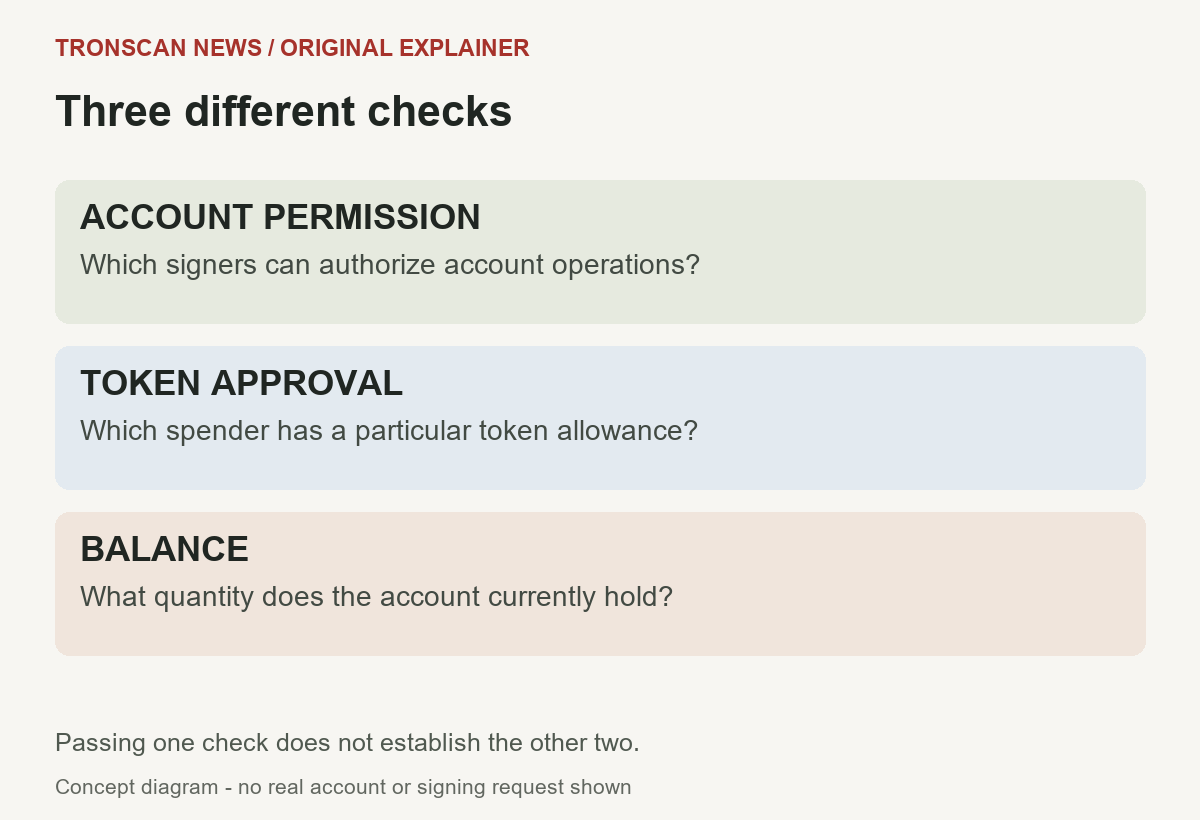
These are separate layers of authority. Account permissions concern which signers can authorize account operations. A TRC20 allowance concerns a spender’s authorization involving a particular token contract. A public account balance concerns holdings, not either type of authority.
Our TRON token approval guide explains the owner account, token contract, spender and allowance relationship. Use that process for a token-approval question. It does not replace the account-level key and threshold review described here.
Revoking one token allowance does not, by itself, rewrite an account’s Owner or Active permissions. Similarly, inspecting the account’s signer list does not prove that every token allowance is appropriate. Avoid presenting one completed check as a complete audit of the other layer.
When discussing TRON account permissions with support, name the layer explicitly. Saying only that an address has authorization leaves open whether you mean a signer, an Active group or a token spender. Clear labels help prevent the wrong proposed fix.
Why importing a private key may not provide full control
A wallet can hold a key without that key being sufficient for the account operation you want. An account’s configured authorization rules still matter. A key may be absent from the selected permission or carry less weight than its threshold requires.
Do not test this by importing a recovery phrase into a troubleshooting website. Public permission data can be reviewed without disclosing credentials. If a wallet reports a signing limitation, preserve the error and identify the selected permission before deciding what it means.
A watch-only view adds another distinction. Being able to display an address and its holdings does not prove that the app has a usable signing key for it. A screenshot of a balance therefore cannot demonstrate control of that account or readiness to authorize a particular operation.
For TRON account permissions, a useful conclusion is narrow: this signer is listed with this weight under this entry at the time checked. Whether the holder can produce a valid signature, whether other signers cooperate and whether a proposed operation is allowed remain separate questions.
A signing error is not automatically a fee problem
Adding TRX or obtaining resources does not change a signer’s configured weight or an Active permission’s operation scope. Resource availability and signing authority are different requirements. A problem with one cannot be diagnosed solely from the other.
For a failed attempt, record the original error, relevant transaction details and whether any on-chain execution occurred. Our TRON transaction errors guide separates stages of failure before a retry. Do not assume every wallet notification represents a completed blockchain transaction.
Permission-related fees can also depend on current network parameters. This article does not quote a fixed update price or instruct a payment to unlock an account. Read the exact operation and current official fee information if you later evaluate a legitimate, separately understood change.
A request from an unknown helper to deposit a little more money is not evidence that a missing signer or insufficient threshold will disappear. Explain the authorization issue using its actual fields before considering any spending or signing action.
Current TRON account permissions and update history
A current permission record answers what the inspected source presently reports. A historical update transaction can help explain a change. Keep those observations separate, including their network and timestamps, instead of treating one screenshot as a complete history.
The official GetAccount reference describes account information including permissions in solidified state. This is useful context for developers comparing sources, but this guide does not require running an API request or entering a key. If two displays differ, document which source and state each one represents.
For an unexpected signer, preserve the full public address and the time at which you observed it. Compare any relevant update record with the current configuration. Do not identify a person’s intent or ownership merely from an unfamiliar address.
Also record the network. Our TRON mainnet vs testnet guide explains why a test record cannot establish a production account’s state. A carefully labelled test configuration is useful for learning, but it is not a substitute for the account you are actually investigating.
Permission changes need a complete configuration review
A permission-update transaction is not a display preference. The official references describe replacement of the permission configuration, including entries beyond the one a user may intend to edit. A proposed update should therefore be understood as a whole, not judged by a reassuring button caption.
This article deliberately provides no copy-and-paste update payload. A configuration suited to one organization’s available signers may prevent another account from authorizing future operations. Structural validity does not establish that the operator controls every key the configuration names.
Changing only an Owner entry is also not a complete statement about remaining Active authority. Review every entry and its scope when assessing the resulting account. Do not infer that the entire account now requires the same signer combination simply because the Owner threshold changed.
For TRON account permissions, the distinction between viewing and changing should remain explicit throughout the task. A read-only review can end with a list of questions and preserved public evidence. It does not have to end with an immediate transaction.
TRON account permissions examples
Hypothetical example 1: a key is listed but cannot act alone. A signer has weight one under an entry whose threshold is two. Its presence in the list is real authority under that entry, but the single signer does not satisfy the configured total. The next question concerns the remaining authorized combination, not the wallet’s displayed token value.
Hypothetical example 2: an Active group has a smaller threshold. Owner may require two signers while an Active entry allows one signer for certain operations. Read that Active entry’s enabled types before saying that every account operation requires two approvals. Different entries can establish different paths.
Hypothetical example 3: an allowance was removed. A token spender’s allowance is revoked, but the account’s permission configuration is unchanged. That action may address the particular allowance; it does not prove that the account-level signer list changed or that every other authorization was removed.
These examples are invented to explain interpretation. They are not observations about real accounts, recommended security policies or promises that a missing key can be recovered. Apply the distinctions to your own public record without treating the sample weights as setup instructions.
Save a useful TRON account permissions review note
Use a short worksheet with the full account address, network, observation time, source URL and permission identifier. For each entry, record its keys, weights, threshold and documented operations. Keep the original values available rather than saving only your conclusion that the configuration looked normal.
Label the purpose of the review. You might be checking an unexpected signer, explaining an insufficient-weight error or distinguishing account control from a token allowance. A focused question helps you avoid collecting unrelated balances and transaction screenshots.
Do not include signing secrets in the worksheet. Public identifiers can still reveal account relationships and activity, so share only relevant details with a known official support channel. Nobody needs your recovery phrase to read the public configuration you are describing.
What a TRON account permissions review can establish
A careful review can identify the configured authority shown by a source at a particular time. It can explain why a proposed signer combination is insufficient under a stated threshold, or why an operation type needs a different authorized path.
It cannot prove that every listed person will cooperate, that a private key is still available or that an unrelated application is trustworthy. A complete configuration description is stronger evidence than a balance screenshot, but it does not answer every operational or security question.
If a discrepancy remains, preserve it as a discrepancy. Record the two observations, their times and their network context. Avoid editing the explanation until it sounds certain when the public evidence still leaves an important field unresolved.
When deciding which tool to use for a TRON account permissions review, compare TRONSCAN and a wallet: public inspection and signing are different tasks. The main TRONSCAN record guide explains how to select the public record before interpreting TRON account permissions.
Frequently asked questions
1. What is the difference between Owner and Active TRON account permissions?
Owner has broad account authority. Active authority is defined by the selected entry’s keys, threshold and allowed operation types. An Active entry may still be powerful, so its name alone does not establish a limited or safe scope.
2. Does revoking a token approval reset account permissions?
No. A token allowance and the account’s permission configuration are different layers. Reviewing or revoking one spender allowance does not, by itself, change the account-level Owner or Active entries.
3. Why can a listed signer be insufficient to authorize a transaction?
The selected permission can require more weight than that key supplies, or the operation may be outside its allowed scope. Inspect the exact entry and error rather than assuming that a visible address or imported key grants unrestricted control.
4. Will adding TRX fix insufficient signing weight?
Adding resources does not rewrite the permission’s keys, weights or threshold. Establish whether the problem is authorization, resource availability or another stage of execution before considering a retry.
5. Can I inspect TRON account permissions without connecting a wallet?
Public account information can be reviewed without connecting a wallet to this website or sharing signing credentials. Reading a configuration is separate from authorizing a transaction that changes it.
Continue learning
Visit the Tronscan News homepage for independent English tutorials. Our editorial standards explain verification and corrections. This article and its original diagrams were prepared with AI assistance and checked against the linked official references; no real account was modified for this guide.
Leave a Reply