A TRON token approval gives a specified spender permission to use a token allowance from an owner account. Before signing, identify the account, token contract, spender and amount. Connecting to a website, approving tokens and sending a payment are different actions, so read the actual wallet request rather than relying on a button’s label.
This independent mobile checklist helps you review permissions and record what happened. It does not connect your wallet, perform a revocation or guarantee asset recovery. Interface names can change, and the examples below describe a review process rather than a real customer incident.
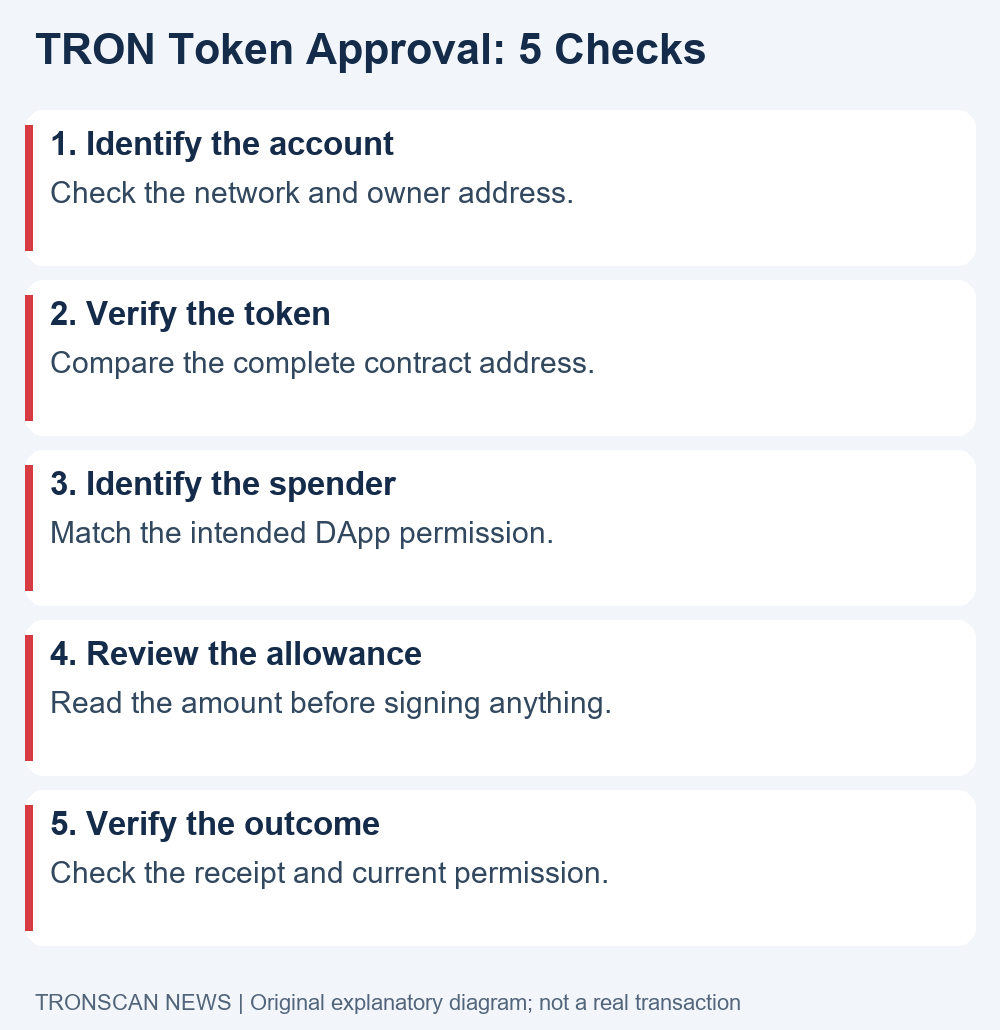
Table of Contents
TRON token approval: 5 easy checks before signing
- Identify the owner account. Confirm the selected network and full address in your wallet. If you use several accounts, make sure you are reviewing the one involved in the intended activity.
- Verify the token contract. Compare the complete address with a reliable issuer reference. A familiar ticker or logo cannot identify a token on its own.
- Identify the spender. Match the requested permission with the product you actually intend to use. Keep the spender separate from the token contract and from a payment recipient.
- Read the allowance. Check the displayed quantity and whether the request gives broader access than the intended action needs. If you cannot interpret the request, pause before signing.
- Verify the outcome. After an authorized change, inspect the transaction result and current permission. A submitted request or an application success message is not the same as a completed on-chain change.
Our review method starts with identities because the same word, such as “contract,” can refer to different addresses on a phone screen. Write the roles down before comparing strings. That small step makes it easier to spot a request concerning the wrong account or an unexpected token.
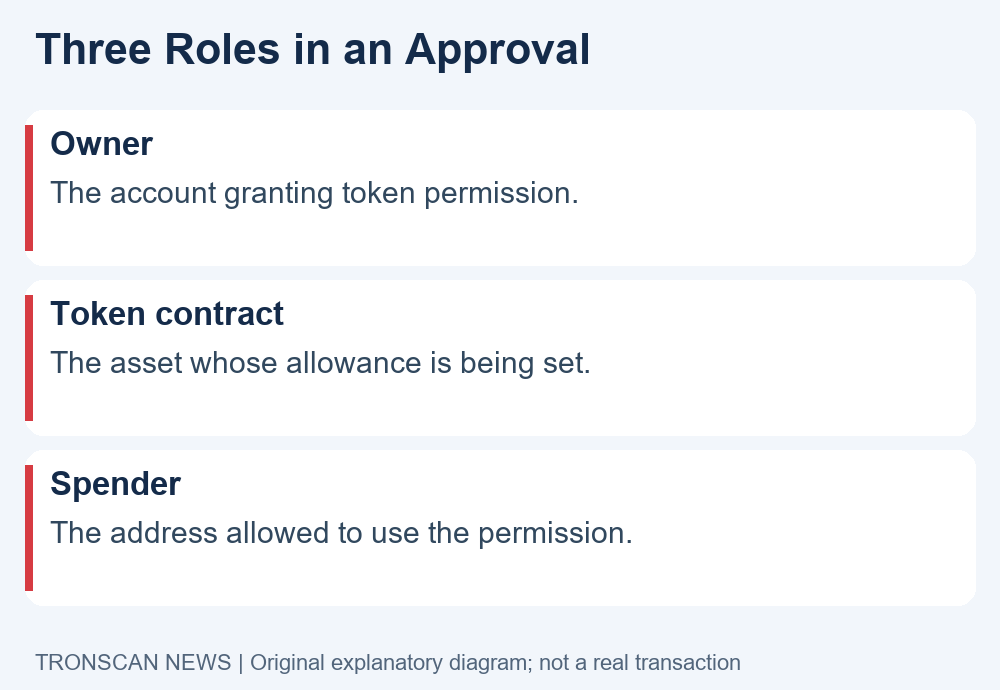
Understand the roles in a TRON token approval
The official TRC-20 interface reference defines approve, allowance and transferFrom. In that model, an owner grants a spender a token allowance; allowance reports the remaining permission, and transferFrom uses an authorized transfer path. An approval should not be confused with a completed payment.
For a practical review, keep three identities in separate fields: owner, token contract and spender. The first tells you whose permission is being examined. The second identifies the asset’s contract. The third identifies the party allowed to use that permission.
Do not infer those roles from the visual layout alone. A shortened address beside a token icon may identify the token, while another address in the signing request identifies a spender. Expand the relevant details or consult the wallet’s official documentation if the display is ambiguous.
A TRON token approval note is useful only when it records the relationship between these identities. Saving one address without its role can create confusion later, especially if support asks which contract or account you mean.
Review TRON token approval requests on mobile
Open a product through a trusted route that you selected yourself. Before interacting, compare the domain with that product’s official documentation. A message, advertisement or imitation support account can point to an unrelated site even when the page copies a familiar name.
When the wallet displays a request, read it as a new decision. The page you visited may describe a swap or another action, but the request could involve a separate permission. If its account, token, spender or amount does not match your intention, cancel and investigate the mismatch.
Do not let a countdown or an urgent chat message determine whether you sign. Save a non-sensitive note about the confusing field and consult the official help page. An unfinished request is easier to examine than a transaction you authorized without understanding.
For TRON token approval reviews, avoid switching between several similarly named tabs. Keep one trusted product page and the relevant wallet request in context. If you lose track of which page initiated the request, close the request and restart from the source you verified.
Check token identity before an allowance
For USDT, use the issuer’s current supported-protocol reference to identify the appropriate network and token contract. Compare the full value rather than accepting a matching symbol or a screenshot. Our USDT TRC20 contract guide explains how to make that comparison.
Our suggested workflow is to record the issuer reference first, then compare the wallet’s displayed token contract. This reduces the chance of treating information supplied by an unfamiliar page as independent confirmation of that same page.
Keep the asset and network together in your note. A token name can appear in different contexts, and an explorer record on one network does not validate a request on another. Do not use a test-network example as a reference for a mainnet asset.
A TRON token approval involving an unfamiliar asset deserves a separate identity check. Seeing an unexpected token name is not a reason to follow a promotional link, connect to its website or sign a transaction to remove it from view.
Read the amount in a TRON token approval
Compare the requested allowance with the action you intend to perform. Ask why that product needs permission for that token and quantity. An amount that you cannot explain is a reason to pause, even when the wallet offers a convenient confirmation button.
In a hypothetical example, a reader intends one small swap but sees a request described as unlimited. This is a comparison of scope, not a claim that a particular product is malicious. The reader should review the product’s current explanation and any supported allowance controls before deciding.
Do not copy arbitrary numbers into a contract-writing interface to resolve a display question. Human-readable token units and raw contract values can differ. An incorrect unit assumption can produce a permission very different from the one you thought you were entering.
When a TRON token approval interface offers an amount choice, read its explanation and the final wallet request together. If the requested value changes unexpectedly between those views, stop and investigate rather than assuming that the page’s earlier setting was applied.
If you already know the contract, token owner and spender, follow the read-only allowance query procedure. Its tested request builder and decoder distinguish a complete zero return value from missing data or a node error; reading does not grant or revoke permission.
Use official approval management guidance
TronLink’s DApp approval guidance warns about approval risks and points users to Wallet Management, then Approval Management, to view or cancel prior approvals. These are the provider’s documented labels; your installed version may present them differently.
Start inside the genuine wallet application or follow its official help route. Do not obtain an approval-management link from an unsolicited direct message. A website calling itself a security scanner is still a separate service whose identity and requested actions need review.
Use the official instructions to locate the relevant account and permission, then compare them with your note. If the wallet does not show the expected entry, do not assume that connecting to several other tools will solve the discrepancy. Check the network, account and displayed scope first.
Our TRON token approval checklist describes what to verify; it is not an instruction to sign every revocation offered by a page. A permission change still needs to match your intended token and spender, and the final request should be readable before you authorize it.
TRON token approval and other wallet actions
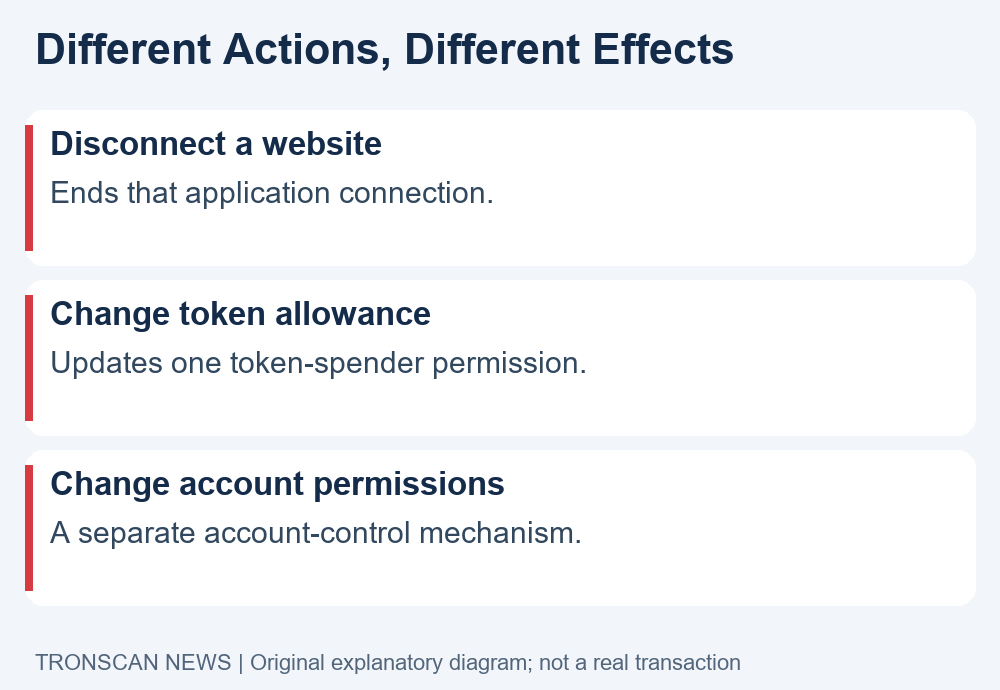
Disconnecting a website concerns that application’s connection. It should not be treated as evidence that a recorded token allowance has changed. Verify the actual permission through the relevant account and token information rather than inferring its state from a disconnected icon.
Account permissions are another subject. A token-spender allowance and the authority to control an account should not be combined into one vague category called “authorization.” If a request concerns account control, investigate that mechanism using the wallet’s official security guidance.
For your own records, label what you did: disconnected a site, submitted a token-permission change, or reviewed account permissions. Precise wording helps you avoid reporting a completed revocation when you only closed a browser tab.
When discussing a TRON token approval with support, describe the observed action and result. Do not say “everything is removed” unless the evidence actually covers every permission you mean. A single change cannot answer unrelated account-security questions.
Check fees and the result of a permission change
Before authorizing an on-chain action, read the wallet’s current estimate and full request. Do not use an old screenshot or a universal fixed-price claim as a substitute. Our TRON Energy and resource guide explains how to keep resource estimates and completed transaction costs separate.
After submission, save the transaction hash and inspect its result. A wallet acknowledgement can describe submission while execution still needs checking. If the record indicates failure, do not describe the requested permission as successfully changed.
Our TRON TxID guide helps distinguish a blockchain hash from an internal order reference. Use the correct hash when comparing the action with its receipt, and keep the network beside it.
For a TRON token approval change, the useful follow-up is the current permission for the same owner, token and spender. Compare that state with your intended outcome. A historical event provides context, while your question about what is allowed now needs the relevant current observation.
When an unfamiliar permission appears
Start by checking the identities, rather than reacting to a token’s name or an alarming message. Record which account, network, token and spender the interface is actually displaying. Compare that record with activity you recognize and with the provider’s explanation of its approval view.
If you also observe unauthorized outgoing activity, preserve the relevant transaction references and use the genuine wallet provider’s incident guidance. An approval review alone does not establish the cause of every loss or prove that the account’s signing credentials remain secure.
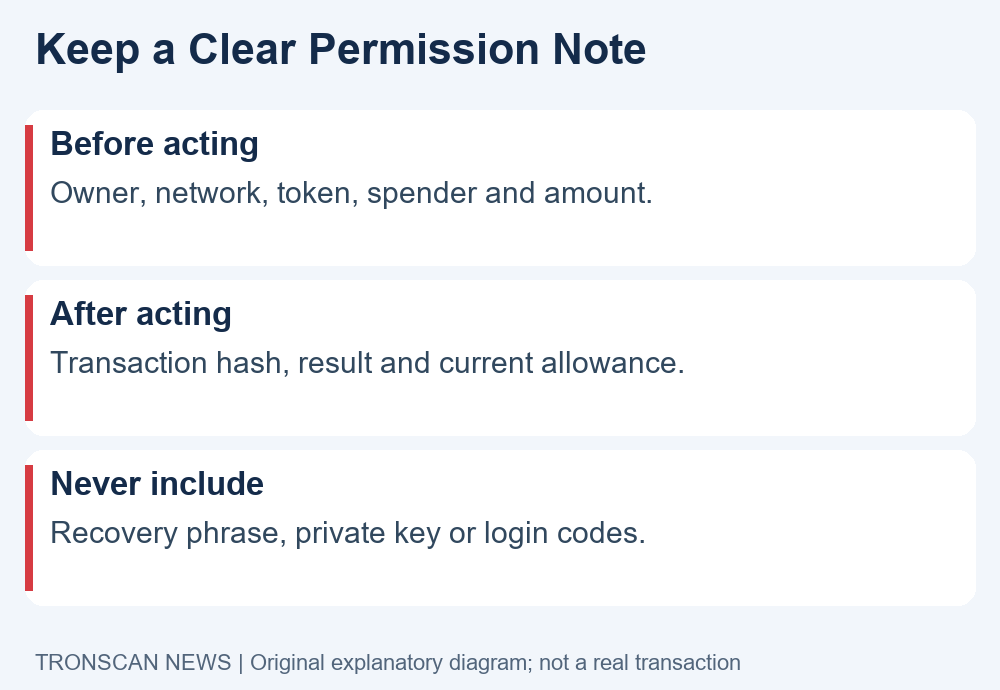
Do not send a stranger a “verification payment” or recovery phrase to diagnose the issue. A useful support report can identify public records without giving another party control of the account. Keep private keys and login codes outside screenshots and chat messages.
Our TRON token approval review method does not promise that a revocation recovers already-transferred assets. Keep prevention, current permissions and historical transfers as separate questions so a supposed recovery service cannot blur them into an unsupported guarantee.
Keep a clear TRON token approval review note
Before acting, record the date, timezone, selected network, owner account, token contract, spender and displayed amount. Include the official product documentation you consulted. This gives you a comparison point if the interface changes after a later update.
After an authorized action, add the hash, observed execution result and current permission. If any field remains unclear, mark it unresolved rather than replacing it with a guess. A short honest note is more useful than a complete-looking report built from assumptions.
If you seek help, share only the relevant portion through the correct official channel. Public addresses and transaction records can reveal connected activity. Redact unrelated balances, account names and personal details before sharing a screenshot.
Review permissions when your use of a product changes, using current official instructions. The purpose of a TRON token approval note is to make deliberate decisions and preserve evidence, not to replace judgment with a blanket claim that a tool or a wallet is always safe.
Frequently asked questions
1. Is a TRON token approval the same as sending tokens?
No. An allowance grants permission within the token’s approval model; a completed transfer is a different event. Read the actual request and transaction result rather than assuming an approval paid the intended recipient.
2. Does disconnecting a DApp cancel its allowance?
Do not use disconnection as proof of an on-chain permission change. Review the relevant owner, token and spender using the wallet’s official approval-management guidance and check the resulting state.
3. Can revoking an allowance recover a past transfer?
A permission review does not reverse historical transfers or guarantee recovery. Preserve transaction evidence and use the appropriate official support route if you are investigating a loss or unfamiliar outgoing activity.
4. Should I trust a verified token name or logo?
Use the complete contract address and a reliable issuer reference. A familiar display name is not enough to identify either the asset or the spender requesting permission.
5. Must I share a seed phrase to check approvals?
No. Do not enter a recovery phrase or private key into an approval-checking website or give it to a support impersonator. Use the genuine wallet application’s documented tools and review every requested action.
Continue learning
Visit the Tronscan News homepage for independent tutorials. Our editorial standards explain source attribution, AI assistance and corrections. Use the linked contract, resource and transaction-hash guides to investigate the particular field that remains unclear.
Leave a Reply