Preserve a TRON record by saving its source, network, observation time and original file, then recording a local SHA-256 fingerprint of that file. A later matching fingerprint helps check whether the saved bytes are unchanged. It does not prove that the source was correct, that a transfer succeeded or that you own an address.
This tutorial is for someone keeping a read-only copy of an existing public observation. No wallet connection, signature or new transfer is needed. The practical success standard is a copy another reviewer can identify, reopen and distinguish from a later edited version. Use the ordinary explorer view for current status; a saved file is a dated observation.
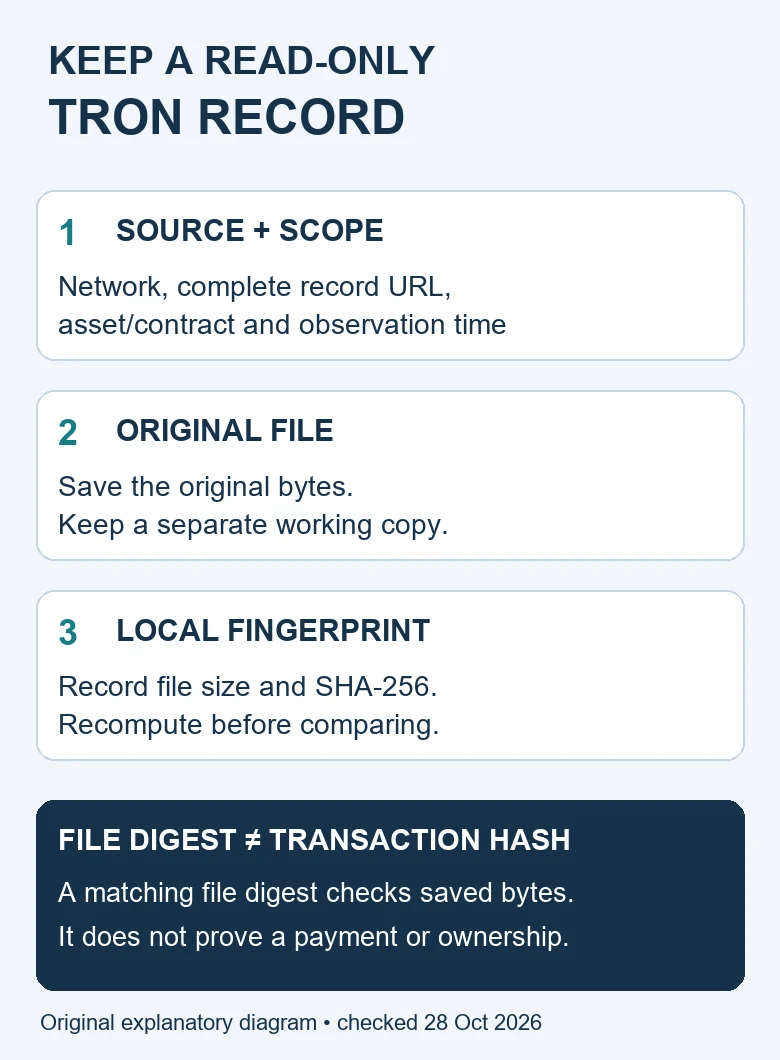
Table of Contents
TRON record: what exactly are you preserving?
A transaction page, account history, token-transfer row and downloaded file are different objects. Begin with the task you want the copy to support. For one payment, retain the complete transaction identifier and the relevant movement. For a history search, keep the account, filters, date interval and pagination limits.
The TRON history filtering and export guide owns the lookup and export workflow. This page addresses what happens after you have an observation or file: preserving its context and checking subsequent byte changes. It does not repeat export clicks or claim that a current CSV download was completed.
TRONSCAN’s historical CSV export announcement documents export support dating from 9 September 2019. That old announcement is not evidence of today’s interface, row limit or successful export. If an export requires human verification, complete it yourself through the normal interface or keep that step unverified. Do not bypass it.
1. Capture the source and the observation time
Open the public record through the official explorer entry point you already verified. Copy the complete URL and identify the network separately. A shortened address in a screenshot is insufficient for later reproduction. Record the timestamp with its timezone; a filename containing only a date omits that context.
Keep the source’s event timestamp separate from your capture timestamp. The former describes a field in the TRON record; the latter describes when you looked. A later explorer view can show a changed confirmation state without making the earlier capture an account of that later state.
2. Describe the selection in a manifest
Use the following original manifest alongside each saved file. Fill unknown fields with “not observed” rather than values borrowed from a different payment. For a non-transaction dataset, describe its actual selection instead of inventing a transaction identifier.
| Field | What to retain | Reason |
|---|---|---|
| Source | Full public URL and network | Locate the same record type |
| Selection | Complete hash or account; asset/contract; filters | Avoid comparing a different operation |
| Times | Source timestamp and your observation time, with zones | Distinguish event time from capture time |
| Coverage | Date interval, visible page, row count and known limits | Do not imply a complete account history |
| File | Original filename, byte count and SHA-256 | Identify the particular saved bytes |
| Handling | Original retained; working/redacted copy named separately | Explain intentional changes |
| Unresolved | Missing fields and the next check | Keep uncertainty visible |
3. Save an original and a separate working copy
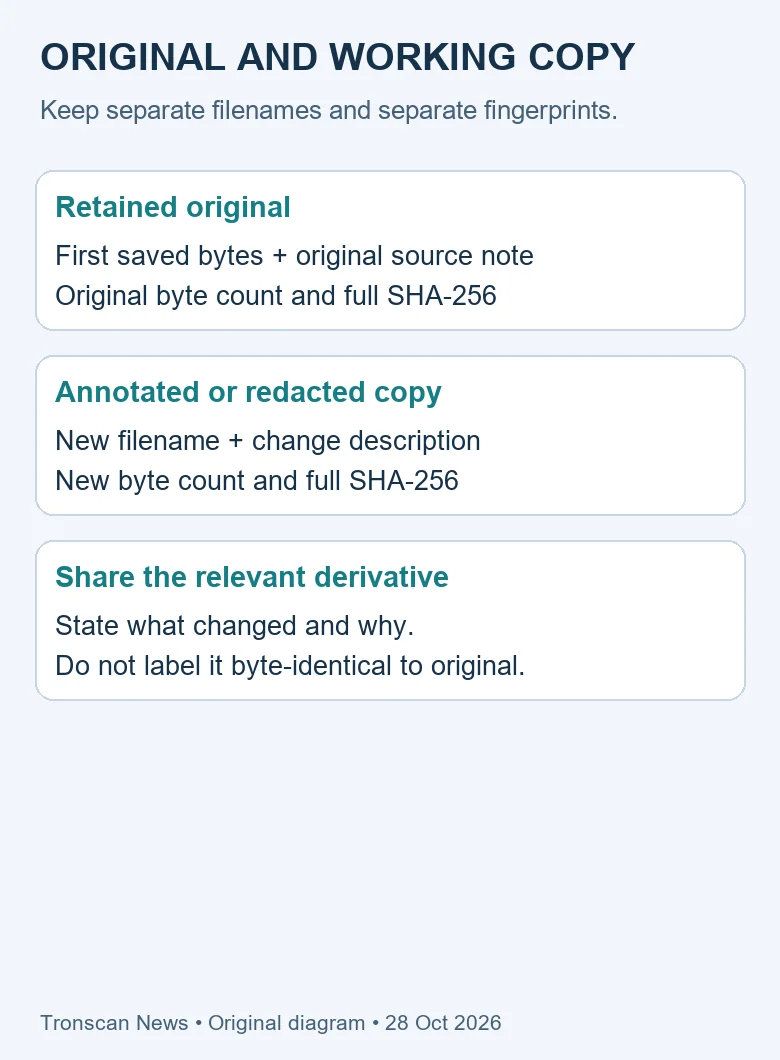
Keep the first retained file unchanged. Use a separately named copy for annotations, spreadsheet import or redaction. If your device offers a read-only file setting, it may help discourage accidental editing, but it is not an immutable archive or an access-control guarantee.
A browser-saved page can depend on other files or active scripts. A screenshot can omit an expanded field. A CSV can contain only the selected scope. Record these limitations rather than describing any one format as a complete blockchain archive. The preservation method here works on an existing local file; it does not make that file more complete.
4. Compute a TRON record file fingerprint locally
The following original Python script reads bytes in chunks and prints the filename, byte count and SHA-256 digest. Save the code as fingerprint.py on a computer with Python available. It opens the selected file in binary read mode and makes no network request or wallet operation.
import hashlib
import sys
from pathlib import Path

path = Path(sys.argv[1])
h = hashlib.sha256()
size = 0
with path.open("rb") as source:
    while True:
        chunk = source.read(1024 * 1024)
        if not chunk:
            break
        size += len(chunk)
        h.update(chunk)
print("file:", path.name)
print("bytes:", size)
print("sha256:", h.hexdigest())
Run python fingerprint.py "your-saved-record.txt" using the actual file path. Keep quotation marks around paths containing spaces. If your system uses another Python command, use that configured command. A missing-file error means you should correct the path, not create an empty replacement and call it the original.
Python’s hashlib reference documents SHA-256 and the update/digest operations used in this script. Our script combines those operations with a byte-counting read loop. It checks the chosen file, not a live network response or a remote copy.
5. Recompute before comparing the saved TRON record
Run the same script against the retained file later and compare the complete digest and byte count with your original manifest. Matching results are evidence that the file’s bytes have not changed relative to that saved reference. They do not authenticate who supplied the reference or establish whether the original capture was accurate.
If the digest differs, compare the filenames and paths first. You may be checking a redacted copy, a re-saved page or a spreadsheet export. Preserve both versions and explain the change. Do not overwrite the original manifest simply to make it agree with a modified file.
6. Understand our local mutation test
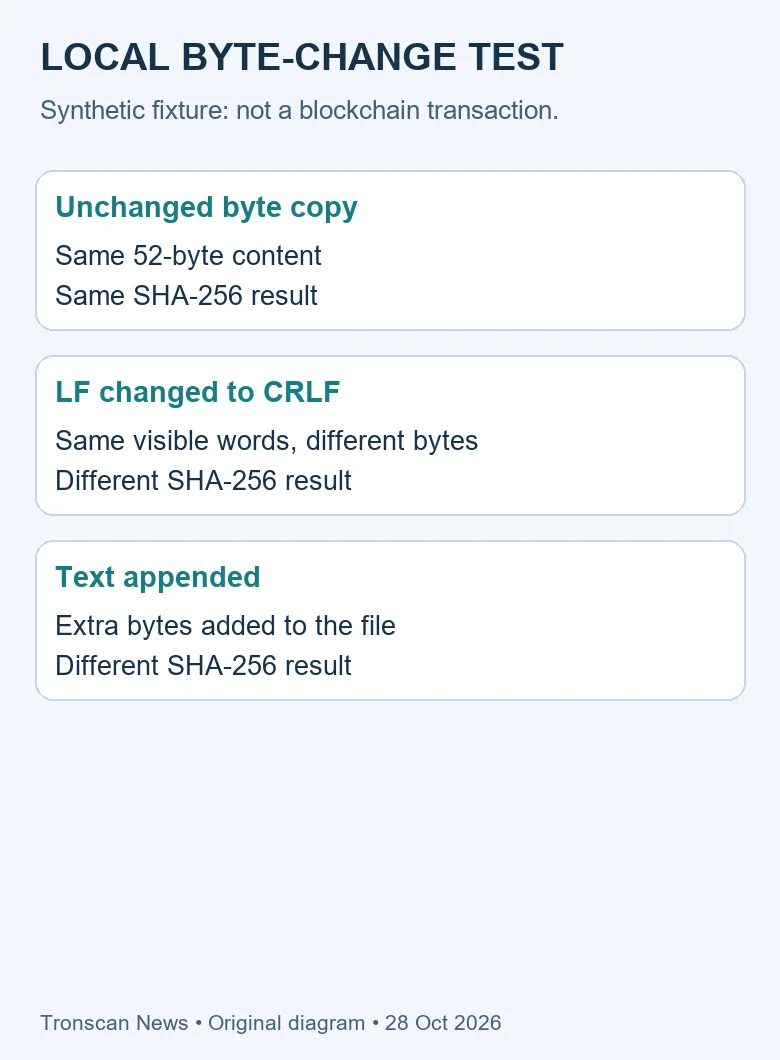
We tested this method on 28 October 2026 using an explicitly synthetic training file, not a real transaction. Its exact UTF-8 content was the two lines below, each ending with a single LF newline. There were no additional spaces or byte-order mark.
TRON mainnet
Observation: synthetic training record
The fixture contained 52 bytes. Its SHA-256 was 8e4950e9ccd9c671b02ed3aef076e010c2bdf360880a35eb1429c77828f4ead4. An unchanged byte copy produced the same digest. Converting LF line endings to CRLF produced a different digest, as did appending text.
This is why a TRON record can remain visually similar while its file fingerprint changes. Text encoding, line endings and re-saving matter to bytes. The test validates local change detection on the fixture; it does not validate TRONSCAN export completeness, a real payment or every browser’s save behavior.
7. Share a relevant copy and preserve the limits
When a receiving service asks for evidence, use its official support route and send the relevant requested fields. Keep unrelated balances, account history and personal details out of the shared copy where appropriate. Never include recovery phrases, private keys or login codes. A public address can still reveal linked activity.
If you redact a file, give the redacted copy its own filename and fingerprint. Explain that it is a derivative. Do not claim it is byte-identical to the original. For another reader comparing observations, the field-by-field TRON comparison worksheet helps separate scope differences from changed values.
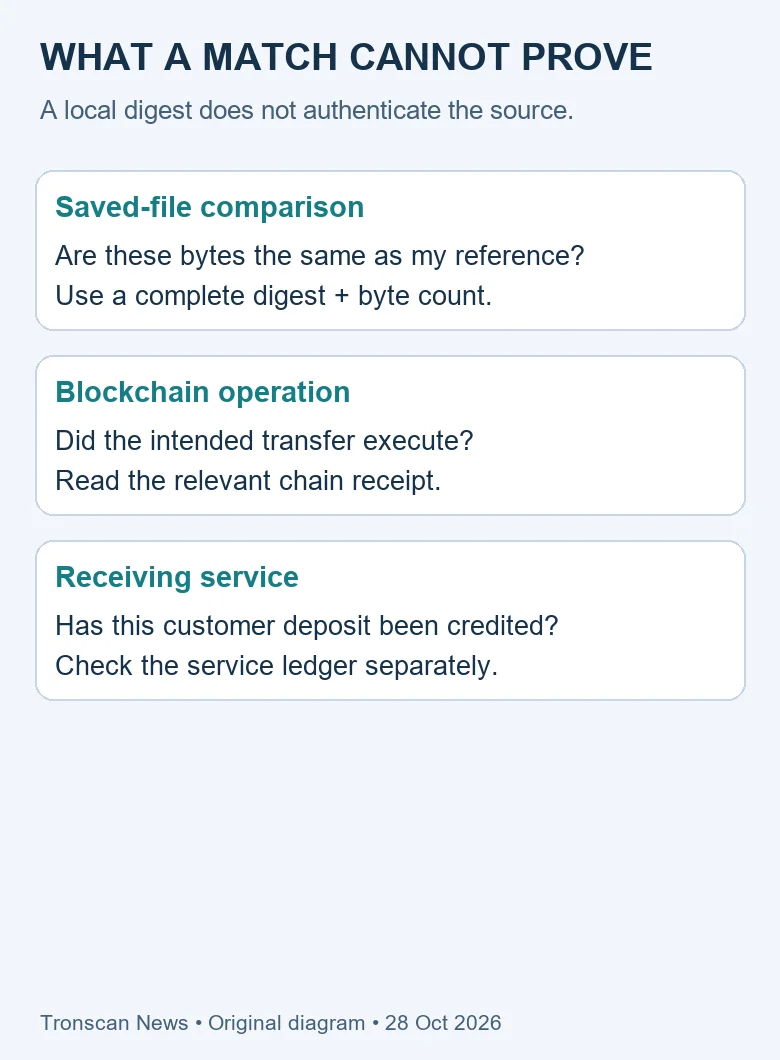
The TRONSCAN guide to public record types explains the wider lookup choices. A preserved TRON record cannot reverse a transfer, update an exchange ledger or prove beneficial ownership. Its useful role is a clearly scoped observation with a reproducible handling trail.
Reproduce the fixture without copying an accidental newline
Copying the two displayed lines into a text editor may create different newline bytes on different systems. That is exactly the distinction this test is meant to expose. For a reproducible exercise, the following Python statement creates the specified binary content. Use a new practice folder that does not already contain a file with this name; the write operation replaces a same-named file.
from pathlib import Path
Path("synthetic-record.txt").write_bytes(
    b"TRON mainnet\nObservation: synthetic training record\n")
The backslash-n sequences inside this Python byte literal become LF bytes. They are not two printable characters in the resulting file. Run the fingerprint script against that new practice file and compare its output with the 52-byte reference. This exercise is optional and uses invented training content only.
We also computed the following full fingerprints for the two deliberate mutations. The CRLF version replaces each LF byte with a CR byte followed by LF. The appended version keeps the original and adds the bytes represented by b"Changed\n". These precise definitions matter: another annotation or a different final newline is another test input.
| Input | Bytes | SHA-256 |
|---|---|---|
| Original LF fixture | 52 | 8e4950e9ccd9c671b02ed3aef076e010c2bdf360880a35eb1429c77828f4ead4 |
| CRLF derivative | 54 | 5f92ab195d9af38e63d8da6d66e840f9efa1bfaf230b33bc5b4539f0e82b6615 |
| Appended-text derivative | 60 | a275f77c84048660644a8bb7286d2ab3e401d323929cc916806cb84139e99ea1 |
A complete match with the original row confirms that you reproduced this training fixture’s saved bytes relative to the printed reference. A mismatch is an opportunity to inspect encoding, byte-order marks, spaces and line endings. Do not delete bytes from an actual preserved record merely to imitate these invented results.
For a real observation, your reference digest will normally be different. Record the actual result from your own saved TRON record and retain the context manifest beside it. The exercise teaches the comparison procedure; its digest is not a value that a genuine transaction page is expected to have.
Resolve disagreements without changing the original
A TRON record preservation check should produce a specific next action. “The file is different” and “the transaction failed” are not interchangeable findings. Before asking another person to investigate, identify whether the disagreement concerns saved bytes, selection, timing or interpretation.
| Observation | Interpretation within this method | Next check |
|---|---|---|
| Digest and byte count match | Consistent with the same saved bytes relative to your reference | Check whether the original source and selection answer the question |
| Byte count differs | The compared file sizes differ | Check copy names, redaction, added text and save format |
| Size matches but digest differs | Equal length does not establish equal content | Preserve both versions and compare without replacing them |
| File matches but live status differs | These may be observations at different times | Record the new observation separately and compare identifiers |
| No original reference exists | A new fingerprint cannot reconstruct a missing earlier one | Start a dated manifest now and disclose the limitation |
Two same-size files can contain different text. Conversely, two files that display the same words can have different newline bytes. The byte count is useful context beside the digest, not a substitute for it. Our unchanged-copy and newline tests deliberately separate visible appearance from file identity.
A synthetic handoff between two reviewers
Imagine Reviewer A keeps the 52-byte training fixture described above and gives Reviewer B a copy together with the full digest and byte count. B runs the printed script locally. If the results match, B can report that the received bytes agree with A’s supplied reference. B cannot infer that A captured an authentic blockchain page: the fixture was explicitly invented.
Now suppose B adds the line “Checked by B” to the working copy. That is a reasonable annotation, but it creates another file version. B should name it separately and compute a new fingerprint. Continuing to attach A’s original digest to this annotated copy would misdescribe what the digest identifies.
Suppose instead that A and B both compute a matching digest but disagree about the network. Hashing the file again will not settle that semantic question. They need the source URL, network context and selection notes. A perfect copy of an incorrectly selected page remains an incorrectly selected page.
The same reasoning applies when two people agree on the saved TRON record but disagree about exchange credit. The copy may help document the on-chain observation. The receiving service still needs to investigate its own customer ledger using the relevant account and case details. A file fingerprint cannot supply those private records.
Common local errors and a useful stopping point
No Python command: the example requires an available Python installation. If that prerequisite is absent, keep the source note and original file and mark the local check incomplete. This article does not ask a reader to download an unfamiliar recovery program or upload their entire history to a checksum website.
Permission denied: choose a file you are allowed to read. Do not weaken device protections to force access. If another application is holding the file or a cloud placeholder has not been downloaded, resolve that normal storage condition first and record which local bytes were actually checked.
Different filenames: filenames help humans organize a TRON record, but this script hashes file contents rather than the filename string. An unchanged byte copy can therefore retain its digest after renaming. Keep the original and new name in the manifest if the rename matters to your review.
Changed metadata: a filesystem modification time is separate from the data read by this script. The printed byte digest does not certify a filesystem timestamp, custody history or the identity of the person who created the file. Preserve those observations independently if they matter.
A needed field was never captured: do not manufacture it from memory. Reopen the real source, capture a new dated observation and explain which information came from that later check. Preserve the earlier file as an earlier observation rather than silently improving it.
Stop when the preservation question is answered: you have identified the file, recorded its context and either reproduced its fingerprint or documented why you could not. Repeatedly generating the same digest adds no evidence about ownership, payment execution or recovery. Direct the next investigation to the source that can answer the remaining question.
Frequently asked questions
Is a file fingerprint the same as a TRON transaction hash?
No. The script fingerprints the saved file’s bytes. A transaction identifier belongs to the blockchain operation. Record each in its own labeled field; even similar-looking hexadecimal strings serve different purposes.
Does a matching SHA-256 prove my deposit was credited?
No. It supports a comparison with the saved file reference. Crediting remains a receiving service’s separate record, and payment execution requires the relevant blockchain evidence.
Why did the digest change after I opened a CSV?
Opening alone need not change a file, but saving through another program may alter encoding, line endings or formatting. Check the path and file version, preserve both copies and investigate rather than assuming a blockchain change.
Can I use this method without downloading a CSV?
Yes, the script can fingerprint another existing local file. State how you saved it and what it omits. This article does not promise that a saved screenshot or webpage captures every relevant field.
Should I replace the original with a redacted copy?
Keep them separately when you need a preservation trail. Label the derivative and compute its own digest. Share only what the legitimate recipient needs and retain the original according to your own storage requirements.
Editorial scope: this original tutorial and diagrams were prepared with AI assistance. The local byte-copy, newline-change and appended-text tests were checked on 28 October 2026. No wallet was connected, no real funds were sent and no current export completion is claimed. Sources appear next to the relevant statements. Use the Tronscan News home page for the independent guide collection and its About & Standards navigation for corrections.
Leave a Reply