The Trezor TRON update in desktop Suite 26.10.2 adds signing support for resource delegation and undelegation through WalletConnect, including Bandwidth and Energy actions in dApps such as TRONSCAN. The release is dated 21 October 2026. This independent review was checked on 28 October; it is not a claim that the feature launched today.
The practical question is whether that announcement applies to your exact device, software and proposed operation. A resource action is different from sending USDT, viewing an address or seeing a wallet connection succeed. We compared the vendor’s release and compatibility sources, then built the scope and evidence worksheets below. No physical Trezor signing session or transfer of funds was performed for this article.
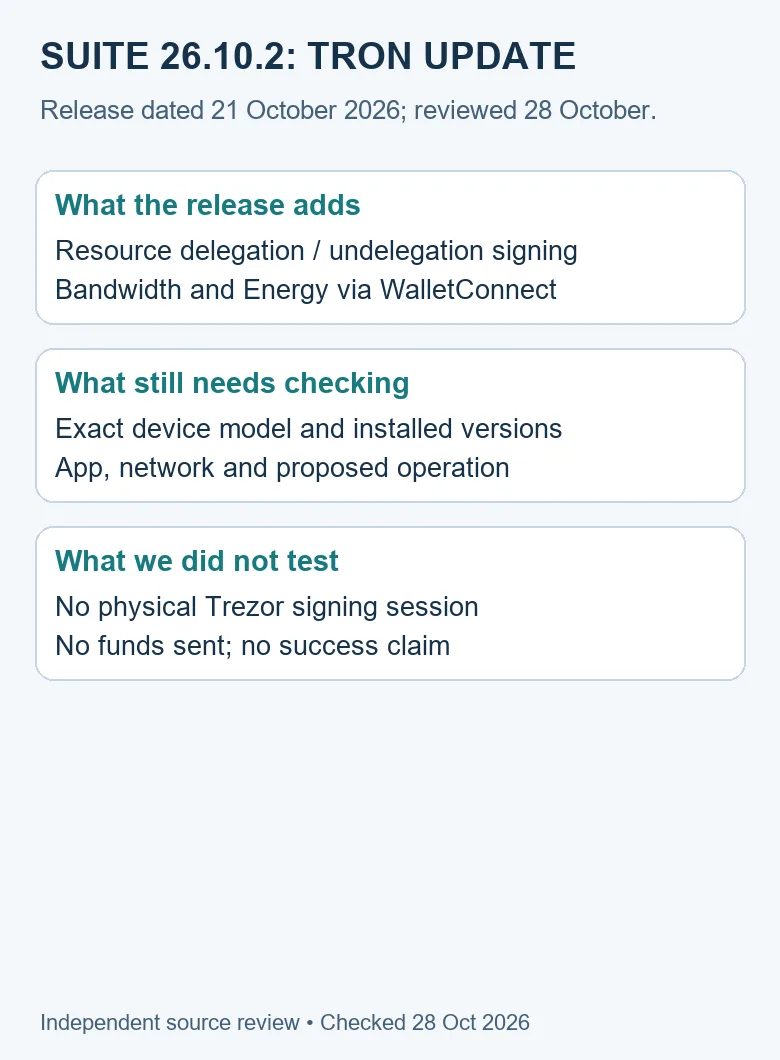
Table of Contents
What the Trezor TRON release actually says
The official v26.10.2 release lists TRON resource delegation and undelegation signing through WalletConnect among its new features. That is the specific change being reviewed. It does not say that every TRON-related operation, device model or application configuration has become interchangeable.
The vendor’s October product update identifies the desktop Suite version and describes a staged rollout. We therefore keep the announcement version separate from the version a reader has actually installed. A screenshot of an announcement is evidence of a published claim, not evidence about the software currently running on another person’s computer.
The scope of this Trezor TRON review is deliberately narrow: a dated resource-signing capability and the checks that stop it being mistaken for a general payment guarantee. It is not a recommendation to buy a device, stake funds, rent resources or perform a demonstration transaction. Readers can use the worksheets to decide which question needs another source without signing anything.
A source-to-claim map for this update
| Question | Source to use | What remains separate |
|---|---|---|
| What changed in Suite? | Official version 26.10.2 release notes | Your installed application and actual operation result |
| Was rollout immediate for everyone? | Vendor October desktop update notice | When your installation offers or completes an update |
| Which devices support TRON? | Vendor TRON asset guide | Version-specific behavior of a particular signing request |
| What does a connection request mean? | Vendor WalletConnect guide | Device confirmation, broadcast and a chain receipt |
| What do resources represent? | TRON resource documentation | Token quantity and a fixed price for a future transfer |
This map is an editorial comparison of sources with different jobs. It is useful because a perfectly accurate statement from one source can still answer the wrong question. A coin-support list addresses asset and model scope; a version note addresses a software change; a transaction receipt addresses a particular operation.
1. Keep the announcement and installed versions distinct
Record the version actually shown in the application and the device model before interpreting a Trezor TRON error report. Keep the operating environment and observation time alongside those details. Do not substitute the release number from this article for a version you have not checked.
If your installation offers a normal update, use the vendor’s established software route and its current instructions. This review does not require enabling early access, downgrading firmware, installing an unofficial build or bypassing any warning. An unavailable update is a version question to resolve, not a reason to enter wallet secrets into an unrelated website.
Suite and firmware are separate version fields. A combined announcement can discuss both without making their numbers equivalent. Preserve both when reporting an issue, but do not invent a minimum firmware requirement from the fact that a firmware release appeared in the same forum post. Check the model-specific vendor instructions for the operation concerned.
2. Match the device, network and token standard
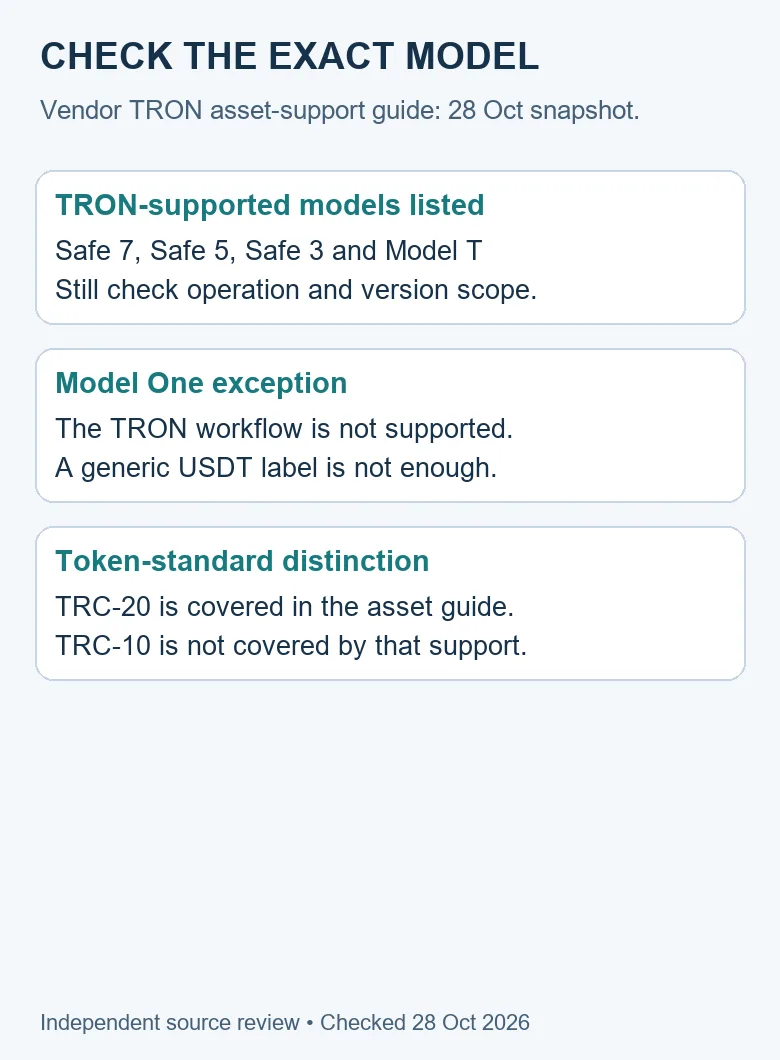
The vendor’s TRON sending and receiving guide, checked for this review, lists Safe 7, Safe 5, Safe 3 and Model T for TRON support. It excludes Model One from that workflow and distinguishes supported TRC-20 tokens from unsupported TRC-10 tokens. These are network and asset compatibility statements, not our independent certification of every delegation flow.
A generic USDT listing on a multi-network coin page should not override a network-specific model exception. Write down TRON and the actual model together. Otherwise a correct statement about USDT on another supported network can be mistaken for an answer about a TRC-20 action on an unsupported device.
Keep network support separate from the operation you want. Receiving a supported token and signing a resource-management request are different tests. An account balance appearing in an application does not establish that an unrelated proposal has the expected meaning or that every version can complete it.
3. Identify the proposed operation before judging success
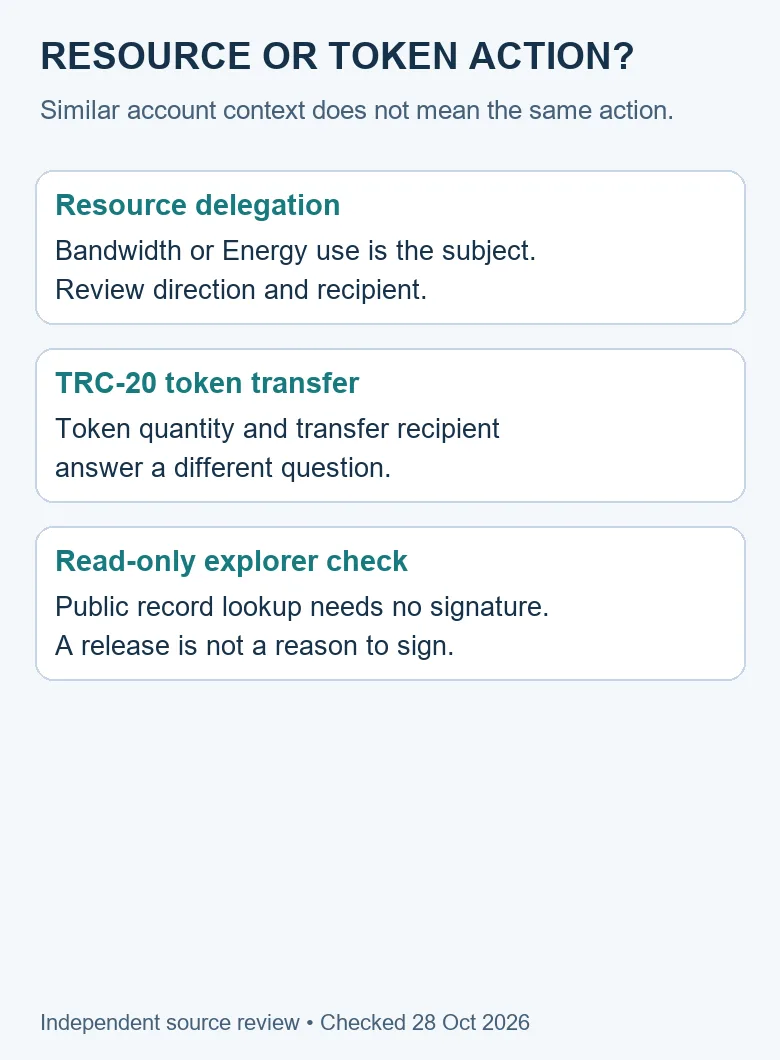
For the Trezor TRON feature under review, ask whether the intended action is resource delegation or undelegation. Do not classify a request solely from a familiar token logo, the account balance or the name of the dApp that opened it. Write down the intended action in ordinary language before comparing any displayed request.
| Task | Subject to identify | Do not infer |
|---|---|---|
| Read a public record | Network, full identifier and source | That a signature is needed to look it up |
| Delegate resources | Resource type, direction and recipient | That a USDT token movement occurred |
| Cancel a delegation | The delegation being addressed and current conditions | That it is the same action as sending tokens |
| Send a TRC-20 token | Asset contract, quantity and transfer recipient | That a resource-release note describes this exact payment |
| Inspect staked versus liquid holdings | The meaning and unit of each account field | That every displayed balance is spendable |
The existing staked TRX versus available balance guide covers the last task. Keeping that task separate avoids turning a product update into another duplicate balance tutorial. Here the useful addition is identifying the release claim and its boundaries.
TRON’s resource model documentation separates Bandwidth for transaction data from Energy for smart-contract computation. We use that distinction to label the worksheet. We do not convert the release into a universal fee quote or a promise that a future USDT transfer will have no cost.
4. Separate a connection from an action request
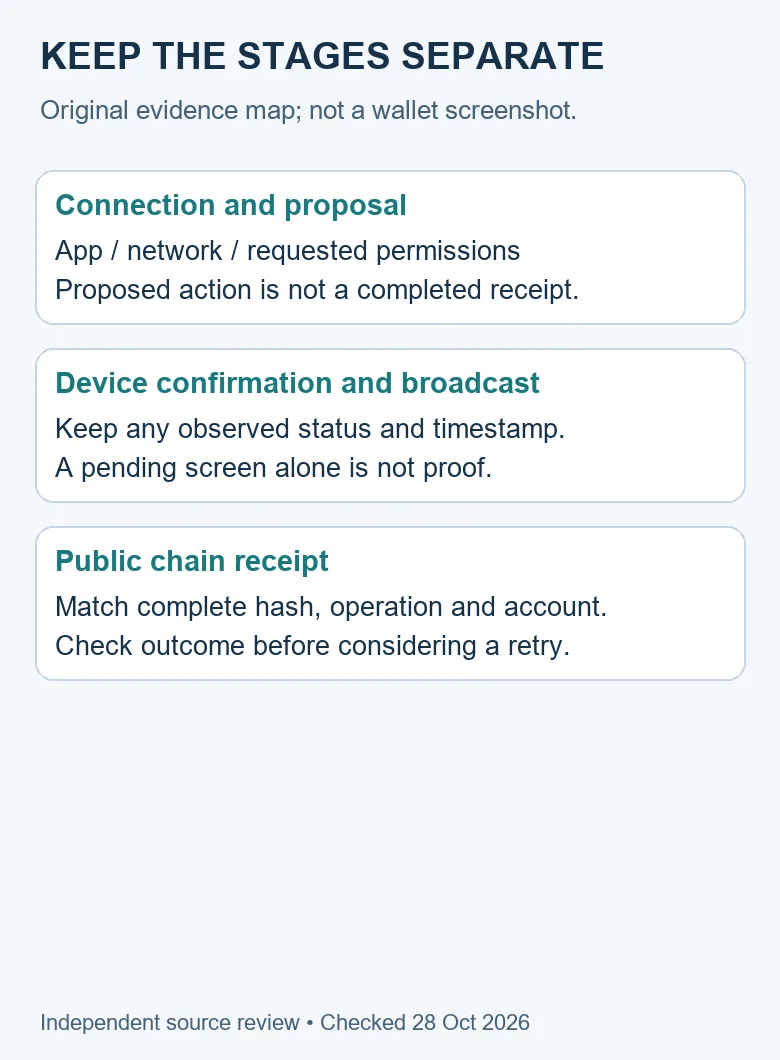
The vendor WalletConnect guide distinguishes reviewing a connection request from reviewing and confirming a transaction. Its connection review includes the application, requested permissions and networks. Treat those as context to examine rather than as a chain receipt.
A familiar name on a connection screen is not enough to explain a proposed operation. Compare the actual site and network with your intention. If the action or requested scope is unclear, leave the uncertainty unresolved and use the official support route. This article does not ask you to approve a connection to prove that the update exists.
The explorer versus wallet decision guide explains why a public record lookup and a signing operation have different responsibilities. The Trezor TRON release concerns a signing capability. It does not make reading a transaction require a wallet session, and it does not make an explorer responsible for your device’s private confirmation process.
5. Keep units, roles and evidence in one review note
Use the following original note structure when you are evaluating compatibility or discussing an existing attempt. It is a field checklist, not an instruction to execute a transaction. Record what you actually observed and mark missing details as unknown. Keep private credentials and recovery material out of the note.
| Field | Observation to keep | Why it matters |
|---|---|---|
| Release context | 26.10.2 claim; source date 21 October | Separate an announcement from a local installation |
| Environment | Exact model, Suite version and observed firmware version | Avoid combining reports from different setups |
| Network and account | TRON context and complete relevant public address | Prevent a cross-network or wrong-account comparison |
| Intended action | Delegate, undelegate, transfer or read-only lookup | Use the source that covers the actual task |
| Resource or token | Label, amount and unit exactly as observed | Keep resource allocation separate from token quantity |
| Last supported stage | Connection, proposal, confirmation, broadcast or receipt | Identify the next source of evidence |
| Outcome | Complete hash if available; actual result and observation time | Do not replace an absent receipt with an assumption |
Preserve field labels with values. A number copied without its unit can be misleading even when every digit is correct. Likewise, an account address, a token contract and a resource recipient can play different roles. Expanding a truncated address for comparison is more useful than relying on matching first and last characters.
If the request includes a condition you do not understand, such as a duration or restriction, do not fill in its meaning from a different screenshot or old tutorial. Resolve that field against the current operation and official guidance. The source comparison in this article does not certify unobserved request fields.
6. Follow the evidence to a public result
A local confirmation, an application status and a chain receipt are separate observations. If you are investigating an existing attempt, write down the last stage that is actually supported. “The connection opened” is narrower than “the transaction was broadcast,” and neither alone establishes the public outcome.
If a complete transaction hash is available, inspect the matching public record on the intended network. Compare the account and operation with the original intention before interpreting its result. A receipt for another action is not evidence that the requested resource operation completed.
The TRONSCAN guide to choosing public records provides the broader read-only lookup route. This review does not claim a device-to-chain test of the Trezor TRON update. Its success standard is a reader who can identify which evidence is missing and avoid treating a stage label as proof of a different stage.
7. Investigate an interruption before considering a retry
An error or a screen that remains open does not by itself explain where a process stopped. First preserve the actual wording, time and version context. Then check whether a public hash or receipt already exists. Do not create another request merely to replace uncertainty with another on-screen status.
| Observed state | Question to resolve | Evidence to retain |
|---|---|---|
| Feature not available | Does this model and installed version cover the task? | Model/version and dated vendor guidance |
| Connection cannot be established | Is the intended app/network/session being used? | Exact error and environment, without connection secrets |
| Request cannot be interpreted | Does the proposed action match your intention? | Non-sensitive field labels and the discrepancy |
| Confirmation reported, no known hash | Was anything broadcast, and which record belongs to it? | Observed status and any actual identifier |
| Hash available, unclear outcome | What does the matching public receipt report? | Full hash, network, operation and actual result |
This table is a triage method, not a claim about how a particular failed device session behaved. A real case can require the wallet vendor or dApp operator to inspect its own logs. Give the relevant service a focused question rather than asserting that the entire network or every device has failed.
Three synthetic scope checks
Example A: a model exception. An invented reader sees USDT on a general supported-assets page and assumes that means a Model One can perform the TRON resource workflow. The network-specific guide’s Model One exception answers that assumption. The right next step is checking compatibility, not sending a test deposit or inferring support from the ticker alone.
Example B: two different versions. An invented reader copies 26.10.2 from the announcement into a support report without checking the local installation. Another person cannot reproduce the environment from that report. Replace the assumption with the version actually displayed and keep the announcement as a separate source field.
Example C: the wrong success statement. An invented reader reports that a WalletConnect session opened and concludes a resource action completed. The connection observation supports only that stage. The later proposal, confirmation, broadcast and public receipt still require their own evidence. None of these examples describes a real customer or a transaction we performed.
What the announcement does not establish
The Trezor TRON update does not establish that your existing balances changed, that an old failed attempt has been repaired, or that another party’s address is trustworthy. It also does not prove that a receiving exchange has credited a customer. Those questions concern different records and should keep their own evidence and dates.
A new capability is not a reason to reinterpret unrelated history. If a token transfer already has a public outcome, preserve that outcome and investigate the actual unresolved question. Do not relabel it as a resource delegation because both operations involve the same network or wallet brand.
Nor does an announcement demonstrate universal operational reliability. A release note describes the vendor’s change; testing a particular device and environment is another form of evidence. We have not performed that test and will not turn an individual community comment into a measured failure rate.
Keep a later review separate from this release snapshot
A dated product analysis can remain useful after another version appears, but it should not pretend that its checking date moves automatically. This Trezor TRON review preserves the version and event it actually examined. When checking a later release, keep a second row for that release rather than replacing the earlier version in your notes.
Use three columns: what the earlier source said, what the later source says, and what you personally observed. If you have only a later announcement, the observation column remains untested. If you have only an application screenshot, preserve its visible version and context rather than treating it as the complete change history.
For example, an invented later review may find a revised connection guide without any new statement about device compatibility. That supports updating the connection-source note. It does not justify announcing that an excluded model gained TRON support. Each claim should move only when the source that owns it provides the relevant evidence.
Likewise, a later software version being available does not prove that every earlier pending operation was broadcast. Keep the original attempt’s identifiers and outcome separate from the later installation. This makes a support discussion reproducible instead of joining events that happened at different times into one assumed success.
For corrections, identify the specific claim that changed: release scope, model scope, connection instructions or an observed result. Retain the source and date beside that correction. Do not report a new launch merely because an old documentation page received a newer checking date.
Frequently asked questions
What is new in the Trezor TRON update?
The reviewed Suite 26.10.2 release adds TRON resource delegation and undelegation signing through WalletConnect. This article reviews the 21 October 2026 release; it does not describe a new 28 October launch.
Does the update make Model One support TRON?
The checked network-specific vendor guide excludes Model One from its TRON workflow. Do not override that exception with a general multi-network USDT listing. Recheck current model-specific documentation before interpreting a proposed action.
Is delegating Energy the same as sending USDT?
No. They address different subjects and require different fields to be interpreted. Keep the intended resource action separate from a TRC-20 token’s contract, quantity and transfer recipient.
Does a successful WalletConnect connection prove a transaction completed?
No. Connection, proposal, device confirmation, broadcast and public receipt are separate evidence stages. Preserve the actual last observed stage and inspect the correct public record when a hash exists.
Did Tronscan News test this update on a physical Trezor?
No. This is a source-checked release analysis with original comparison tables and diagrams. No hardware signing session, wallet connection or funds transfer was performed for this review.
Editorial note: sources and model scope were checked on 28 October 2026. The release event is 21 October 2026. Original worksheets, synthetic examples and diagrams were prepared with AI assistance; they are not screenshots or vendor certification. Visit the Tronscan News home page for independent guides and use its About & Standards navigation for corrections.
Leave a Reply