Staked TRX vs available balance: available TRX is the liquid balance to inspect for an ordinary transfer; staked TRX is committed to staking. Starting an unstake does not immediately make that principal transferable. First identify whether funds are staked, pending, eligible for withdrawal, or already withdrawn. Review the wallet’s current transaction estimate separately from the amount you want to send.
A large portfolio figure can include amounts in different states. This guide explains how to read those states and prepare a clear balance comparison on a phone. It is an educational explanation, not a recommendation to stake, unstake, delegate resources, or transfer funds.
Browse more independent tutorials at Tronscan News. We are not affiliated with the official TRON or TRONSCAN service.
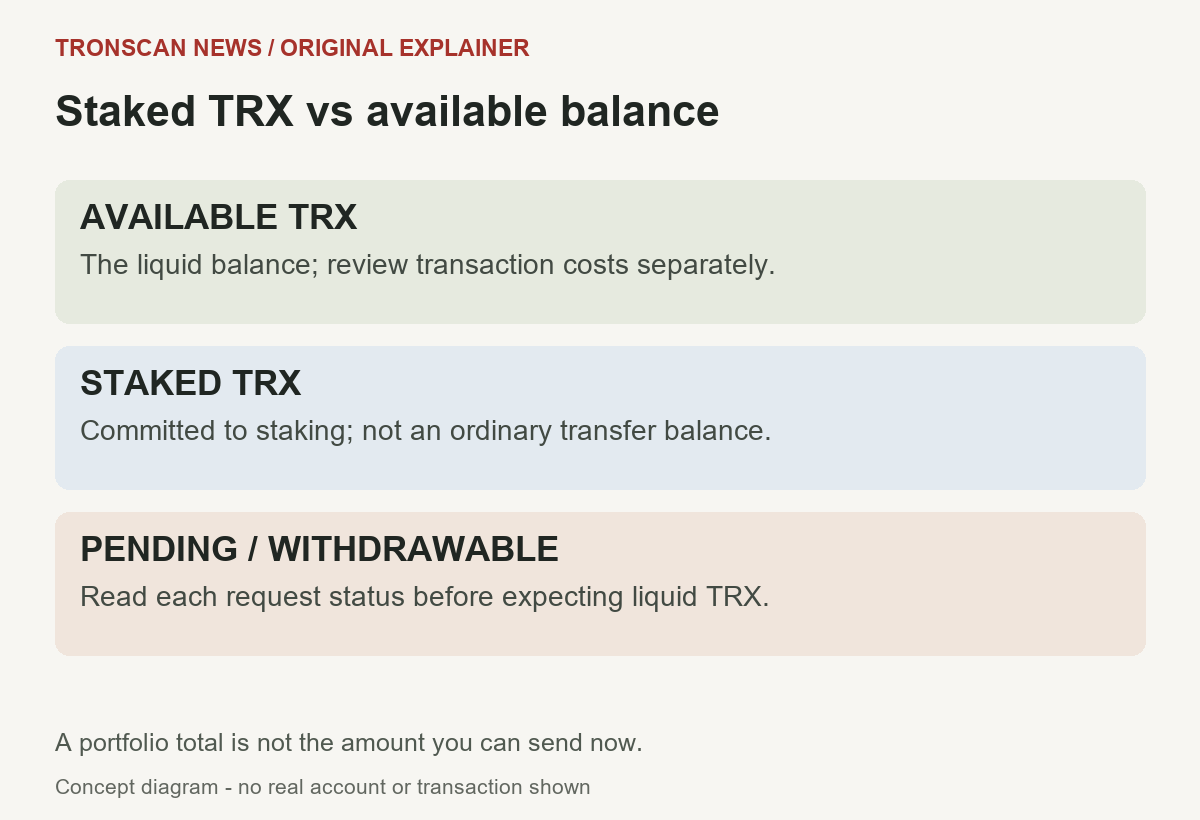
Table of Contents
Staked TRX vs available balance: a quick comparison
| State or field | How to interpret it | What to check |
|---|---|---|
| Available TRX | Liquid native-asset balance | Exact account and the current cost estimate |
| Staked TRX | Principal committed to staking | Stake version and any outgoing resource delegation |
| Unstaking or pending | A confirmed request is waiting to mature | Its recorded withdrawal eligibility time |
| Withdrawable or To Be Withdrawn | Eligible principal has not necessarily reached the liquid balance | Whether a withdrawal has confirmed |
| Energy or Bandwidth | Network resources, rather than additional liquid TRX | Resource units and availability |
| Rewards | A separate category to inspect | Whether a reward is claimable, claimed, or already included |
The central staked TRX vs available balance mistake is adding every visible figure together and treating the result as a transfer budget. Read the label and unit beside each amount before doing arithmetic. Also establish whether a headline total already includes the detail rows beneath it.
5 easy checks before interpreting a TRON staked balance
- Match the account. Compare the network and complete public address with the wallet account you intend to examine.
- Separate the balance states. Write down available, staked, pending, and withdrawable quantities on different lines.
- Find the request, if any. For an unstaking question, inspect the confirmed request and its recorded eligibility time.
- Read delegation and resource fields separately. Incoming Energy does not establish ownership of the underlying stake.
- Confirm the final state. After any action you independently choose to make, use its transaction result and a fresh account reading to establish what changed.
Keep the first pass read-only. Opening public account information on the official TRONSCAN explorer does not require a recovery phrase. Do not interpret a balance-checking tutorial as a reason to connect a wallet, approve a request, or import keys into a website.
Get the identity right before the arithmetic
A staked TRX vs available balance comparison is useful only when both observations refer to the same account. A wallet may contain several accounts, while a service may display a private customer ledger. Copy the public address from your trusted wallet record and compare the entire address in the explorer.
Use our TRON address balance guide for the general account lookup. This article adds the lifecycle distinction: whether TRX is liquid, committed, waiting, or eligible to withdraw. It does not repeat token-identity or general portfolio lookup steps.
Include a timestamp and time zone in your note. If one screen was captured before an operation and another after it, their numbers can differ without either being wrong. An old screenshot also cannot establish how much the account can transfer now.
What staking changes, and what it does not
The official Stake 2.0 overview describes staking TRX to obtain network resources and governance voting power under the applicable resource model. It also distinguishes the current mechanism from legacy Stake 1.0 positions. Keep these native staking fields separate from a protocol receipt token. Our sTRX token, rate and withdrawal-state worksheet explains that different quantity and its conversion limits.
For this staked TRX vs available balance question, the useful distinction is the principal’s status. Resource capacity associated with a stake is not a second copy of the principal. Do not add an Energy counter to a TRX amount or assume that using some resources spends the same number of TRX from the stake.
Rewards need their own reading path. The rewards and matured-principal comparison separates the two query purposes, an explicit returned zero and an unavailable amount. A rewards read does not establish that unstaking principal has reached the liquid balance.
Read the stake version
Official documentation says legacy Stake 1.0 positions remain valid, while new staking uses Stake 2.0. Do not apply a remembered instruction for one version to a position labelled with the other. Identify the position first, then use its matching official instructions.
Record the version beside the amount instead of writing only “locked TRX.” That short label can hide the difference between a staking position, a pending request, a delegation lock, and a service’s own restriction. Each needs a different explanation.
Unstaking, maturity and withdrawal are separate stages
For staked TRX vs available balance, follow the state transition rather than the headline total. The official unstaking documentation explains that a Stake 2.0 request enters a network-defined pending period, after which matured principal can be withdrawn into the spendable balance.
As checked on October 25, 2026, that documentation states a current mainnet waiting period of 14 days. It identifies the delay as a changeable chain parameter. Use the selected network and the request’s actual eligibility time; do not treat a testnet setting or an old article as a permanent mainnet rule.
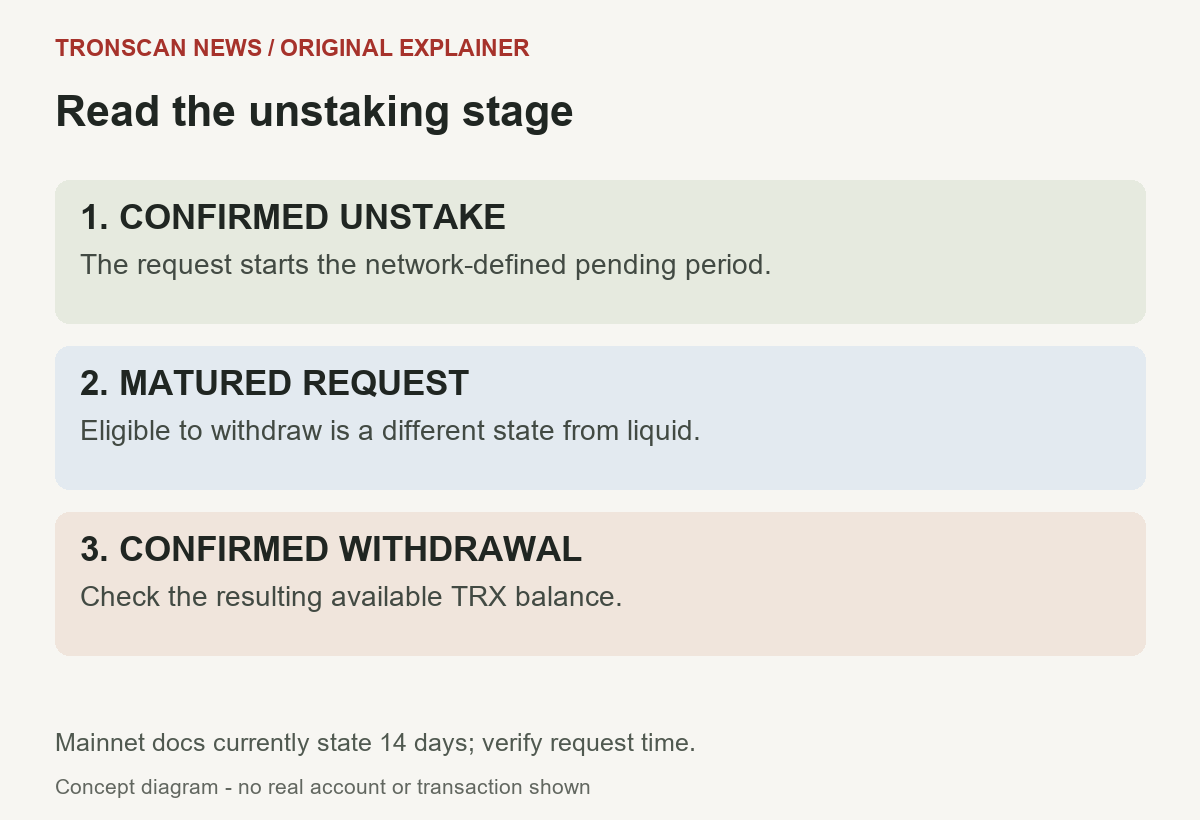
- Confirmed unstaking request: verify that the request actually reached the chain. Tapping a wallet control without a confirmed record is not evidence that the waiting period started.
- Pending period: inspect the request’s status and eligibility time instead of counting rounded calendar dates from memory.
- Matured principal: identify the amount eligible for withdrawal. Eligibility is different from already having liquid TRX.
- Confirmed withdrawal: inspect the withdrawal result and the refreshed liquid balance. Do not infer completion solely from a button disappearing.
This staked TRX vs available balance workflow avoids a common ambiguity: “unstaked” can mean that someone requested release, or that funds are fully liquid. In a support note, describe the exact stage rather than relying on that word alone.
What the official TRONSCAN withdrawal instructions say
The TRONSCAN unstaking guide describes a To Be Withdrawn section after the pending period, followed by a Withdraw action and a signed transaction. We verified this description in the official support material; we did not connect a wallet or perform an unstake or withdrawal for this article.
That distinction matters when following mobile instructions. Read the current wallet request before independently deciding whether to sign anything. A public lookup and an action changing an account are separate operations, even when their controls appear on the same site.
If a timer appears complete but the liquid amount has not changed, check the request and withdrawal records. Avoid assuming that time passing alone proves a withdrawal transaction executed. Preserve the exact status text if the explanation remains unclear.
Delegated resources do not become transferable TRX
The official resource-delegation documentation explains that the recipient can use delegated Bandwidth or Energy while the underlying TRX stays staked under the staking account. TRON Power is not delegated with those resources.
In a staked TRX vs available balance comparison, distinguish the staking account from the resource recipient. Incoming delegated Energy is not a TRX deposit into the recipient’s liquid balance. Conversely, an outgoing delegation does not mean the staking account sent the underlying principal as an ordinary payment.
Delegation may have a lock. The official materials describe undelegation constraints, and the unstaking documentation says delegated principal must be undelegated before unstaking. Inspect the actual record and its lock status; do not assume the same release time applies to every position.
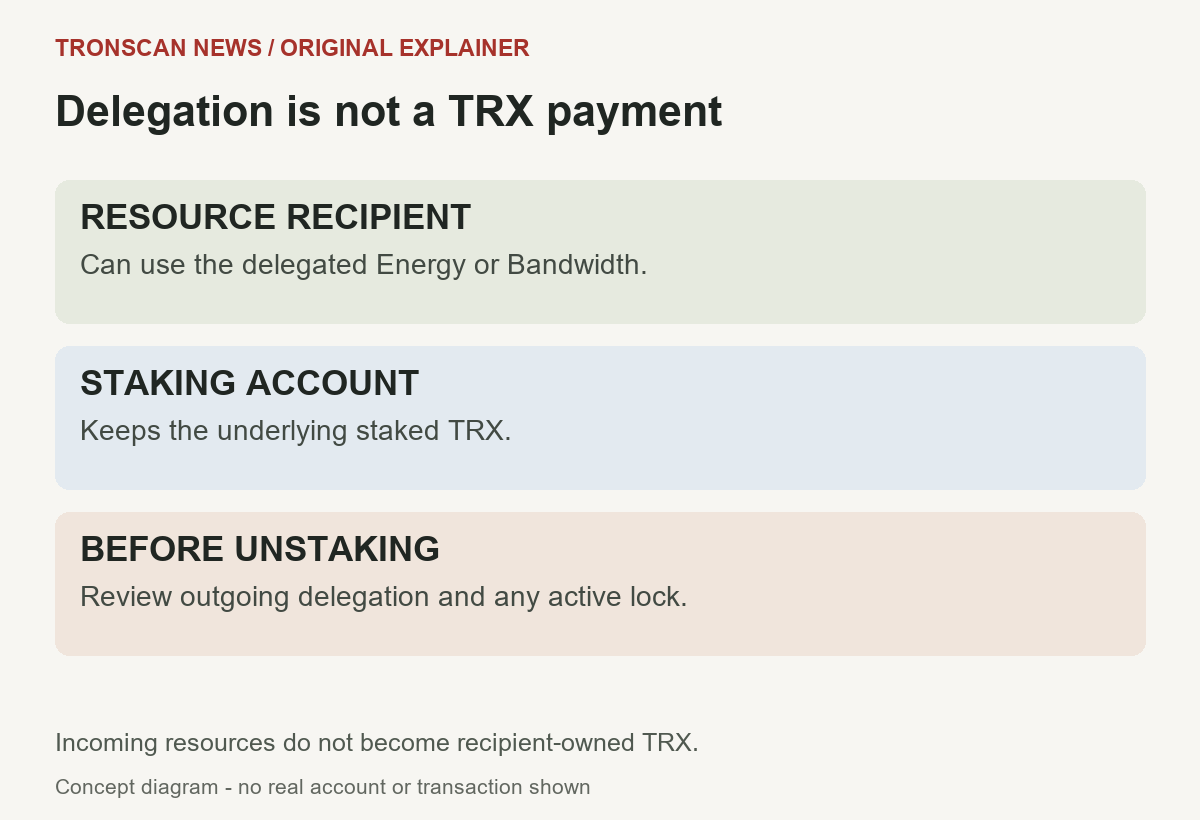
A useful note has separate rows for stake ownership and resource access. This helps explain why one account can display substantial resources without showing an equivalent amount of transferable TRX.
Worked example: a large total and a small liquid balance
Hypothetical example only: suppose a display clearly separates 12 TRX available and 300 TRX staked, and a headline total includes both. The resulting 312 TRX is not a liquid transfer budget. Only the 12 TRX belongs in the starting liquid-balance row, before reviewing the costs and conditions of the proposed action.
Do not infer a universal minimum reserve from this example. The 12 and 300 figures are invented to explain categories, not recommended balances, observed accounts, or fee estimates. The correct cost check concerns your actual transaction.
Now suppose a separate confirmed request shows 50 TRX pending. Record it under pending and preserve its eligibility time. Do not silently add that amount to available TRX. Also do not assume whether the application’s headline total includes pending requests unless its field definitions establish that.
Later, a view may label an amount withdrawable. In your notes, move the observation to that category rather than immediately calling it liquid. Only after inspecting the relevant withdrawal result and updated balance should you describe a completed move into available funds.
This example shows why staked TRX vs available balance requires labels as well as numbers. You are tracing a state change, not discovering extra assets by adding the same principal at several stages.
Example: resources arrive without principal
Another hypothetical situation: an account receives resource access from a different staking account. Its resource display changes, while its liquid TRX remains unchanged. Those observations are compatible with resource delegation; they are not, by themselves, evidence of a missing TRX payment.
Keep a record of what was promised by the sender or service, if a promise is involved. Compare that promise with the actual operation type. A claim about resources and a claim about transferring principal should not be treated as interchangeable.
Available TRX is still not a guaranteed maximum-send amount
The official TRON resource model distinguishes Bandwidth for transaction data and Energy for smart-contract execution. It describes resource charging and TRX-burn fallbacks. Available principal and the cost of performing an operation are different parts of a transfer check.
Our TRON Bandwidth guide explains the resource fields in more detail. Here, keep the proposed amount and the wallet’s current estimate on separate lines. A maximum-send control may account for costs differently across wallets and operations; read its current explanation rather than copying a value from another app.
For staked TRX vs available balance, the safe reading order is account identity, liquid quantity, proposed operation, and current estimate. Having enough principal for the displayed send amount does not prove the entire operation can execute under its actual resource and fee conditions.
A USDT or another TRC20 token amount should also remain separate. It is neither the account’s available TRX nor its staking principal. Do not convert a token portfolio estimate into a TRX transfer budget without an actual separate transaction and verified result.
Troubleshooting a balance that has not become available
- No confirmed request: find the actual transaction record before deciding that a waiting period has started.
- Request still pending: compare the recorded eligibility time and selected network.
- Request matured: check whether a withdrawal has confirmed and refresh the account reading.
- Outgoing delegation remains: inspect its status and lock conditions using the applicable official instructions.
- Wrong stake version: return to the position’s matching documentation.
- Different account: repeat the check for the full address associated with the request.
- Service-managed stake: distinguish the public chain record from the service’s internal account terms.
Do not turn an unresolved staked TRX vs available balance difference into an instruction to send more funds to an unfamiliar address. A public record does not identify an unsolicited helper as support or establish that a proposed payment will release anything.
When a screen is loading or a service is unavailable, record the field as unavailable. Missing data is not a zero balance. Try the official service’s normal refresh or return later, keeping earlier screenshots labelled with their actual observation time.
Make a balance-state worksheet you can compare later
Start a short note with network, complete public account address, date, time zone, and the source URL. Add separate entries for available TRX, stake version and amount, pending requests, withdrawable principal, rewards, and resource information. Copy the field labels before interpreting them.
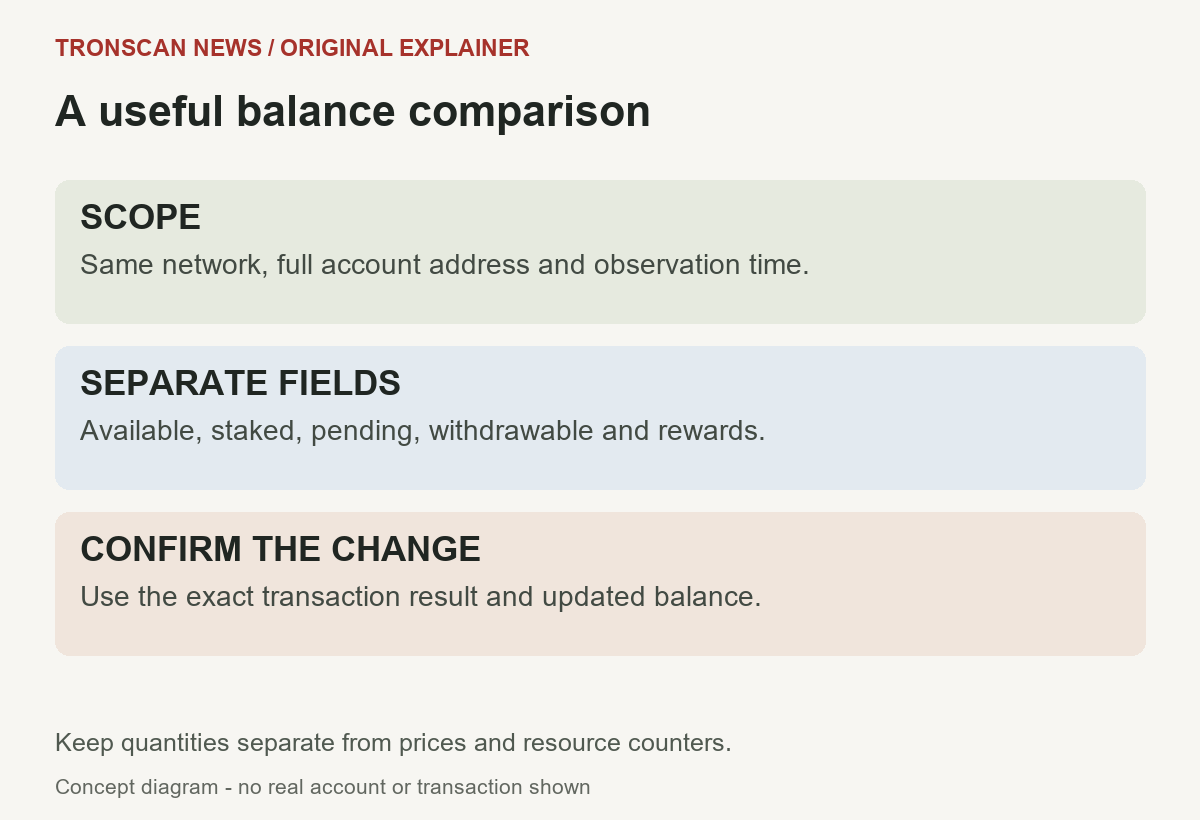
For each pending request, record its transaction hash, confirmed result, principal amount, and recorded eligibility time. If you later find a withdrawal, add its own hash and result. Keep the request and withdrawal as two observations rather than overwriting the first record.
If several requests exist, label them separately. One matured request does not establish that all other requests have matured. Similarly, a change in the total available balance does not identify its cause without checking the intervening account activity.
For a staked TRX vs available balance comparison across two apps, use a row for each app and preserve its exact terminology. If one app shows a combined total and another shows a liquid subtotal, the figures answer different questions. Reconcile the categories before calling the difference an error.
Separate facts from conclusions. “The request says eligible at this time” is a record of a field. “The funds are now transferable” needs evidence about the resulting state and operation. This makes a support request more specific and easier to investigate.
A concise support message
Describe the problem in one sentence: the account, network, request, and two states that appear inconsistent. For example, explain that an eligible request remains listed as withdrawable while the available field is unchanged. Use your real public records in an official support ticket, not invented amounts from this guide.
Include the relevant transaction links and observation times. Share only the information needed for the question. Never include recovery phrases, private keys, wallet backups, login codes, or unrelated personal financial history.
The goal of this staked TRX vs available balance checklist is a precise question: which stage does the principal occupy, and what record establishes that stage? Once that is clear, follow the applicable official wallet or service instructions for any action you decide to make.
Frequently asked questions
1. Can I send staked TRX directly as an ordinary transfer?
Staked principal is different from liquid available TRX. Identify the stake version and its release process before treating it as transferable. A combined portfolio total does not establish the current amount available to send.
2. How long is Stake 2.0 unstaking on mainnet?
Official documentation checked on October 25, 2026 states 14 days for mainnet. The delay is a changeable network parameter, so use the actual request’s eligibility time and current official instructions. Maturity and completed withdrawal remain separate states.
3. Why is TRX still listed as withdrawable after the waiting period?
Withdrawable means eligible for withdrawal, not necessarily already added to the liquid balance. Check the withdrawal transaction result and a fresh account reading. If no completed withdrawal can be established, describe that step as unresolved.
4. Does receiving delegated Energy give me the staked TRX?
No. Resource delegation gives access to resources while the underlying TRX remains staked under the staking account. Read resource access and ownership of principal as separate facts.
5. How should I compare staked TRX vs available balance in two apps?
Use the same network, full account address and observation time. Separate liquid, staked, pending and withdrawable quantities, then check whether each total already includes its detail rows. Keep costs and resource counters separate from principal.
Editorial note: prepared with AI assistance and checked against official TRON and TRONSCAN documentation on October 25, 2026. Examples and diagrams are original illustrations, not live accounts or a claim that we performed a staking transaction. Read our editorial standards and corrections policy.
Leave a Reply