The USDT TRC20 contract listed in Tether’s TRON issuer reference is TR7NHqjeKQxGTCi8q8ZY4pL8otSzgjLj6t. This identifies the token, not your personal receiving address. Verify a USDT TRC20 contract by starting with Tether’s official supported protocols page, selecting TRON, and comparing the full linked contract with the token in your TRONSCAN record. A token name or logo alone is not enough. This is a read-only check: no wallet connection, approval, payment or recovery phrase is required.
This USDT TRC20 contract guide separates three questions that are often confused: which token is displayed, who receives a transfer, and whether a specific payment succeeded. A correct token identity helps with the first question. It does not automatically answer the other two or establish that a website asking you to interact with the asset is trustworthy.
A USDT TRC20 contract check is different from a numeric TRC10 token-ID lookup. If you are unsure which identifier a record requires, use the TRC10 and TRC20 identifier comparison worksheet before comparing the token with the issuer reference.
Table of Contents
The issuer reference for the USDT TRC20 contract
At the time checked for this guide, Tether’s supported protocols and integration guidelines links its TRON USD₮ token to this TRONSCAN token record. The contract shown in that issuer reference is:
TR7NHqjeKQxGTCi8q8ZY4pL8otSzgjLj6t
Use the issuer page to recheck the reference when you need it. The address above identifies the token contract; it is not a personal deposit address to which this guide tells you to send funds. A receiving wallet or exchange supplies its own destination and network instructions.
During a USDT TRC20 contract check, keep the source page open in a separate browser tab while inspecting your record. This makes it easier to distinguish the reference from a string copied out of a message, a screenshot or an advertisement. A shortened display is convenient for reading but insufficient for a full comparison.
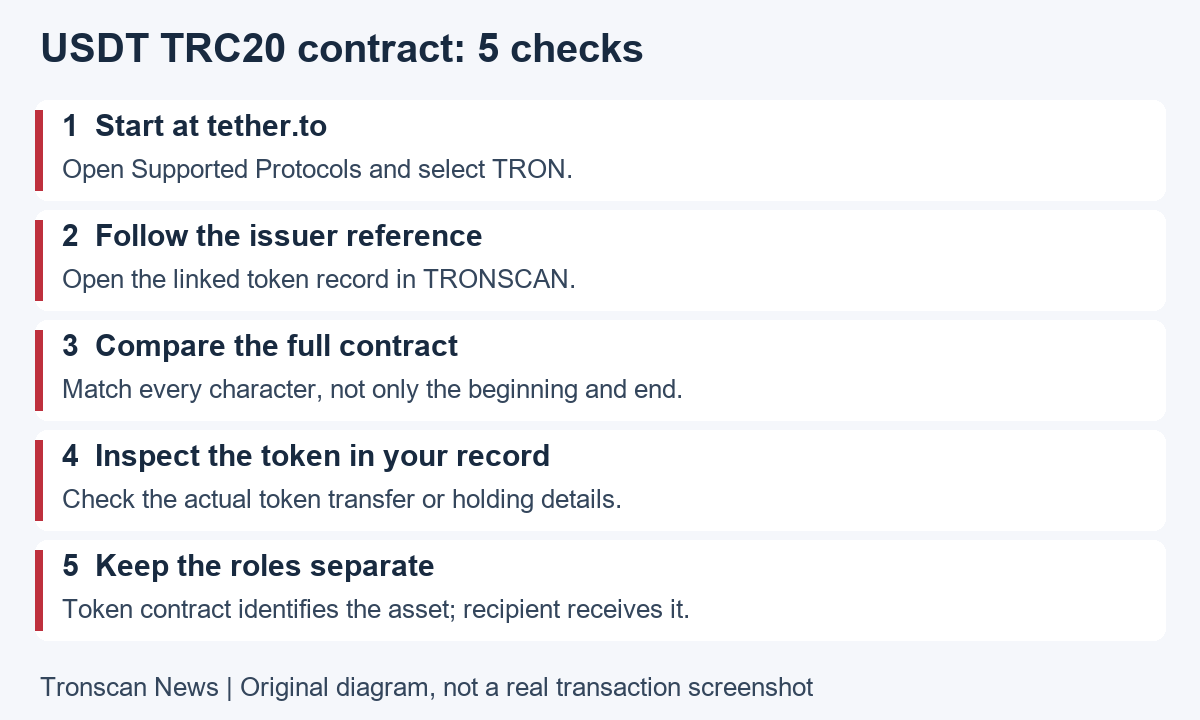
Before a USDT TRC20 contract check: label the identifiers
A token contract identifies an asset on a particular network. A recipient address is the intended destination for a transfer. A transaction hash, also called a TxID, identifies one on-chain operation. Write these labels beside anything you copy so you do not later compare values serving different purposes.
The TRON account documentation explains that contract and ordinary account addresses share the same address formats. Seeing a string beginning with T does not tell you whether it is the token contract or the intended recipient. Context matters more than a familiar prefix.
For example, a wallet’s asset-details screen may expose a contract, while its Receive screen exposes an account address. An exchange withdrawal detail may additionally include an internal order number. An order number is not a substitute for the chain transaction hash when you need an explorer record.
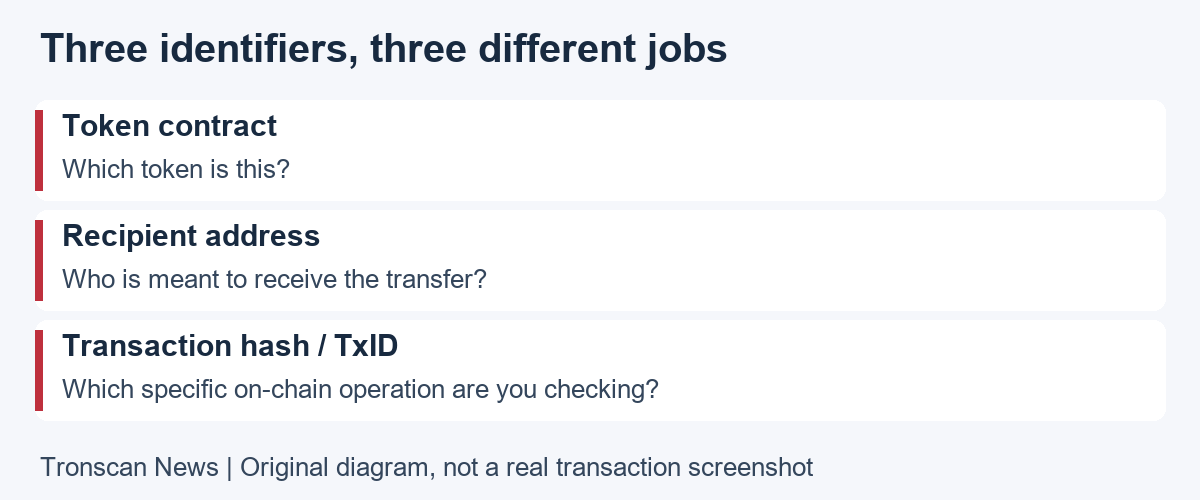
5 easy USDT TRC20 contract checks on a phone
- Start from the issuer. Open tether.to and locate Supported Protocols. Find the TRON section rather than copying an address from a different supported network.
- Follow the official token reference. Open the issuer-linked explorer record. Check the destination domain and retain the issuer tab so you can go back to the source.
- Compare the full contract. Open the asset in your wallet or in the relevant TRONSCAN token-transfer record. Expand the address or copy it into a private note, then compare every character with the issuer reference.
- Confirm the context. Check that the record belongs to the TRON network and the intended token. For a payment, examine its token-transfer section, recipient and quantity as separate fields.
- Record your conclusion precisely. Save the source link, token-record link and time checked. State whether the contracts match. Do not turn that result into a claim that a payment is credited or that an unrelated service is safe.
Mobile interfaces may move or collapse sections. Follow the information being checked rather than relying on a particular button position. If a token label is visible but the contract is truncated, open the details before deciding you have a match. Never infer the hidden middle of an address from its first and last characters.
Why the ticker is not a USDT TRC20 contract check
The official TRC20 interface reference describes name, symbol and decimals as token metadata. A symbol is a display abbreviation, while decimals describe amount precision. Those fields help applications present an asset; a familiar-looking abbreviation is not an issuer identity check.
That distinction is useful when several search results look similar. First find the contract in the issuer reference, then select the matching token record. Starting with a name and choosing whichever result looks most polished reverses the verification process and leaves the central question unresolved.
Likewise, a large displayed holding does not establish cash value. A quantity tells you how many units a record reports for that token. It does not prove that the issuer is the one you expected, that a market exists, or that a third-party site can legitimately convert the holding.
USDT TRC20 contract metadata and code verification differ
TRON’s token issuance tutorial separates deployment, source verification and adding display metadata to TRONSCAN. Recording a token’s name, logo and website adds information for display; it does not alter its code or holder balances. A professional-looking profile therefore should not replace the issuer-reference comparison.
Source-code verification addresses a different technical question about the deployed contract. Do not interpret a verified-code label as proof that a token is Tether-issued, that its economics are suitable for you, or that an external application is trustworthy. This guide checks identity by matching an official reference; it is not a contract audit.
If you are unsure what a badge means, read the explorer’s explanation of that specific label. Avoid combining several unrelated badges into a single vague judgment of safety. A clear statement about one verified property is more useful than calling the entire token, wallet and service fully verified.
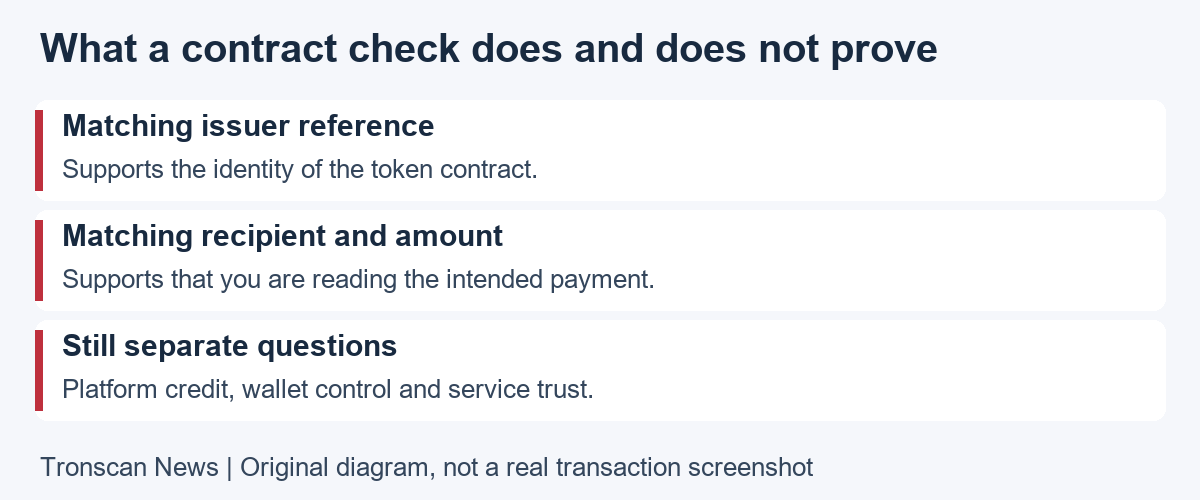
Apply the USDT TRC20 contract check to a payment
Open the transaction you are actually investigating. Use the token-transfer details to identify the asset and final recipient, rather than assuming a top-level interaction address is the person receiving funds. The contract involved in an operation and the address receiving tokens have different roles.
Our mobile TRON transaction lookup guide covers execution, confirmation and transfer details. After checking the token identity, follow those checks for the same TxID. A matching USDT TRC20 contract does not rescue a payment sent to an unintended address.
Next compare the recipient with the destination supplied by the receiving service. Read that service’s current network and deposit instructions. An explorer can show chain activity, while an exchange’s crediting process is an internal matter that may need its official support team.
If you are checking current holdings instead of a single payment, use our TRON address balance guide. Keep current token quantity separate from historical incoming transfers. A past incoming payment and a lower current holding can coexist if subsequent activity changed the balance.
What to do when the USDT TRC20 contract does not match
Stop and establish what you are reading. Reopen the original transaction or wallet holding, confirm the network, and copy the token’s full contract again. A mismatch may reflect a different asset, the wrong network, a mistaken record or an untrusted representation. The mismatch alone does not explain every circumstance.
Do not try to repair a discrepancy by sending another payment to a stranger. Do not follow a token description’s invitation to import keys or connect to a recovery page. An identity question is not resolved by granting someone access to your wallet.
Save the public links and describe the evidence accurately. Say that the token contract differs from the issuer reference, rather than claiming you have proved a particular person’s intent. If a platform supplied the asset or deposit information, contact it through a known official channel and ask which contract and network it supports.
Keep unresolved assets separate from verified holdings in your own notes. This prevents an attractive quantity or estimated value from influencing a later decision before you have established what the asset actually is. Do not label every unfamiliar token fraudulent solely because you have not identified it.
Three hypothetical USDT TRC20 contract examples
Example 1: same ticker, different contract. Imagine two token rows both display USDT. One matches the issuer reference and the other does not. Treat them as different token records while investigating. The shared abbreviation is not evidence that the second balance can be exchanged for the first.
Example 2: matching contract, wrong recipient. Suppose a hypothetical transfer uses the expected contract but its recipient differs from the intended destination. The token identity check passed; the destination check did not. Preserve the TxID and contact the relevant service without claiming the browser can reverse the transfer.
Example 3: a familiar logo invites an unlock payment. Suppose an unfamiliar holding directs you to a separate website asking for an activation payment. A logo and an apparent balance do not establish that request’s legitimacy. Stop the interaction and investigate the token and website independently.
These are invented situations to explain a method, not reports of real accounts or allegations about any service. No example is a request to transfer funds. Use the distinction between identity, destination and service trust to describe the actual evidence in your own case.
Keep a useful USDT TRC20 contract verification note
Record the network, asset name, full contract, issuer source URL, explorer URL and date checked. If a payment is involved, add its TxID separately. Do not put the recipient and token contract in one unlabeled field; later you may forget which value served which role.
Preserve the original context rather than only a cropped image showing a logo. A public token link lets another person inspect the exact record, while a source link explains why you used that reference. Note any unresolved difference without guessing what hidden fields or unavailable pages would show.
For a support request, explain one concrete question. For instance, ask whether the platform supports the specific contract on TRON, or why an identified TxID has not been credited. A clear question is easier to investigate than a collection of unrelated screenshots and a claim that everything is missing.
Store the note privately. Addresses and transaction hashes are public identifiers, but sharing them can connect your identity with other visible activity. Provide only relevant records through the service’s official support process and hide unrelated personal information in screenshots.
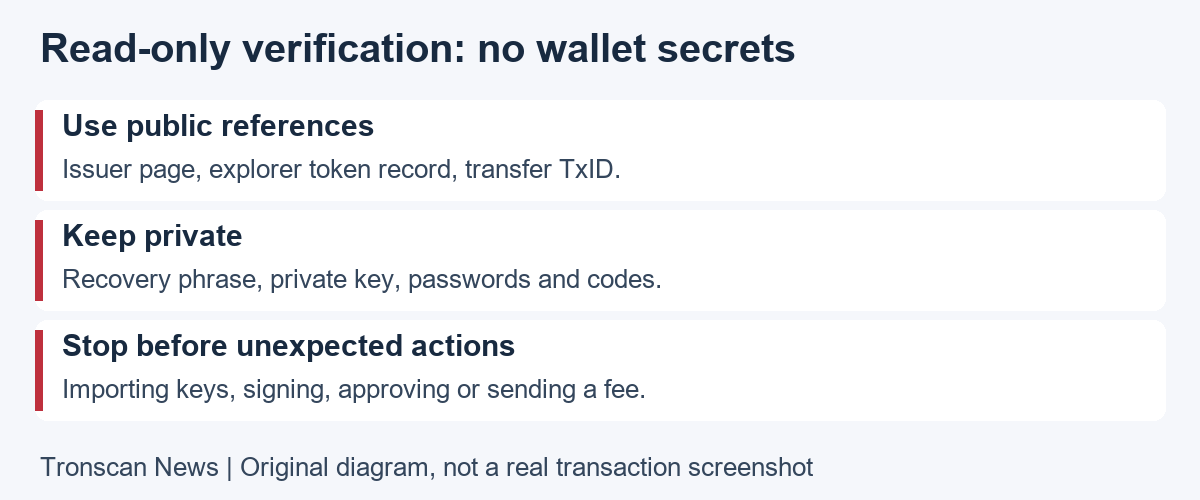
Never store a recovery phrase, private key, password or verification code in this note. None is needed for the USDT TRC20 contract comparison. If the task changes from reading records to signing, approving or sending, stop and evaluate that new action separately.
Frequently asked questions
1. Where should I find the USDT TRC20 contract reference?
Start with Tether’s official supported protocols page and its TRON token link. Compare the entire contract with the token in your record. Recheck the source when needed instead of trusting an address from an advertisement or private message.
2. Is the USDT TRC20 contract my deposit address?
No. It identifies the token contract. Your wallet or receiving platform provides its own recipient address and network instructions. Do not paste a token contract into a payment destination just because a tutorial displays it.
3. Do I need to connect a wallet to verify the token?
No. This public lookup can be performed by reading the issuer reference and explorer record. It does not require a signature, token approval or recovery phrase. A request for those is a separate action from this identity check.
4. Does a matching contract guarantee an exchange deposit is credited?
No. Also verify the transaction, recipient, quantity and platform deposit requirements. Contract identity is one part of the investigation. Use the receiving platform’s official support for questions about its internal customer ledger.
5. Does verified source code prove a token is authentic Tether?
No. Code verification and issuer identity are different checks. Compare the token with the issuer’s official contract reference. Neither that comparison nor a code label is a general guarantee about an unrelated application’s safety or promises.
Continue learning
Use the two linked English guides above for transaction status and account holdings. Visit the Tronscan News homepage for further independent TRONSCAN tutorials. Our editorial standards explain source checking, AI assistance and corrections.
Leave a Reply