TRON typed data is structured message data verified with a domain and explicit type definitions. A passing signature does not automatically authenticate every property displayed in a JSON object. In our offline test, an extra field that was not declared in the type could change while the original signature still verified.
This guide is for readers and developers checking a structured message, rather than a transaction receipt or a plain text signature. On November 2, 2026, we ran thirteen synthetic cases with TronWeb 6.5.1 and Node v24.19.0. No provider was configured, no wallet was connected and no transaction was broadcast. The temporary local signing key was never printed, saved or funded.
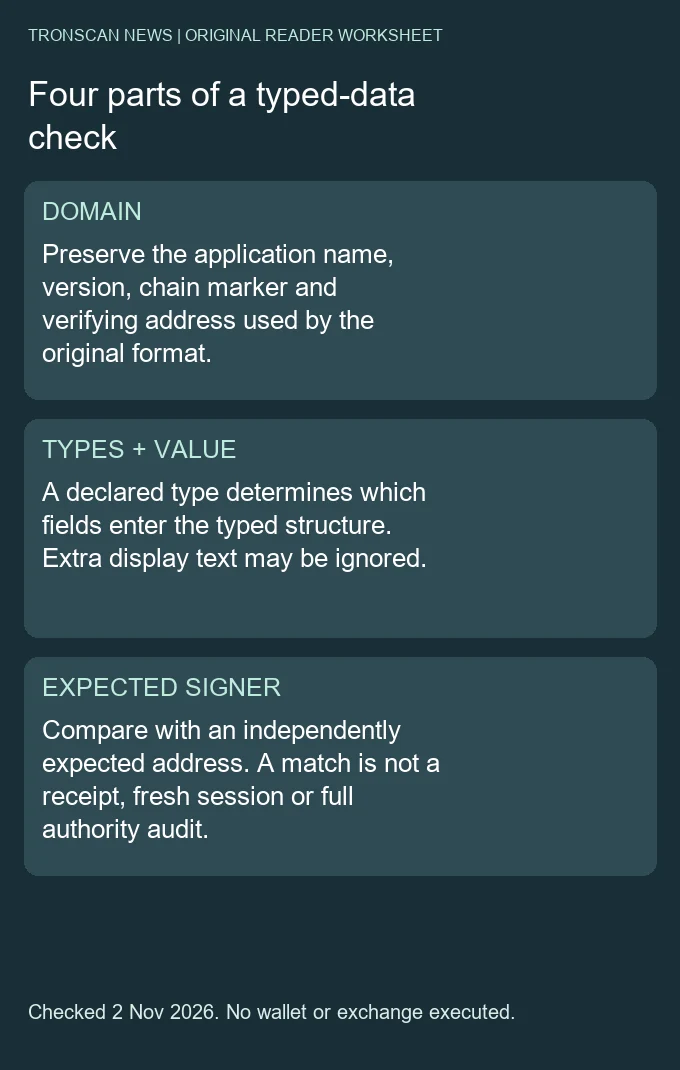
Table of Contents
Four boundaries to preserve before verification
- Domain: retain the exact context supplied to the signing format.
- Types: retain every declared field name and type, not just the visible values.
- Value: distinguish declared values from unrelated display properties.
- Expected signer: compare against an independently established address, rather than an address supplied only by an untrusted message.
The TIP-712 specification defines TRON’s typed structured-data hashing and signing format. It includes TRON-specific address and chain-ID details. This article tests one SDK implementation and a deliberately small Note structure; it is not a compatibility claim for every wallet, contract validator or historical SDK version.
The current verification reference lists the domain, types, value, signature and expected-address inputs. We supplied all five explicitly in our static local call. That avoids relying on a default account or mistaking a connection status for an independently expected signer.
The public fixture is deliberately synthetic
Our Note type declares purpose as a string, counter as uint256 and validBefore as uint256. The purpose says the fixture grants no permission. The chain marker is 0x2a, or 42, chosen for this local exercise; it is not a claim that we checked Mainnet or a particular deployed network. The verifying-address field was generated for the fixture, not verified as a deployed contract.
The counter and expiry-like value are also test values. Naming a field validBefore does not make the cryptographic utility check a clock. A number can be part of the signed structure while an application still needs a separate rule for accepting it at a particular time.
The complete public example below contains the actual fixture used in our successful local verification. It contains no private key, network host or transaction-building step. Use the named TronWeb version when reproducing the recorded result, and preserve the full domain, types and values rather than copying only the signature string.
const { Trx } = require('tronweb');
const fixture = {
  "domain": {
    "name": "Tronscan News Synthetic Note",
    "version": "1",
    "chainId": "0x2a",
    "verifyingContract": "TKRfU9WGu9zEiRAoobGRAngMp6eQKWy1g2"
  },
  "types": {
    "Note": [
      {
        "name": "purpose",
        "type": "string"
      },
      {
        "name": "counter",
        "type": "uint256"
      },
      {
        "name": "validBefore",
        "type": "uint256"
      }
    ]
  },
  "value": {
    "purpose": "Public offline fixture; grants no permission",
    "counter": "7",
    "validBefore": "2000000000"
  },
  "signature": "0xb3c47531f68ba88dd27b50aa8ca4bc05b440b006ad7006b4b47b48b38567c087192ba2270e75d3aec90f68f4b1b0d4366eeca36753e2b37524e3304fa9c431891b",
  "address": "TCe8kPECYbC9AeEQnqbDMPLKQ1xDNXdh2h",
  "kind": "Entirely synthetic offline fixture; chainId42 is a test marker,not a named-network assertion; verifyingContract not deployed or checked"
};
try {
  console.log(Trx.verifyTypedData(
    fixture.domain, fixture.types, fixture.value,
    fixture.signature, fixture.address
  ));
} catch (error) {
  console.error('Verification failed:', error.message);
}
We ran this exact verification-only example separately; it printed true. That result concerns the public fixture’s explicitly supplied expected address. It is not a login, token approval, transfer authorization or proof that the synthetic address owns funds. Do not replace the expected address with whichever address makes an untrusted record pass.
Why an undeclared display field still matched
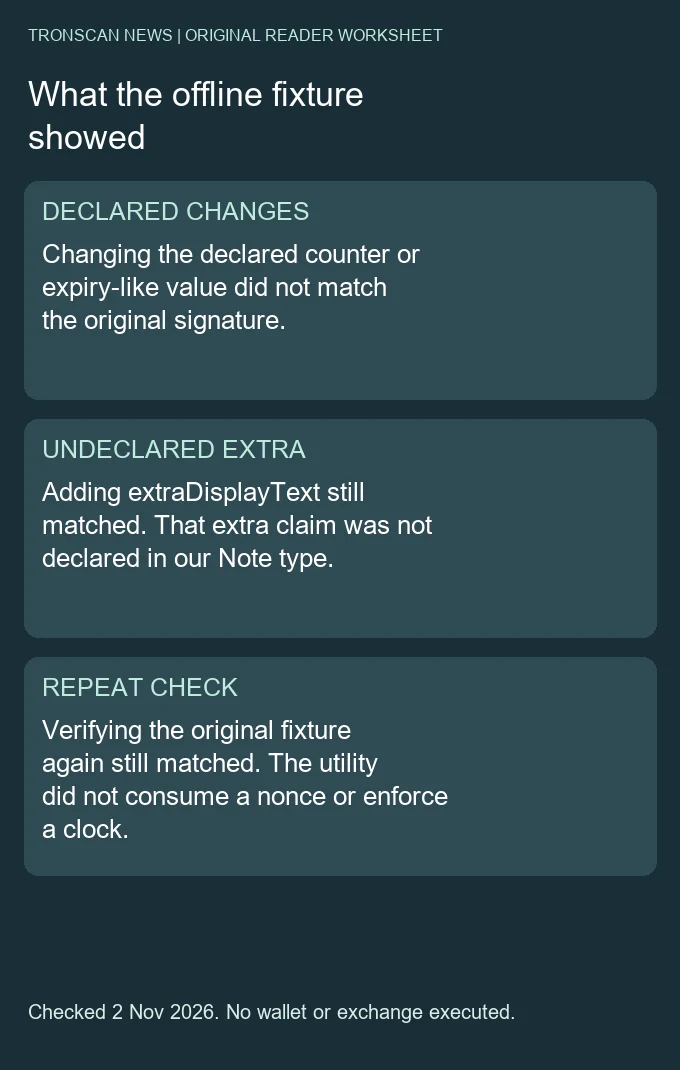
We added extraDisplayText to the value object without adding it to the Note type. The text asserted an extra claim, but the original signature still matched. This is the most important typed data distinction in the exercise: the declared structure, rather than the mere presence of a property in JSON, determines what the tested encoding covers.
The TronWeb 6.5.1 release notes describe the value argument as being walked according to type definitions, with undeclared fields ignored. Our observed result is consistent with that narrower statement. We did not test a wallet’s visual display or claim that its interface would reveal or hide the extra property.
A reviewer should therefore compare the displayed claim with the declared type. If a payment label, approval statement or support assurance appears only in an undeclared field, a passing typed data check does not establish that claim. Preserve the mismatch in the evidence note rather than silently treating every visible property as signed.
What changed the result in our thirteen cases
| Actual local test | Observed result | Scope |
|---|---|---|
| exact declared data | Matched | Synthetic offline fixture |
| changed domain name | Did not match | Synthetic offline fixture |
| changed domain version | Did not match | Synthetic offline fixture |
| changed chain marker | Did not match | Synthetic offline fixture |
| changed verifying address | Did not match | Synthetic offline fixture |
| changed declared purpose | Did not match | Synthetic offline fixture |
| changed declared counter | Did not match | Synthetic offline fixture |
| changed declared validBefore | Did not match | Synthetic offline fixture |
| extra undeclared display text | Matched | Synthetic offline fixture |
| changed declared field type | Did not match | Synthetic offline fixture |
| wrong expected signer | Did not match | Synthetic offline fixture |
| repeated exact verification | Matched | Synthetic offline fixture |
| separate fixture with past-valued validBefore=1 | Matched | Synthetic offline fixture |
Changing the domain name, version, chain marker or verifying address did not match the original signature. Changing a declared value also did not match. Changing the counter’s declared type from uint256 to uint32 changed the result even though the numerical counter still fit both types. The type definition is part of this verification question.
All thirteen expected outcomes passed in our harness. These are controlled local mutations of the main synthetic fixture plus one separate past-value fixture, not thirteen real user messages. We did not infer that every malformed input returns false: invalid encodings can raise errors. A caller should preserve the difference between a clean mismatch and a failure to interpret the input.
A repeat match is not proof of a fresh session
The original structured message matched on a later repeated verification as well. The utility did not remember a prior use or consume the counter. It also did not apply an acceptance policy to our validBefore field. Those outcomes belong to the test’s boundaries, rather than a claim that typed data is a complete authentication service.
When reviewing an application’s record, identify which component checks current time, stores used challenges and associates the expected address with a session. This guide does not implement those components. Its goal is to prevent a cryptographic match from being expanded into a claim about application state that was never checked.
The same distinction applies to a domain chain marker. A local signature check can use the supplied marker without contacting that network. Do not call our 0x2a fixture a Mainnet test, and do not infer deployment or current contract behavior from the verifying-address field alone.
To check the clock boundary directly, we created a separate offline fixture whose declared validBefore was 1, an explicitly past-valued test marker. It still verified against its own expected synthetic signer. This thirteenth case used a new ephemeral key, also never saved or funded. It demonstrates the utility boundary; it does not test or weaken a production application’s expiry policy.
How to inspect a typed data record without signing again
- Identify the format and version. Confirm that the record is structured data for the expected verification method. Do not substitute a plain-message utility because both inputs contain hexadecimal signatures.
- Preserve the original inputs. Retain the exact domain, named types, values, signature and expected-address source. Avoid editing a field to repair a mismatch.
- Map each claim to a declaration. Make a short table showing the visible property, its declared type and whether it is part of the intended structured message.
- Record the result narrowly. Keep match, mismatch and interpretation error distinct. Record application freshness, current authority and on-chain execution as separate questions.
Success is a reproducible statement about the exact structured input and independently expected signer. If a source supplies only a screenshot or a signature without the type definition, the verification is incomplete. Asking for the missing public structure is more useful than repeatedly guessing encodings.
A practical declared-field worksheet
| Property in our example | Declared location | Interpretation boundary |
|---|---|---|
| purpose | Note / string | Exact declared text is part of the tested structure |
| counter | Note / uint256 | Being signed does not consume it |
| validBefore | Note / uint256 | Being signed does not enforce a clock rule |
| extraDisplayText | Not declared in Note | The original signature still matched after this addition |
For a real record, replace the example rows with its actual declarations; do not assume it uses our three fields. Preserve nested structures and arrays in the same way. A flattened display may omit relationships that matter to the original type, and our small fixture does not validate every possible nested construction.
Keep sensitive login challenges and private user messages out of public support posts. Our example was created specifically for publication. The worksheet is an original reading aid, not a request to collect a reader’s key or to send a message to an unknown verifier.
Choose the next evidence according to the task
For exact text and whitespace questions, use the separate plain TRON message-signature guide. For current account authority, use the TRON account-permission guide; a recovered or matching key is not a full threshold audit. For a transaction hash, use the raw transaction-ID verification guide. A typed message is not automatically a transaction receipt.
Frequently asked questions
Does typed data authenticate every displayed JSON field?
Our undeclared extra field was ignored by the tested encoding. Compare each important claim with its type declaration.
Did the synthetic chain marker connect to Mainnet?
No. The fixture used marker 42 offline without a provider or a deployment check.
Does validBefore enforce an expiry by itself?
No clock rule was applied in our test. Application acceptance policy is separate from verifying the signed value.
Does a second match mean a new authorization?
No. Repeating the same cryptographic question still matched; freshness and prior use require separate evidence.
Was a wallet approval or transfer performed?
No. Only synthetic offline messages were generated and verified. No wallet, funded account, provider or broadcast was used.
Independent Tronscan News guide with AI-assisted drafting and primary-source checks on November 2, 2026. Two original diagrams, a declared-field worksheet and thirteen synthetic offline cases support the method. No real wallet prompt, contract deployment, production login or account-authority audit is claimed. Browse the Tronscan News homepage; use About & Standards for corrections.
Leave a Reply