TRON account activation creates an address’s account state on the blockchain. Generating a receiving address in a wallet is a separate step, so a new address can appear in your app before an explorer has an account record for it. Start by checking the full public address and network, then read the account state before considering any transaction.
This mobile guide explains how to investigate an inactive or unrecognized address, read the relevant costs and verify the result. It does not require a wallet connection to this website. The original documentation review was on October 22, 2026; the actual read-only comparison below was added on November 3. Wallet screens, service requirements and network parameters can change.
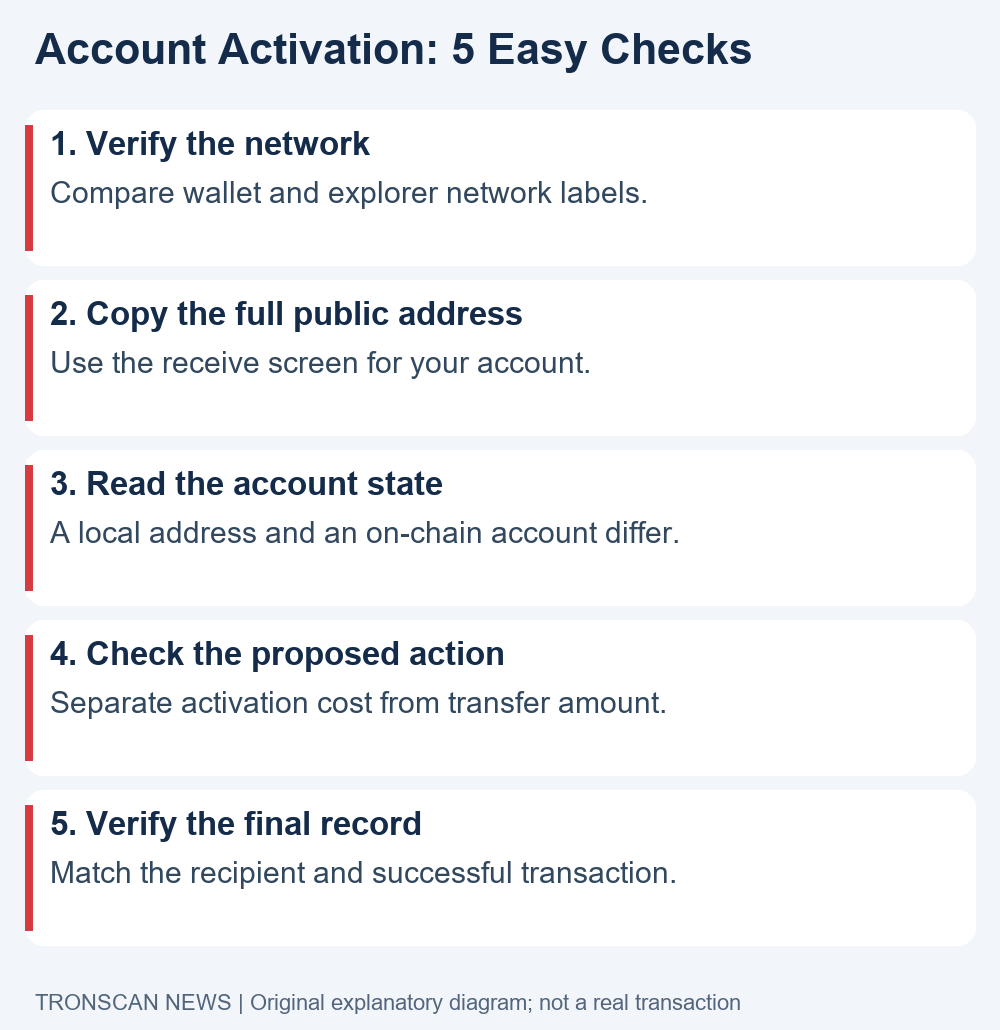
Table of Contents
What TRON account activation means
The official accounts and keys documentation separates locally generated keys from activation. Standard activation can occur when an existing account sends TRX or a TRC-10 token to the new address, or through the account-creation operation. This is a network process, rather than registering an email address with an explorer.
A receiving address and a recovery phrase serve different purposes. Use the public address for a lookup. Keep wallet secrets out of search boxes, support tickets and screenshots. A site offering an address search does not need the credentials that authorize transactions.
The practical question is whether the expected address has an on-chain account record on the intended network. A wallet label, a token amount and an account record are different observations. Record each one separately instead of treating a single screen as an answer to every question.
5 easy checks for TRON account activation on mobile
- Confirm the network. Compare the wallet’s selected network with the explorer network.
- Copy the complete public address. Take it from the intended account’s receiving screen.
- Inspect the account record. Distinguish an inactive address from a failed lookup or a token balance view.
- Read the proposed action and costs. Separate the recipient amount, account creation cost and any service fee.
- Verify the final result. Match the transaction recipient and resulting account state before drawing a conclusion.
Complete the read-only checks first. If you cannot establish the network or intended address, stop at that uncertainty. An unexplained error is not a reason to transfer funds to an address supplied by someone claiming to be an activation agent.
Check 1: confirm the network before TRON account activation
Begin TRON account activation checks inside the wallet or service you actually use. Read its account name and network indicator, then open the receiving screen for that account. If you recently imported or switched wallets, do not assume the currently displayed address is the one you used earlier.
Open the official TRONSCAN explorer through a verified bookmark or the address you checked yourself. Compare its network with the wallet’s network before entering the public address. A test environment and Mainnet are different places to investigate an account.
On a phone, the network indicator may be inside a menu or partially hidden by the layout. Read the label rather than guessing from the page color. If you cannot identify it confidently, check the wallet’s documentation before proceeding.
Make a small evidence note containing the wallet account label, network, public address and observation time. This gives you a consistent reference if a later screen looks different. Do not add the recovery phrase or private key to that note.
Check 2: compare the full address, not a nickname
Before TRON account activation, copy the address directly from the intended receiving screen. Expand any shortened display before comparing it with the explorer result. Matching only the beginning and end is a convenient visual check, but it does not replace verifying the complete address before a consequential action.
A nickname such as Savings or Main Wallet is an app label, not an on-chain identifier. Two apps can display different labels for the same address, and two accounts can use similar names. Keep the public address as the common reference between your records.
If you are investigating a prior deposit, compare the destination in the sending record with the current receiving address. This prevents a lookup for a newly selected account from being mistaken for evidence about an older transfer. For the balance view itself, use our TRON address balance guide.
TRON account activation does not establish that an address belongs to the person you intended to pay. It also does not prove that a wallet displayed in watch-only mode has signing access. Verify the purpose and ownership of an address through your own trusted records before treating it as a destination.
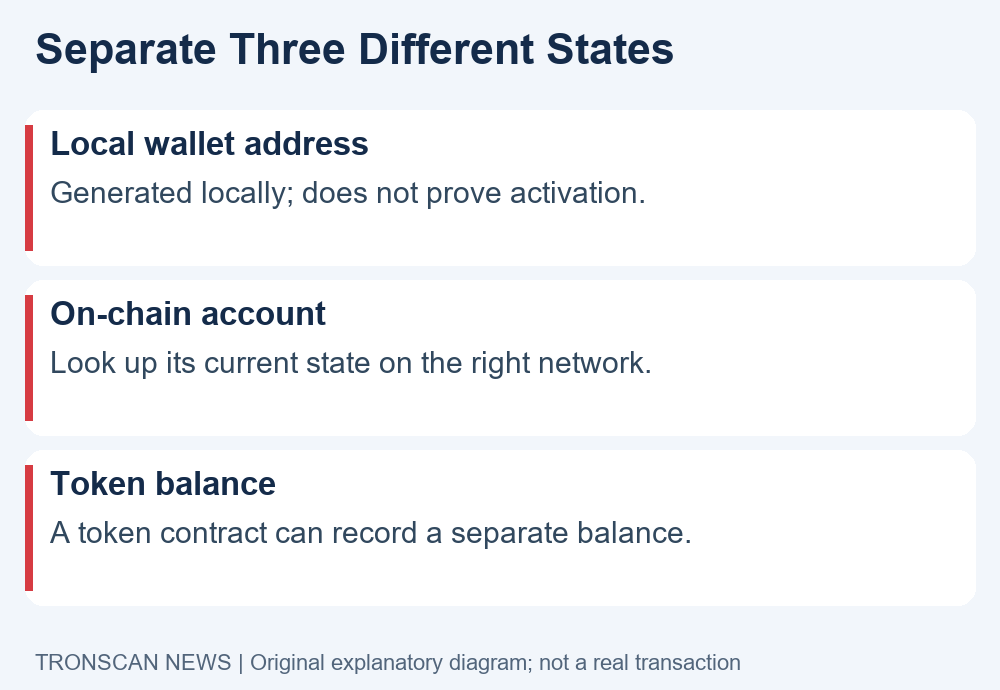
Check 3: distinguish the account state from token records
Read the result that the explorer actually provides. An explicit inactive-account message, a network error and an empty search result do not carry the same meaning. Copy the exact wording and note whether the rest of the explorer loaded normally.
The GetAccount reference describes an account query for information including TRX, TRC-10 balances, staking, votes and permissions. It also notes that many fields are conditional. Missing a particular field is therefore not automatically evidence of an invalid address or lost funds.
TRC-20 balances are queried through the token contract or an index service, rather than being stored directly in the basic account object. Seeing a USDT balance alone should not substitute for checking the account’s activation state. Likewise, an absent token row in one view does not prove that the corresponding transfer failed.
If the token is the issue, compare the exact contract and transaction record before making a second transfer. A ticker or icon can be misleading. Keep the token question separate from the TRON account activation question so that the next step addresses the actual missing evidence.
Refresh the same address on the same network once the explorer is responding normally. If the wallet and explorer still differ, record both results and their timestamps. Avoid changing networks, addresses and token filters simultaneously, because that makes the comparison difficult to interpret.
Check 4: understand TRON account activation costs
The official documentation currently lists a standard Mainnet account-creation charge of 1 TRX paid by the sender. That charge is separate from the amount delivered to the recipient. The java-tron account model identifies the governing network parameters and explains that they can change.
For standard creation, ordinary free Bandwidth is not used for the creation transaction. Eligible staked or delegated Bandwidth can cover its resource requirement; otherwise the documented fixed Bandwidth charge applies, currently 0.1 TRX on Mainnet. Check current parameters and the wallet’s actual estimate rather than treating these dated values as a permanent quote.
A provider handling TRON account activation may impose its own minimum withdrawal amount or service charge. That is a different rule from the network’s account-creation cost. Read what the service intends to deliver, what it charges and which network it will use. A quoted total should identify which components it includes.
Do not conclude that receiving exactly the account-creation fee is a universal requirement. The activation mechanism, sender’s resources and provider’s delivery rules matter. Keep transfer amount and transaction cost as separate lines in your note.
The documentation also describes contract-based activation when a contract transfers TRX or TRC-10 to a new address. That route has different charging rules. This guide does not recommend choosing a contract service simply to obtain a lower advertised price; verify the actual operation and provider before signing anything.
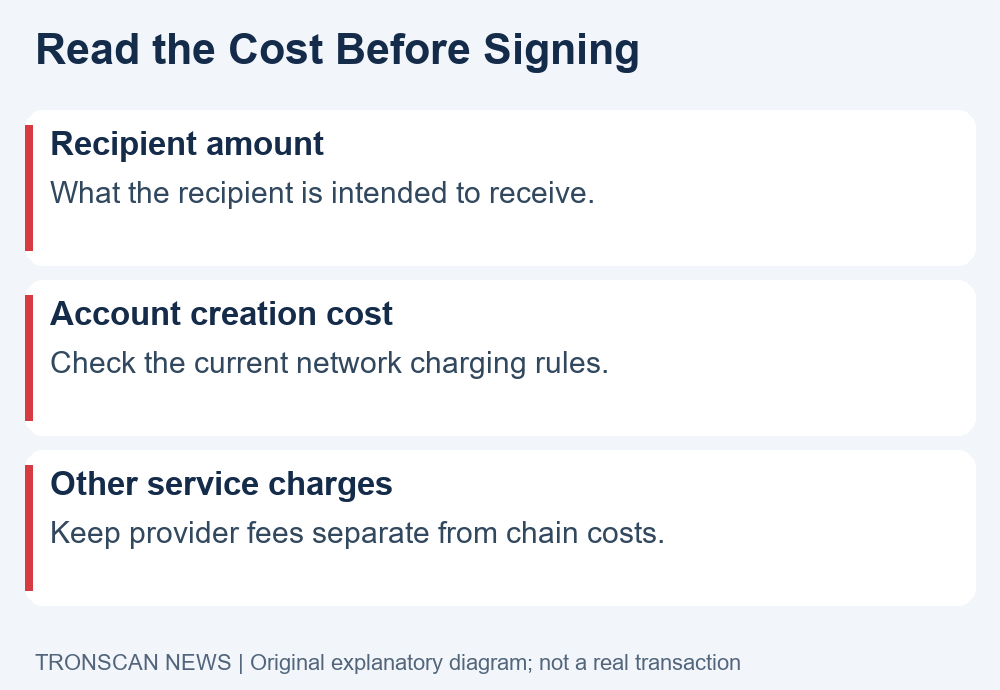
Review the final wallet confirmation carefully
Before any TRON account activation action, read the confirmation screen for the exact network, destination and asset. If a service describes its own fee, compare the amount charged with the amount expected at the destination. Resolve an unclear quote before authorizing the transaction.
A transfer confirmation and a token-spending approval are different actions. If a supposed activation flow asks for an allowance or an unrelated contract permission, inspect that request on its own merits. The words Activate or Verify on a webpage do not explain what a wallet signature authorizes.
Our TRON token approval guide explains how to read the owner, token, spender and allowance. You do not need to approve a token contract merely to search a public address on an explorer.
If the wallet shows an unexpected destination, unfamiliar operation or unexplained message, stop before signing. Return to the wallet publisher’s established help route. Do not resolve an uncertain transaction by sending a recovery phrase to a person offering remote activation.
Check 5: verify TRON account activation after the action
If you have already performed an activation-related transaction, obtain its full transaction hash from the sending record. Review its execution result and destination, then look up the receiving account again on the same network. The record should support the conclusion you make.
Use our mobile TRON transaction tutorial for the receipt workflow. An order number inside a service is not necessarily the blockchain transaction hash. If the sender has not provided a hash, ask its official support where the on-chain record can be found.
Check the recipient carefully if a transaction succeeded but the address you searched still appears inactive. You may be looking at a different account, network or cached screen. Establish those details before assuming a protocol failure or repeating the transaction.
TRON account activation is also separate from a receiving platform crediting your deposit internally. An active address does not prove that the platform supports the asset, accepts the amount or has completed its own processing. Compare its deposit requirements with the actual transaction.
November 3 evidence update: five actual read-only requests
We tested the distinction between address representation, account recognition and token balance with five anonymous Mainnet requests on November 3, 2026, at approximately 00:58 UTC / 08:58 Beijing. These were sequential latest or solidified reads from one public provider, not a historical snapshot pinned to a single block. We made no activation, funding, wallet or signing operation.
Our query fixture, TYTgE77MnsxbK5e3eu6iLeaPuMFE5eUCcb, was constructed from a random 20-byte public payload with the TRON prefix and Base58Check encoding through TronWeb 6.5.1. Its address-format check passed. No private key or key pair was generated, and we make no claim that this is a usable wallet. The string is a lookup fixture, not a receiving destination.
| Actual request | Result | What it establishes |
|---|---|---|
| Constructed address via wallet/getaccount | HTTP 200; empty object {} | No account object supplied by this request |
| Same address via walletsolidity/getaccount | HTTP 200; empty object {} | No account object supplied by the separate solidified view |
| Existing public contract via wallet/getaccount | Matching address; explicit type Contract | A positive account-result control during the same session |
| Issuer-referenced USDt contract via wallet/getcontract | Published balanceOf(address) view ABI found | The schema for the following separate token query |
| USDt balanceOf for the constructed address | Full 32-byte zero word; decoded integer 0 | One actual token balance result, not a value inferred from an empty account object |
The account-control address was TUpMhErZL2fhh4sVNULAbNKLokS4GjC1F4, an existing TrueUSD contract, not our wallet. The token-query target was TR7NHqjeKQxGTCi8q8ZY4pL8otSzgjLj6t, checked against Tether’s TRON protocol reference. The balanceOf argument was the constructed fixture. Preserve those three address roles separately.
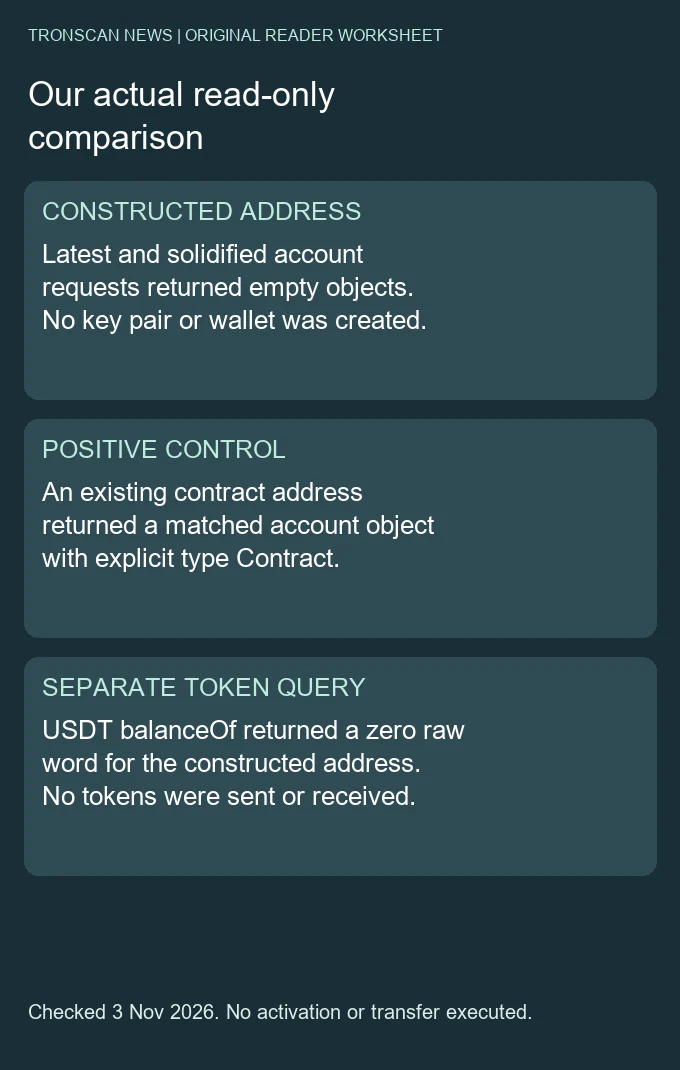
The empty account results are consistent with the documented distinction between an address and an activated account. They do not supply a universal diagnosis for an unrelated reader’s empty response. A wrong network, incorrect input, partial export, provider error or unavailable request must remain separate possibilities. The matched control demonstrates one successful account response; it does not authenticate every possible provider result.
The separate USDt query returned zero in this actual example. We did not fund the fixture or demonstrate an unactivated address with a positive token balance. Its zero was decoded from the token response, not manufactured by treating an empty account object as zero. Neither result proves control of an address or the ability to execute a future token transfer.
For the token read, the existing contract address was used only as simulation caller context. The constant-call reference explains that this simulation does not commit a transaction. No signature or broadcast occurred. A returned simulation object or identifier is not an activation or transfer receipt.
Preserve the distinction when repeating a lookup
- Record the exact network, provider, public address and purpose: native account recognition, one token holding or one historical transfer.
- Save the HTTP result and actual body shape. Distinguish a matching account object, an empty object, explicit Error and a failed request.
- If a token holding is the question, independently verify the token contract and view method. Do not substitute a ticker or native account balance for that result.
- Keep each route and timestamp. Latest and solidified requests are different state views, even when both return the same shape.
- State the unresolved question. A public lookup does not settle activation costs, personal signing authority, wallet onboarding or an exchange’s deposit-credit rules.
Question / network / provider / observation time:
Requested public address and its role:
Account route / matching object / empty object / Error:
Separate token contract / method / raw result, if queried:
What the response actually establishes:
Activation, control or service questions still unresolved:
Next relevant record or official clarification:
This update tested the documented APIs, not current explorer activation labels or a particular wallet interface. It adds actual evidence to the earlier checklist without claiming a completed activation or a current personal fee quote. The cost discussion above retains its dated documentation context.
Frequently asked questions
1. Is generating a wallet address the same as TRON account activation?
No. A wallet can generate keys and an address locally before the blockchain has an activated account record. Confirm the intended network and address, then check the current account state rather than relying on the wallet label alone.
2. Can a normal TRX transfer activate a new account?
The official documentation lists a transfer from an existing account as a standard activation path, alongside TRC-10 transfer and explicit account creation. Review the sender’s actual costs and any service restrictions before choosing an operation.
3. Does receiving USDT alone prove that the account is activated?
No. A TRC-20 token record and the basic account state answer different questions. Check activation directly, and verify the relevant token contract and transaction if your concern is an incoming USDT payment.
4. Is the TRON account activation cost always the amount I must receive?
No. The creation charge, recipient transfer amount and provider’s service fee are separate. Network parameters and provider rules can change. Read the current estimate and intended delivered amount rather than treating an old screenshot as a fixed price.
5. Must I connect my wallet to check activation on an explorer?
A public address lookup does not require sharing wallet secrets or granting token permissions. Use the public address and correct network. Signing a transaction is a separate step that deserves its own review.
Sources and editorial note
This TRON account activation guide uses the official account documentation, account query reference and account model linked above, checked on 22 October 2026. The November 3 update adds five actual anonymous Mainnet reads, a response comparison and an original evidence diagram. We did not perform an activation or transfer, generate a key pair, test a positive-token-balance fixture or independently test a wallet interface.
Visit the Tronscan News homepage for related English tutorials. Tronscan News is independent of TRON, TRONSCAN and token issuers. This article and its original explanatory diagrams were prepared with AI assistance and source checks. The illustrations are not screenshots of real wallets, accounts or transactions.
Leave a Reply