USDT not received after a TRON transfer? Start with the transaction hash, then check the network, execution result, token contract and full recipient address. A successful on-chain transfer and a credit in an exchange account are separate events. Do not send a second payment just to make the first one appear.
This mobile guide helps you identify which stage needs attention and collect useful evidence. It cannot reverse a transfer or promise recovery. All examples below are hypothetical, and platform deposit rules must be checked with the actual receiving service.
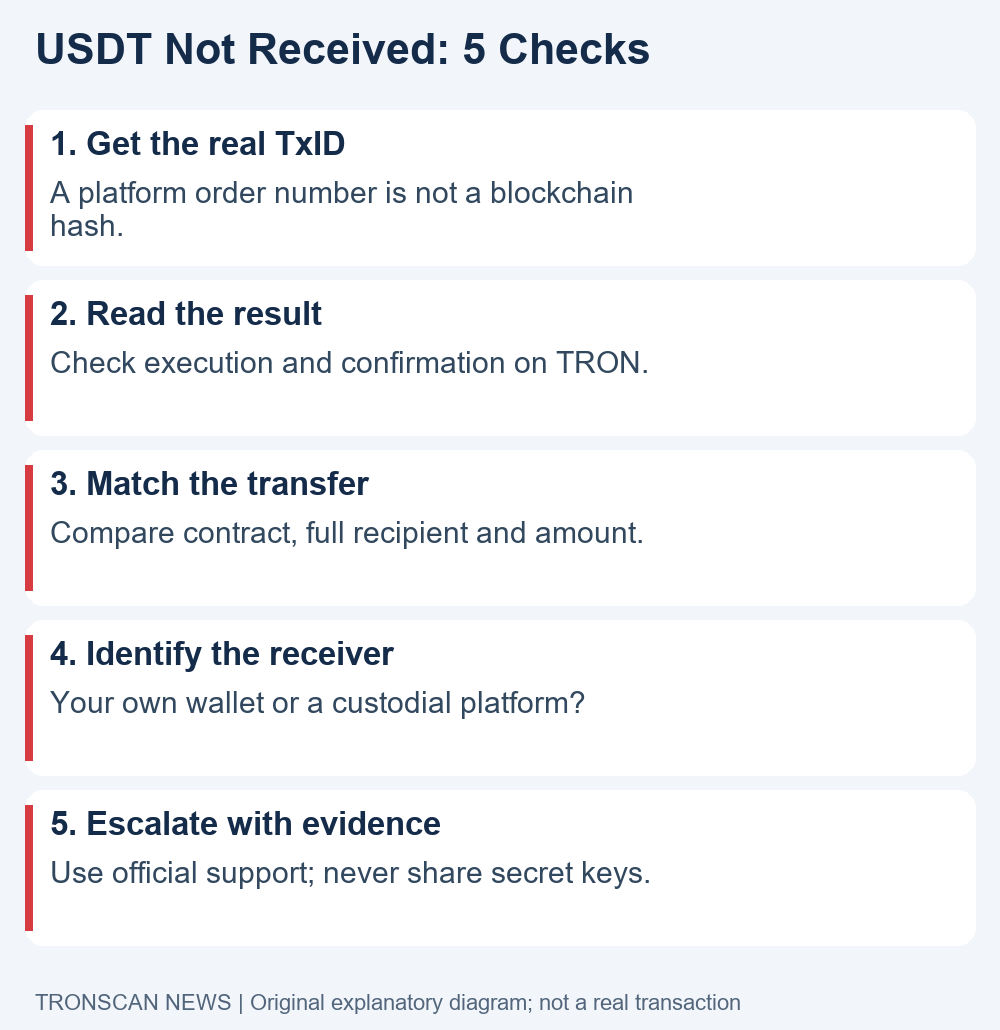
Table of Contents
USDT not received: 5 easy checks on your phone
- Get the blockchain TxID. Open the sending wallet or withdrawal history and copy the transaction hash, rather than an internal order number.
- Check the correct network. For a TRON transfer, open the official TRONSCAN explorer and inspect execution and confirmation. Do not search a different blockchain and treat an empty result as proof of failure.
- Match the actual token transfer. Compare the verified token contract, full recipient address and amount. A successful transaction alone does not identify which token moved.
- Identify the receiving account. A self-custody wallet may have a display issue; a custodial platform applies its own deposit requirements and internal crediting process.
- Choose the right support route. Use the sender for an unbroadcast withdrawal and the receiver for a matching confirmed deposit that has not been credited. Preserve evidence and never share secret keys.
Follow the checks in order. They prevent a missing wallet notification from being confused with a failed transaction. Keep one note containing the network and hash so you do not accidentally compare records from two different withdrawals.
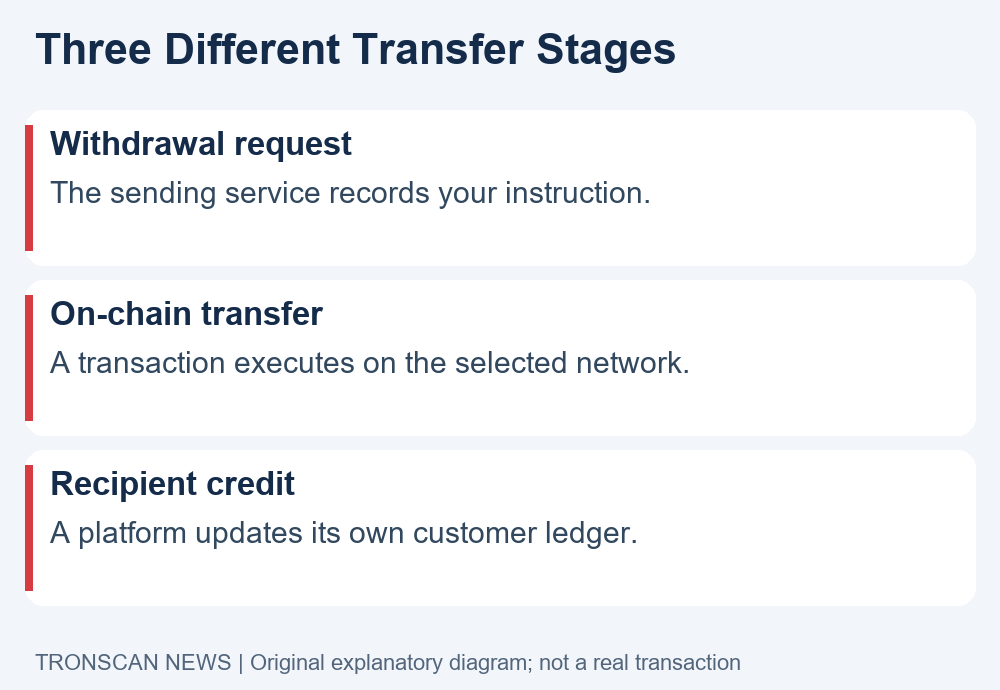
USDT not received: distinguish three transfer stages
A withdrawal request starts inside the sending service. Its status may describe approval, processing or an internal queue. That record is useful, but it is not itself a blockchain receipt. Ask the sender whether the withdrawal has actually been broadcast and which TxID belongs to it.
The next stage is execution on the selected network. The official TRON confirmation documentation separates confirmation from smart-contract execution evidence. For a token payment, inspect the completed receipt and transfer details rather than relying only on a broadcast acknowledgement.
The final stage, when a custodian is involved, is crediting its customer ledger. This may depend on its current supported network, token, deposit requirements and operational status. A public explorer cannot update that private ledger or tell you every reason for a service review.
When investigating USDT not received, write down the last stage supported by evidence. “The sender accepted my request” and “the correct transfer executed on-chain” justify different next steps. Avoid replacing a precise status with the vague word “sent.”
USDT not received and no transaction appears on TRONSCAN
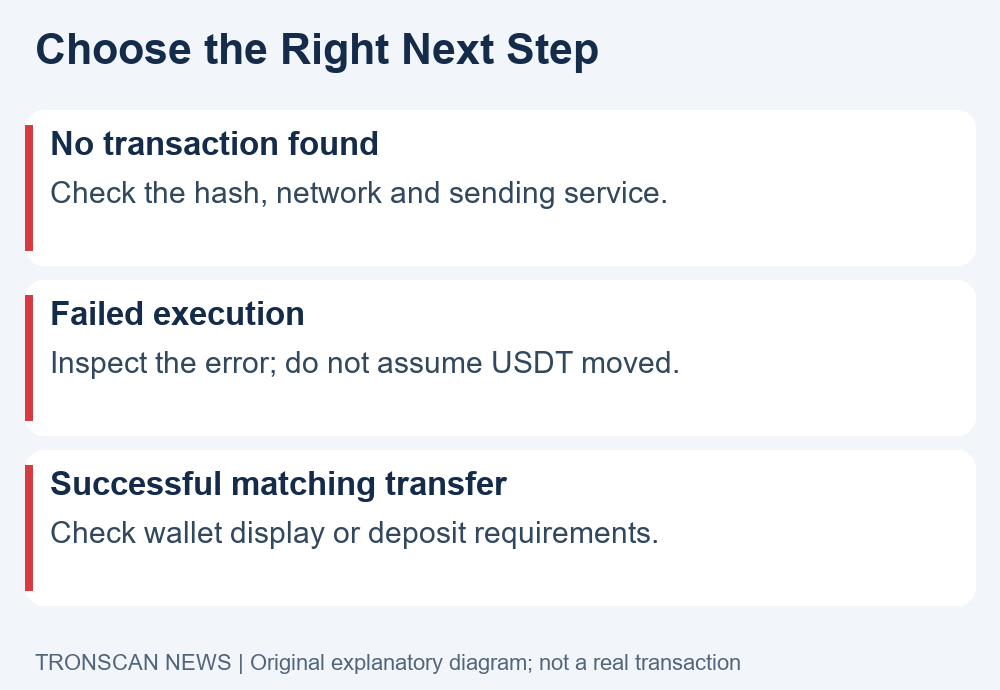
Copy the complete hash again from the withdrawal details. Remove accidental spaces and check that the selected network is TRON. An internal support reference or exchange order ID may be searchable only within that service, even when it looks like a long identifier.
Open the explorer through its official address, tronscan.org. You do not need to connect a wallet or sign a message to read a public transaction. A page asking for a recovery phrase to “locate” a transfer is not a normal lookup step.
If the sender has not provided a usable hash, ask for the broadcast status and network. If the correct hash still has no record, preserve the sending status and contact that service. An empty search alone does not prove the funds were stolen, successfully delivered or permanently lost.
For the basic explorer workflow, use our mobile TRON transaction lookup guide. It shows which fields belong to the blockchain record and which questions remain outside an explorer’s scope.
USDT not received after a failed transaction
Read the execution result carefully. A failed contract call is different from a successful token transfer. Look for the recorded error and the actual token movement; do not assume that every transaction containing a token name transferred that token to the recipient.
If the record indicates a resource-related failure, inspect the receipt before deciding what to do next. Network charges and token movement are different questions. A fee being consumed does not establish that the intended payment succeeded.
Do not immediately repeat the transfer from a phone notification. First reopen the original record and confirm its final result. If a new attempt is appropriate, review the wallet’s current estimate and transaction details independently. A second transaction has its own outcome and can create a duplicate payment.
The USDT not received checklist is about tracing evidence, not bypassing errors. Never accept an unsolicited offer to fix a receipt by sending funds to a stranger, granting token approval or entering a seed phrase into a recovery website.
USDT not received despite a successful result
Open the token transfer details within the transaction. Compare the token’s full contract address with the issuer’s current reference. A familiar name, logo or ticker is insufficient because unrelated tokens can use similar labels. Check the contract before interpreting a token quantity as genuine USDT.
The Tether supported protocols page is an issuer reference for network and contract verification. If the withdrawal network is uncertain, use our USDT explorer network-selection guide before searching the hash. Its network worksheet helps you match the sending record to the correct explorer; compare complete contract addresses rather than a shortened token label.
Next compare the entire recipient with the destination you intended to use. On a narrow screen, expand or copy a truncated address into a trusted local note for comparison. Do not rely only on the first and last characters, or copy a replacement destination from unrelated transaction history.
Finally, compare the transferred quantity with the withdrawal details. Keep any service fee separate. Do not infer the recipient from a contract-call destination field alone: the token contract and the token transfer’s recipient have different roles.
USDT not received in a self-custody wallet
Check that the wallet is showing the same account and TRON network used in your investigation. An application can hold or display several accounts. A matching asset name in another account is not evidence about the receiving address you just checked.
If the explorer shows the correct incoming transfer, check the current verified-token balance and any later outgoing transfers. A past incoming payment is not necessarily the current balance. Keep the transaction history and present holding separate when explaining the issue.
Our TRON address balance guide covers this comparison. If the current on-chain balance is present but the app display differs, consult the wallet’s official help for refreshing or displaying the verified asset. Use only the real contract when an app supports adding a token reference.
Do not import your recovery phrase into a different website to resolve USDT not received. Reading an explorer requires a public address, not control of the wallet. If unfamiliar outgoing activity exists, stop treating the problem as a simple display delay and use the wallet provider’s official security guidance.
USDT not received in an exchange account
Reopen that exchange’s current deposit instructions inside its official application or website. Confirm that your account supports the asset on TRON, that the full deposit address matches, and that the transfer meets any stated minimum or other requirements. Do not use another platform’s rules as a substitute.
Compare the service’s deposit history with its required confirmations. For example, Poloniex’s confirmation guidance directs users to check deposit status and contact support when a qualifying deposit has not been credited. This is a platform-specific example, not a universal waiting time or recommendation to use that service.
Also check official maintenance or deposit-suspension notices. Record the relevant status and date instead of assuming a current service issue from an old social post. Confirmation thresholds and processing policies can change, so avoid promising a fixed number of minutes.
If the transfer matches the correct deposit instructions but the balance remains missing, ask the receiving platform to investigate crediting. An explorer operator cannot log into your exchange account, approve a deposit or remove a service restriction on your behalf.
USDT not received after a network or address mismatch
A token name appearing on several blockchains does not make those networks interchangeable. If the sending record shows a different network from the receiver’s deposit instructions, stop and contact the receiving service through its official route. Whether it can assist depends on the actual destination and its policies.
Likewise, a successful transfer to an unintended address is not repaired by changing a wallet display setting. Preserve the exact address and hash. Do not promise yourself or another person that a recovery is available before the relevant party has confirmed what it can do.
For USDT not received after an address mismatch, avoid sending an additional “verification deposit.” Any new transfer is a separate action and may increase the loss. Check whether the supposed support channel is linked from the real service before sharing case details.
Do not publish your entire account history to seek help. A public address can reveal linked activity. Share only relevant transaction evidence with the correct support destination, and keep login codes, recovery phrases and private keys out of every report.
Build a USDT not received support report
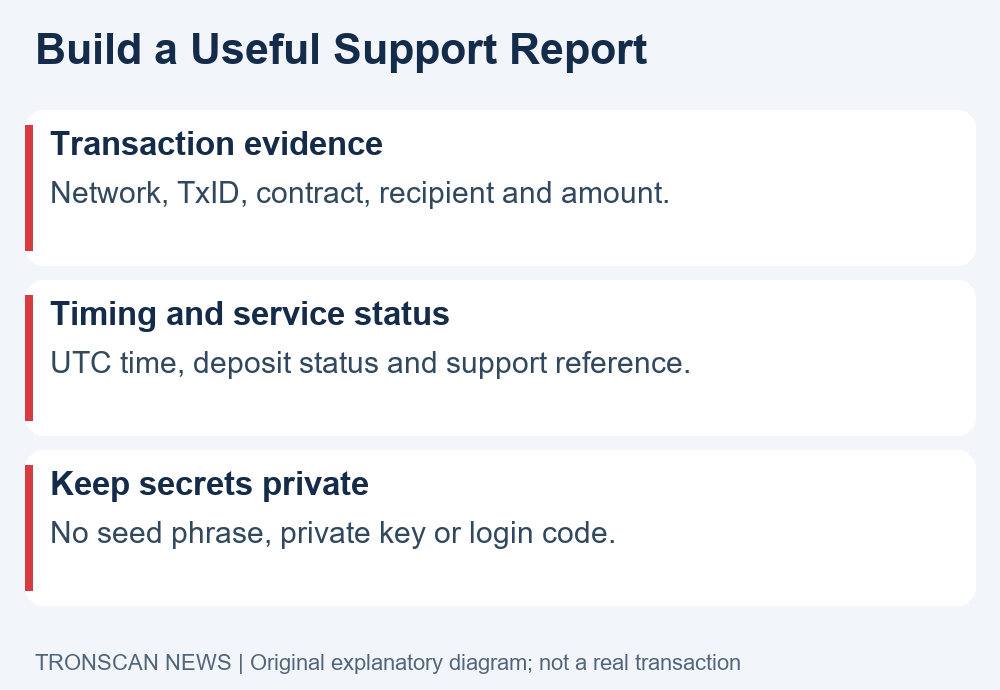
Use a short factual report: “Network: TRON. TxID: [actual hash]. Asset contract: [verified contract]. Recipient: [full address]. Amount: [recorded quantity]. Time: [timestamp and timezone]. Explorer result: [observed status]. Receiving deposit status: [observed status].” These brackets are a template, not a real transaction.
Add the sender’s withdrawal reference separately so support can distinguish it from the blockchain hash. Explain which published deposit requirement you checked and include a relevant screenshot if the official support form accepts one. Redact unrelated balances and personal information.
When USDT not received remains unresolved, ask a specific question: has the withdrawal been broadcast, has this deposit been detected, or which requirement is preventing credit? A focused question is easier to investigate than an unsupported claim that the entire network is broken.
Keep the ticket reference and the response in one place. Update the case when new evidence appears, such as a completed receipt or changed deposit status. Do not create contradictory reports based on different addresses or timezones.
Support evidence worksheet, reviewed 1 November 2026. For USDT not received, compare the fields below with the actual receiver’s instructions. The worksheet organizes evidence; it does not promise support or recovery.
| Field | Where to check | Keep separate |
|---|---|---|
| Network and token | Sending record, issuer reference and receiver’s deposit instructions | A ticker alone is not a network or contract |
| Transaction hash | Sender’s broadcast details and matching explorer record | Withdrawal order or ticket number |
| Block number | The located transaction’s block field | Confirmation count and observation time |
| Receiving address | Full token-transfer recipient and the account’s deposit address | The called token-contract address |
| Amount | Matched token movement, with its unit | USD estimate and service fee |
| Unresolved stage | Sender status, chain result and receiver status, each dated | Observed fact versus suspected cause |
This editorial worksheet draws on platform-specific guidance. Crypto.com’s deposit-review documentation, dated 6 November 2025, starts with a transaction hash. If that lookup cannot locate the deposit, it lists block number, token, network, receiving address and amount as further details. That list is not a universal form or proof of current TRON support for any particular account.
Kraken’s missing-deposit guidance, updated 22 October 2026, separately asks readers to check network, minimum, confirmations, address and maintenance before contacting support. Apply the actual receiver’s rules; do not copy an unrelated platform’s thresholds or assume every asset needs a memo.
We reviewed public help documents; no logged-in deposit review was tested or submitted. Mark missing fields “not observed.” Share case details only through the receiver’s official support route.
Frequently asked questions
1. Why is USDT not received when TRONSCAN says success?
Check the actual token transfer, contract, full recipient and quantity first. A successful matching transfer can still be separate from a wallet display update or a custodial platform’s internal credit. Contact the party responsible for the unresolved stage.
2. How long should I wait before contacting support?
Use the receiving service’s current instructions and the observed transaction status. There is no single waiting time for every wallet and exchange. Contact the sender when it cannot provide a broadcast record, or the receiver about a qualifying deposit it has not credited.
3. Do I need TRX to make incoming USDT appear?
Do not send TRX to an unknown address to unlock a missing deposit. Reading an incoming record and checking a balance do not require a signed transaction. Fees for a future outgoing action are a separate issue to review in your wallet.
4. Can TRONSCAN reverse a transfer?
An explorer displays blockchain records; it does not control your wallet or a receiving platform’s ledger. Use the evidence to contact the relevant service. Do not trust anyone claiming explorer access lets them reverse a payment for an advance recovery fee.
5. Should I send the payment again?
First establish the original transaction’s outcome and coordinate with the intended recipient. Repeating a successful payment can create a duplicate. An unresolved notification or balance display is insufficient evidence that a second payment is needed.
Keep your next check focused
For USDT not received, the useful outcome is identifying the last verified stage and the next responsible party. Use the three linked tutorials for transaction records, network selection and current holdings. Visit the Tronscan News homepage for independent guides. Our editorial standards explain sources, AI assistance and corrections.
Leave a Reply