NFT metadata is descriptive data associated with a collectible, often reached through a contract’s tokenURI method. It is separate from the token ID, current owner and the picture shown by a wallet. A readable blockchain record does not guarantee that an external NFT metadata address or image can be loaded.
This guide helps a TRON reader identify the specific layer that is missing. We tested one public Mainnet tokenURI read on 1 November 2026. The contract returned a URL, but an anonymous request to that URL received HTTP 403. We preserve that limit rather than presenting invented NFT metadata or claiming the artwork disappeared.
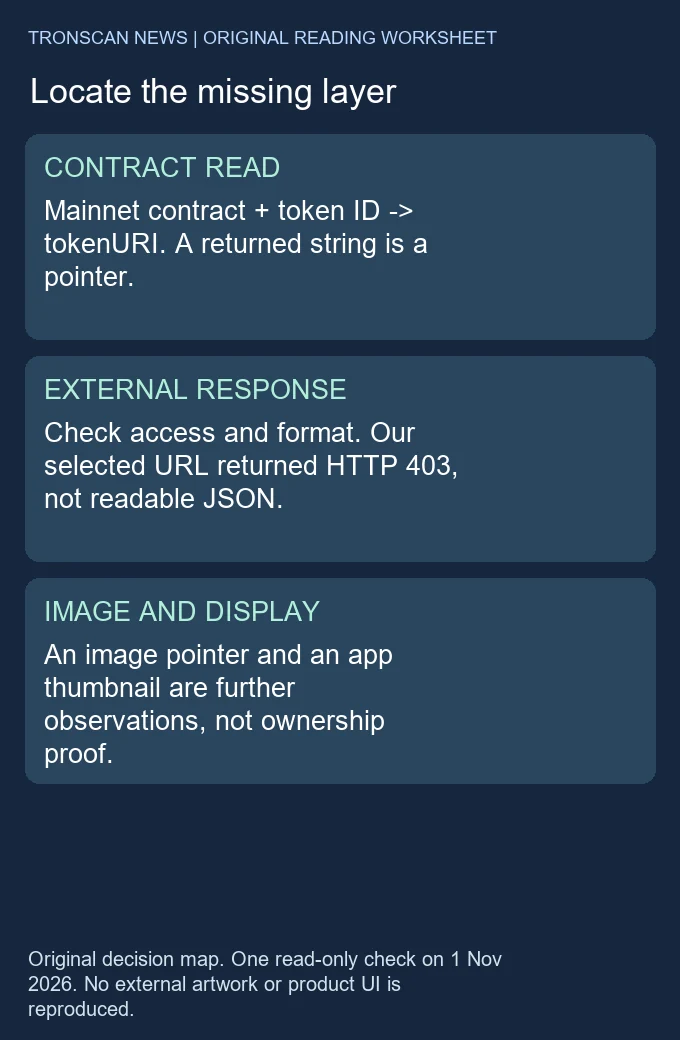
Table of Contents
NFT metadata: four observations to keep separate
The official TRC721 reference describes NFT metadata as an optional extension. It exposes collection name, symbol and tokenURI for an individual ID. Its example metadata schema includes name, description and image. The image field is itself a pointer; it is not an ownership record.
Start with the correct network, complete collection contract and exact item ID. Our TRC721 item-identification guide owns that earlier task. This article continues from an identified item to the external data boundary. It does not repeat a historical transfer as evidence that NFT metadata is available today.
| Layer | Useful observation | What it cannot establish alone |
|---|---|---|
| Contract and ID | Complete Mainnet collection address and item identifier | Which person owns an account, or whether an image is reachable |
| tokenURI result | Exact returned string and read time | Successful retrieval, JSON format or permanent availability |
| Metadata document | Actual response, parse result and relevant field types | Successful image retrieval or creator authenticity |
| Media and app display | Image response or a particular app’s visible thumbnail | Ownership, approval, a completed sale or rights to the artwork |
The success standard is a narrow finding: identify the last verified layer and the next check. “The contract returned a string” is useful. It becomes misleading if reported as “the metadata and image both loaded.” Keep the observation attached to its source and date.
A dated NFT metadata read on TRONSCAN
For the selected example, the Mainnet contract was THjYwnDDN6aYxrzKb88CSMTEYjBuHpoYxS, and the token ID was 965650. The explorer displayed Devikins NFT (DVKNFT). That is a label observed on the page, not a project endorsement or an authenticity assessment.
The public contract page displayed “Contract code not verified.” Its available read interface included tokenURI(uint256). An interface being available is not the same as verified source code, a security audit or permission to interact financially.
- We opened the contract page and checked that the network was Mainnet.
- We selected Read Contract, leaving wallet connection and write methods unused.
- We expanded tokenURI, entered 965650 in the uint256 token-ID field and selected Call.
- We recorded the returned string and then made one anonymous HTTP request to that exact external URL.
The returned value was https://marketplace.devikins.com/devikin/965650. The separate HTTP request at 2026-11-01 01:03:05 UTC returned 403 Forbidden. We did not work around that response, retrieve the page through another protected route or connect an account.
| Check | Observed outcome | Recorded limit |
|---|---|---|
| Read-method input | token ID 965650 | One selected ID, not every item |
| Read-method output | HTTPS marketplace URL shown above | A current pointer, not a historical URI comparison |
| Anonymous external GET | HTTP 403 | Document contents and format not established |
| Image field and media | Not obtained in this check | No image-availability or deletion conclusion |
The address contains the item number, but its path does not prove that it serves JSON. A response would have to be inspected before classifying the representation. Here the access refusal prevented that step. We therefore did not establish a name, description or image field from the external resource.
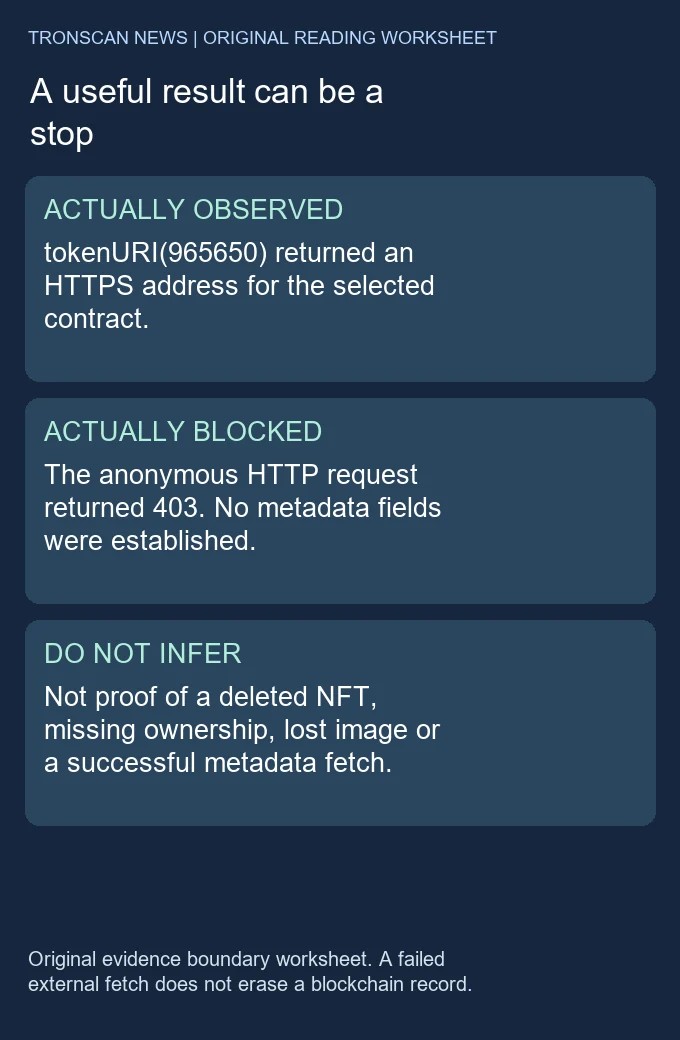
Six practical NFT metadata checks
- Confirm the item. Copy the full contract and token ID from the relevant record. A fungible token ticker or another collection’s ID is insufficient.
- Read the current pointer. Use the named read method if the interface exposes it. Preserve the exact returned string; do not fill a missing method with a guessed marketplace path.
- Identify the URI scheme. HTTPS, ipfs and other schemes need different retrieval support. Reading a string does not require opening every destination it contains.
- Check the response before fields. Record status, content type where available, time and whether parsing succeeded. An access-denied page is not a valid metadata object.
- Separate the image pointer. If an actual JSON object contains an image string, record it as a second resource to investigate. Do not call the image loaded just because the field exists.
- Name the unresolved layer. Stop at an access or verification barrier and report it. Do not infer a changed owner from an unavailable thumbnail.
You can complete the first two checks without a wallet connection. Our TRONSCAN beginner guide explains the general public-record lookup route. This site provides independent instructions; it does not offer a live NFT metadata resolver or execute contract calls for visitors.
NFT metadata addresses: HTTPS and IPFS
An HTTPS URI identifies a web location. The server may return data, redirect, refuse access or be unavailable. Keep the actual response separate from the apparent purpose of the URL. A single failed request does not establish that every reader or application receives the same result.
The IPFS NFT-data guidance distinguishes canonical ipfs URIs from HTTP gateway URLs. A gateway is an access route; availability still depends on data being provided. Its documentation also warns that older code examples use an obsolete library. We use its addressing explanation, not those old installation examples.
Preserve the CID and any path when documenting an IPFS pointer. A different gateway host does not by itself mean a different content identifier. Conversely, a gateway response should not be described as an independent local verification of the content-addressed data. No IPFS object was retrieved in our selected Mainnet example.
Check NFT metadata fields with synthetic JSON
The following invented object is for learning field interpretation. EXAMPLE_CID is a placeholder, not a valid resource or a download link. It is unrelated to the real contract read above.
{"name":"Synthetic practice item","image":"ipfs://EXAMPLE_CID/art.png"}In a local standard-library JSON parsing test on 1 November 2026, this string parsed as an object with a nonempty image string. Removing image left that field unestablished. Replacing its value with the number 7 did not produce an image string. A synthetic HTML fragment did not parse as JSON.
| Synthetic input | Observed local result | Next useful question |
|---|---|---|
| Object with image string | Image string present; retrieval not tested | What does that resource actually return? |
| Object without image | Image string not established | Does this schema use another documented media field? |
| image value is 7 | Image string not established | Is the actual document valid for the consuming app? |
| HTML fragment | Not JSON | Was the requested resource an error or another representation? |
These NFT metadata checks validate only parsing and the particular field-type distinction. They do not validate a complete metadata schema, resolve a URI, download an image or certify a collectible. A different application can support additional documented fields. Do not silently reinterpret an unknown field as a successfully loaded image.
NFT metadata failures and the right next step
No read method is shown: verify the contract and the interface before making assumptions. The NFT metadata extension is optional in the reference. An absent UI method alone does not prove that the token was destroyed or that a method can be safely guessed.
The call returns empty output or an error: retain the input and the exact result. It might concern the selected ID, the method, the provider or another condition. Our one successful pointer read is not a test of every invalid-ID or provider-error branch.
The external address refuses access: report the status and time, as in our 403 example. Do not bypass verification, submit credentials to an unfamiliar page or label the refusal as evidence of a deleted asset.
The app shows an old or missing thumbnail: compare the app observation with whatever current pointer and document evidence you actually obtained. A cached display, an inaccessible server and a missing field are different hypotheses. None was proven to explain a particular user’s wallet in this exercise.
Keep permission questions separate. Our NFT approval scope worksheet distinguishes item-level approval from a specific owner/operator pair. An attractive image does not establish those permissions, and a metadata lookup is not a reason to approve, claim, mint or transfer anything.
Keep a copyable NFT metadata observation note
Copy the following blank note into a trusted local text editor. These are field labels, not a real item or a claim that every field is available. Complete only the observations you made. Keeping the request context beside the result makes a later comparison more useful than a screenshot of a broken picture.
Network:
Complete collection contract:
Item ID, copied without rounding:
Explorer page used:
Read method and exact input:
Read time and timezone:
Exact returned URI, or observed error:
External request time and timezone:
HTTP status, or access not attempted:
Final URL and content type, if obtained:
JSON parse result, if tested:
Image field value and type, if obtained:
Separate media retrieval result, if tested:
App name and visible display, if checked:
Last verified layer:
Unresolved question and next check:
For our actual example, the contract and ID lines identify the selected Mainnet item. The read-method output line contains the marketplace URL. The external-request line records 01:03:05 UTC and HTTP 403. The JSON and image lines remain “not obtained.” Writing a plausible item name in those last lines would mix an explorer label with a document we never retrieved.
When you repeat a check, keep a new dated note rather than overwriting the earlier result. If the contract later returns a different URI, you have observed two pointer values at two times; you have not necessarily established when the value changed or which account changed it. If the pointer matches but the HTTP outcome differs, record that narrower difference before proposing a cause.
A phone screenshot can omit a long contract, URI suffix or expanded error. Preserve the complete strings as text where possible. Keep item IDs as exact text as well: a spreadsheet’s rounded scientific notation is unsuitable for identifying a particular item. Do not add personal login details, recovery phrases or unrelated account history to this public-record note.
The NFT metadata note can also explain a deliberate stopping point. “External access not attempted” is different from “HTTP 403,” and neither is a successful image fetch. A reviewer should be able to locate the same contract and ID, understand which NFT metadata checks you actually performed and see which observation would resolve the remaining question.
Five frequently asked questions
1. Is NFT metadata stored inside the picture?
Not necessarily. An NFT metadata document can describe an item and point to a separate image resource. The contract pointer, document and image are distinct observations, even when an application presents them together.
2. Does tokenURI prove who currently owns the NFT?
No. It returns an NFT metadata pointer for the selected ID. Ownership is a separate contract-state question. Our pointer and external-access checks did not establish a current owner or the identity of any account holder.
3. Does HTTP 403 mean the NFT is gone?
No. It records an access refusal for that request. Our result did not establish the external document’s contents, media availability, ownership change or token destruction.
4. Does an IPFS image string guarantee a visible thumbnail?
No. The pointer, available data, access route and consuming application’s support all matter. A field being present does not demonstrate successful retrieval or rendering.
5. Do I need to connect a wallet to perform these reading checks?
Our tested TRONSCAN read required no connection or signature. Stop if a supposed viewing step asks you to grant approval or make a transaction. Those actions are outside this read-only method.
Method, sources and corrections
We used one current explorer read, one anonymous external HTTP request and four local synthetic parsing fixtures. We did not fetch real metadata JSON, retrieve external artwork, audit source code, test an app’s cache or perform a funded operation. The diagrams and decision tables are original editorial material, not copies of a product interface.
The Tronscan News homepage links our independent guides. This article was prepared with AI assistance and source review under our published editorial standards. Report a specific field or source correction through the site’s stated correction route, preserving the network, contract, ID and observation time.
Leave a Reply