To verify a TRON batch transfer, open its transaction hash in TRONSCAN and match each expected recipient to an outgoing row for the correct token. A successful transaction tells you that the call completed. The transfer rows tell you which addresses received which amounts.
Start with the hash from the sender and the recipient list you expected. The check is complete when every expected address and amount can be reconciled with the recorded rows, with any extra or missing movement noted separately. For an exchange deposit, the exchange still has to confirm credit to its customer account.
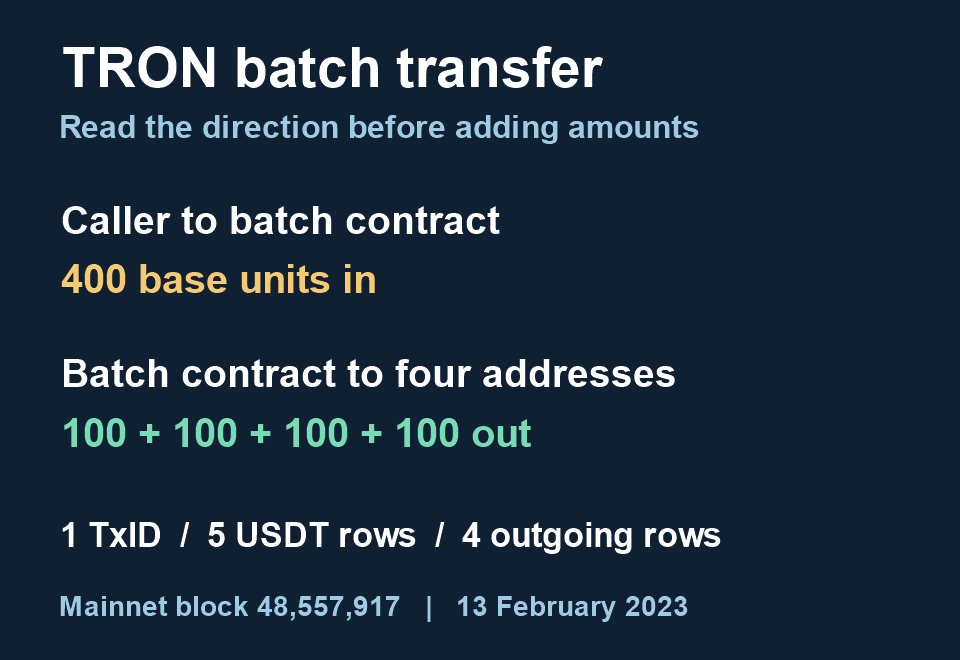
Table of Contents
Where to look in a TRON batch transfer
- Open the TRON batch transfer on the intended network. Use the complete TxID in the explorer. In the overview, compare the block, timestamp, result and confirmation status with the record you received. If your sender gave you several hashes, open each separately and record which ones you checked. The TRONSCAN guide explains how to choose the right lookup page.
- Expand all token movements. In the example below, the overview shows Token Transfers with an All Transfers view. Select it if you are looking at Net Transfers. Expand the additional rows before counting. Use the token contract to identify USDT, then write down the From, To and amount from each relevant row.
- Match the outgoing rows to the list. Compare the full recipient address and the amount in the same unit. A transfer into the batch contract can fund the outgoing transfers. Set that funding row aside when calculating the amount sent to recipients. If the same address occurs twice, retain both rows until you know whether the expected list calls for two movements or one combined payment.
- Save the result for each recipient. Record the transaction hash, token contract, recipient, amount and how you matched it. Mark a missing row as unresolved. If the transfer is for an exchange account, use the recipient address and amount from the matching row when contacting the exchange.
A TRON batch transfer with five USDT rows
Open the TRONSCAN transaction overview for block 48,557,917. The record is dated February 13, 2023 at 09:38:06 UTC on TRON mainnet. We checked it on November 11, 2026. The explorer showed a successful call and CONFIRMED status. In Token Transfers, All Transfers initially showed three rows and More (2) revealed two more.
The transaction calls the contract TKLVCkGBGMLADUgcuQPnDmxmJ1EBTG7ijM. All five USDT rows use the token contract TR7NHqjeKQxGTCi8q8ZY4pL8otSzgjLj6t. The first row moves 0.0004 USDT into the batch contract. Four rows move 0.0001 USDT each out of it. One of those four recipients is also the address that initiated the call. You can compare the account roles in the transaction sender guide.
These are recorded address movements. The record does not identify the people who control the addresses or tell us why the transfer was made. We did not have the sender’s recipient list. The worksheet reconciles the recorded movements.
A TRON batch transfer reconciliation worksheet
The short labels below identify rows in this case only. Open the transaction and use the full addresses for your own comparison.
| Direction | Amount | Worksheet treatment |
|---|---|---|
| Caller to batch contract | 0.0004 USDT | Funding row. Keep separate. |
| Batch contract to TMV77…aP1o | 0.0001 USDT | Outgoing row 1. Same address as caller. |
| Batch contract to TZC4…ikZG | 0.0001 USDT | Outgoing row 2. |
| Batch contract to TWcZ…PVbe | 0.0001 USDT | Outgoing row 3. |
| Batch contract to TJed…Z7h | 0.0001 USDT | Outgoing row 4. |
The outgoing sum is 0.0004 USDT. Adding all five rows gives 0.0008 USDT of gross movement because the same quantity moved into and out of the contract. That larger figure would overstate the outgoing amount. Looking only at the contract’s net change would also conceal the four outgoing transfers because the recorded USDT inflow and outflow balance within this transaction.
For your own TRON batch transfer, add a row to your worksheet for each expected recipient with columns for expected amount, observed amount, token contract and TxID. Record repeated rows individually, then sum them by address if your reconciliation calls for a total. Save the unmatched entries too. They are the items you need to ask the sender about.
Cross-check a TRON batch transfer in the node receipt
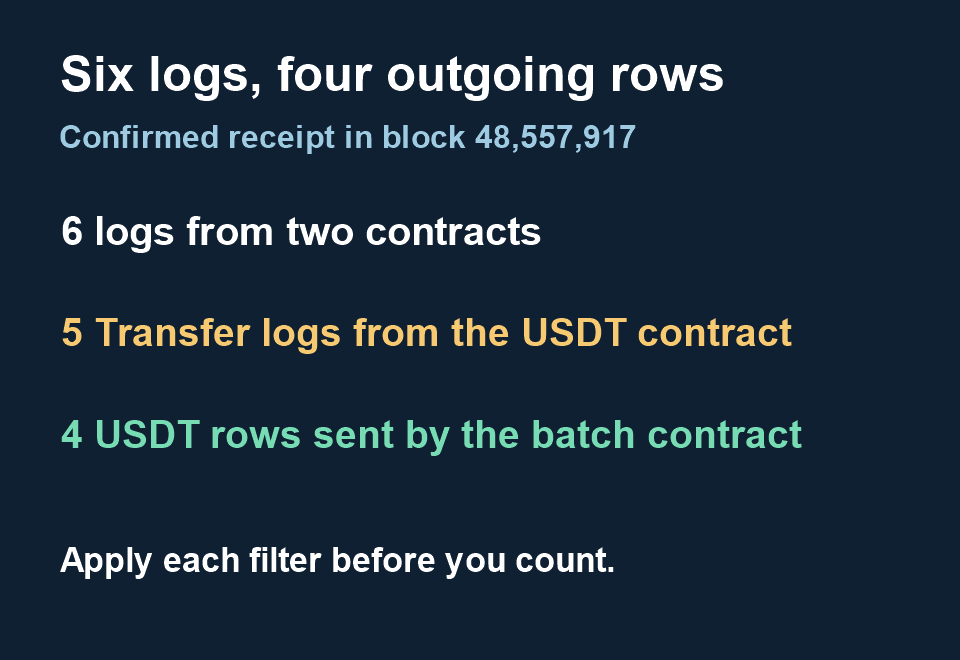
We also queried the confirmed transaction receipt through the TRON mainnet node endpoint walletsolidity/gettransactioninfobyid. The receipt returned the same block and SUCCESS. It contained six logs: five USDT Transfer logs and one event from the batch contract. The USDT values in base units were 400, 100, 100, 100 and 100. With six decimal places, 100 base units are 0.0001 USDT. Counting every log as a recipient would include both the funding transfer and a separate contract event.
For a reader checking on a phone, the expanded explorer rows are sufficient for the address and amount comparison in this case. Use the receipt when you need to confirm that a displayed token movement corresponds to a log from the intended contract. The TRONSCAN transaction information reference describes the fields available for a transaction lookup.
A receipt can include activity for more than one token. Group by token contract before adding values. A native TRX movement and a USDT event can appear in the same transaction, but they have different units and answer different questions. If you want to follow the funds beyond this transaction, use the guide to tracing USDT through multiple transfers.
When a TRON batch transfer is missing a recipient row
Check that the address belongs to the right network and that you have the full transaction hash. Reopen All Transfers and expand the list. Some services divide a batch into several transactions, so check the other hashes from the sender before concluding that an address was omitted. If the transaction failed, start with the recorded error rather than counting a recipient from the planned list.
If the address appears and the amount differs, compare the recorded token’s decimal places and the unit used in the sender’s list. Keep the actual amount and the expected amount side by side. A token symbol, address prefix or rounded display value is insufficient for a match.
Keep the payment record as it appeared when checked. An address’s current balance can change after the transfer. Use the historical row when documenting what happened in the transaction. Send the public hash and matching row to the payment provider through its official support channel if account credit is still pending.
Find related read-only tutorials on the Tronscan News homepage.
Set up the recipient comparison before counting rows
Start a TRON batch transfer worksheet from the list you received, with one line for each expected payment. Include the network and token contract once at the top if they are the same for every row. If the list mixes networks or assets, split it before comparing. An address copied from a TRON transfer cannot resolve a payment expected on another network.
Put the full address in one column and the exact expected token amount in another. Preserve trailing digits when copying values. A rounded spreadsheet display may make two different base-unit values look identical. When the source list gives whole token units, keep that label with the value. If it uses base units, write down the decimal conversion beside it so the second person reviewing your work can repeat it.
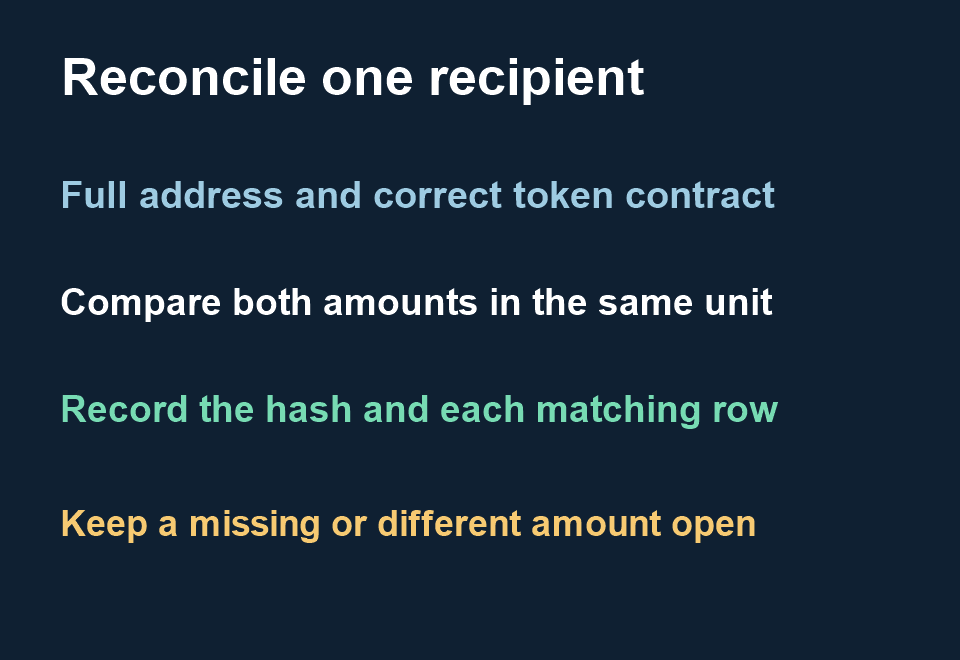
Make a second list from the actual outgoing rows. When a batch spans multiple hashes, use the hash and the event position, if available, to keep repeated-looking rows separate. Two transfers with equal amounts can belong to different recipients. Two rows with the same address and amount can also be separate recorded events. If an explorer screen omits event positions, preserve row order in your notes and use the receipt for a more precise comparison.
For example, suppose a hypothetical sender planned 2 USDT each to addresses A and B. If you find one 4 USDT row to A, the total matches the plan but the recipient check fails. If the record shows two 1 USDT rows to A and one 2 USDT row to B, the per-address totals match. Whether two movements satisfy the intended instructions is a separate question for the sender. Record the two rows before you mark the total as matched.
Write the results in terms of the check you performed. Use “matched address and amount” when you have a corresponding row. Use “matched address, amount differs” if the address is present but the amount is different. Use “unresolved” when you lack a matching row or still need another hash. Those notes tell a second reviewer what remains to be checked without requiring them to repeat the whole search.
Reproduce the TRON batch transfer receipt check
If you need to audit the worked case, send the following read-only request to a mainnet node that provides the confirmed transaction-info endpoint. The JSON value is the complete hash used in the explorer link. The response is a historical receipt. You can read it without a wallet or a signature.
POST https://api.trongrid.io/walletsolidity/gettransactioninfobyid
Content-Type: application/json
{"value":"e6178451c3ad9f77b7134f556239ec130a4cb5dcbfb0625f7754801d9e698059"}
- Check the receipt identity. Compare its
id,blockNumberandreceipt.resultwith the public case. In our response the block was 48,557,917 and the result was SUCCESS. If the response is empty or the node reports an error, keep the receipt check open. - Check the event emitter. In this receipt, the USDT contract appears in the log address field as
a614f803b6fd780986a42c78ec9c7f77e6ded13c. Check the emitting contract and the event signature before treating a value as a USDT Transfer amount. The other emitter in this receipt is the batch contract. - Read the five values in order. For these USDT Transfer events, the data field contains the amount in hexadecimal base units. Converting the five fields to decimal integers gave 400, 100, 100, 100 and 100. Use the indexed From and To topics, or the explorer’s decoded addresses, to determine direction. An amount alone cannot identify a recipient.
- Compare with the expanded explorer rows. The five decoded amounts and their directions agreed with the public explorer. In this case you can reproduce the reconciliation by counting one funding row and summing the four outgoing rows. If an API provider limits access, keep the explorer observations with the date and mark the independent receipt check as unavailable.
Keep the source response with your own notes when the reconciliation needs review. A statement that the transaction is confirmed and a statement that a particular recipient matches the expected list need different evidence. The first follows from the transaction overview and receipt. The second requires an address and amount on the appropriate outgoing row, plus the sender’s expected list.
How the receipt identifies the sender and recipient
The first USDT log gives the caller’s address in the From topic and the batch contract in the To topic. The next log in the full receipt comes from the batch contract. After filtering by the USDT contract and the Transfer signature, the second USDT log has the same two addresses in reverse order. The final three filtered logs have the batch contract as From and three different addresses as To.
Each indexed address occupies a 32-byte topic. For the Transfer events in this example, take the last 20 bytes of each address topic. To compare with a Base58Check TRON address, decode and verify its checksum, then remove the network prefix byte from the payload. Compare the remaining 20 bytes with the topic. We compared both address fields and the base-unit amount for each of the five rows.
For example, the first USDT log’s From topic ends with 7e50f35bdaec23276f7730747fb821480f10b53c. That matches the payload for TMV77n3DqPJTt54h9f2tXpjC3VG2GAaP1o. Its To topic ends with 66bf643f6e697256b3eee3f8cb031831f11ec83e, which matches the called contract. This gives you a direction check even when two rows involve the same pair of addresses.
Record what a second reviewer needs
Give each checked row a short reference, such as the transaction hash and its position in the full receipt. If you use a position, state whether you started counting at zero or one and whether you counted all logs or only the filtered USDT logs. In this case the unrelated event sits between the funding row and the first outgoing row, so positions in the two lists differ.
When two records disagree, preserve the values from both before deciding which field to recheck. An address mismatch calls for a fresh copy of the full address and a comparison of the From and To fields. A value mismatch calls for a check of base units, token decimals and any rounding in your source list. A position mismatch can come from comparing the full receipt with an explorer list that shows only transfers.
Write the date you collected the evidence and keep the historical transaction link next to the row. A second reviewer can then open the same hash, find the same token contract and reproduce the comparison without relying on a screenshot or the address’s current balance.
When the same address appears on both sides
In the worked TRON batch transfer, the caller funded the contract and also received one of the outgoing rows. Record that outgoing row if it belongs to the list you are checking. If your question is how much USDT that address gained or lost within this transaction, subtract its observed USDT outflow from its observed USDT inflow. In this case the caller’s two recorded movements are an outflow of 400 base units and an inflow of 100, a net outflow of 300 base units. The net figure does not replace the individual 100-unit outgoing row from the contract.
Keep that distinction if you share your worksheet. Someone checking the recipient list needs each outgoing row, while someone reconciling the caller’s change needs both directions. The note should also identify the token. An account’s TRX resource charges and its USDT movements are separate values. We used the token rows to verify the distribution and did not use the network fee as part of the USDT sum.
Frequently asked questions
Can one TRON batch transfer have more than one recipient?
Yes. The checked mainnet transaction has four outgoing USDT rows under one TxID. Verify the address and amount in each row.
Why does the explorer show five transfers for four recipients?
The first USDT row funds the batch contract. The four later rows distribute that quantity. Filter by direction before counting recipients.
Do I need a wallet connection to inspect the batch?
The public transaction overview and its token rows can be read without connecting a wallet. Use the complete TxID on the correct network.
Does the contract address identify my recipient?
Read the To address on the outgoing token row. The contract called by the transaction can be the batch processor rather than the address receiving that particular token movement.
Can I prove an exchange credited a recipient from this record?
You can verify the recorded on-chain transfer to an address. The exchange can confirm whether it credited the customer account.
Editorial note: AI assisted with drafting and the original diagrams. We checked the public mainnet overview and confirmed node receipt on November 11, 2026. The test was read-only. We did not connect a wallet, sign a transaction, test a sender service or check a private account.
Leave a Reply