Before opening a TRON explorer link, inspect its complete hostname and compare it with an independently verified entry point. Then check the network and the record you intended to read. A familiar token logo, a link label or the word “tronscan” somewhere in a URL does not establish the destination.
This guide is for readers checking a public transaction or account from a message, withdrawal record or shared document. Its success standard is a clear decision: use a verified entry and search the identifier yourself, or leave an uncertain link unopened. It is not a promise that a hostname check can certify a website, payment or recipient.
For the official entry, the TRON developer documentation links to tronscan.org. This article uses that exact hostname as its reference, rather than trying to maintain an exhaustive list of legitimate subdomains or alternative explorers. A different hostname needs its own verification; it is not automatically malicious.
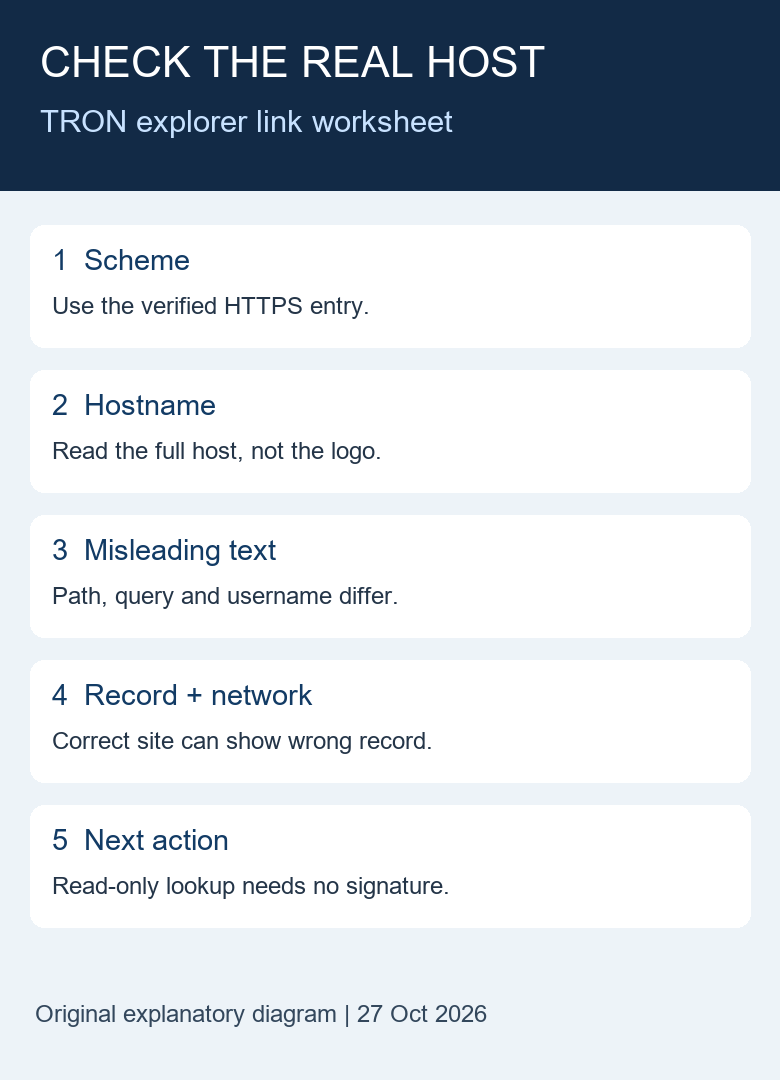
Table of Contents
7 checks before following a TRON explorer link
- Preserve the identifier separately. Copy the transaction hash or public address from the original activity entry. Keep an exchange withdrawal reference separate from a blockchain hash. If the sender supplies only a shortened screenshot, ask for the complete public identifier.
- Inspect the actual destination. Use your application’s link information or copy-link function into a trusted local note. Do not open a suspicious page merely to inspect its address bar. Mobile long-press behavior varies: a preview can contact a destination. If your application does not reveal the full URL without loading it, skip the supplied link and use an independently verified entry.
- Read scheme, hostname and port separately. The reference here is HTTPS with hostname
tronscan.organd its usual HTTPS port. An unexpected scheme or port is a reason to stop this workflow and use the known entry. HTTPS alone does not establish who operates a site or whether its contents are honest. - Look beyond familiar words. In the worksheet below,
tronscan.orgcan appear in a path, a query or a username while the hostname is different. Read the full host; do not approve a URL just because the beginning looks familiar. - Open your verified entry independently. Use a bookmark you previously verified, or the entry linked in the official documentation. Paste only the public hash or address into its search. This avoids depending on an unfamiliar redirect or a shortened link.
- Match the network and record. Confirm Mainnet versus a test network and compare the full hash, asset contract and recipient relevant to your task. A real explorer can display a genuine transaction unrelated to your payment. The TRONSCAN guide to selecting the right record explains those choices.
- Keep the next action within your task. Reading public chain data does not require signing a wallet transaction. If a page asks you to connect, sign, install something or disclose a recovery phrase, stop before treating that as part of a simple lookup. A legitimate explorer may offer separate interactive functions; their existence does not make them necessary for reading your record.
Read a TRON explorer link in three parts
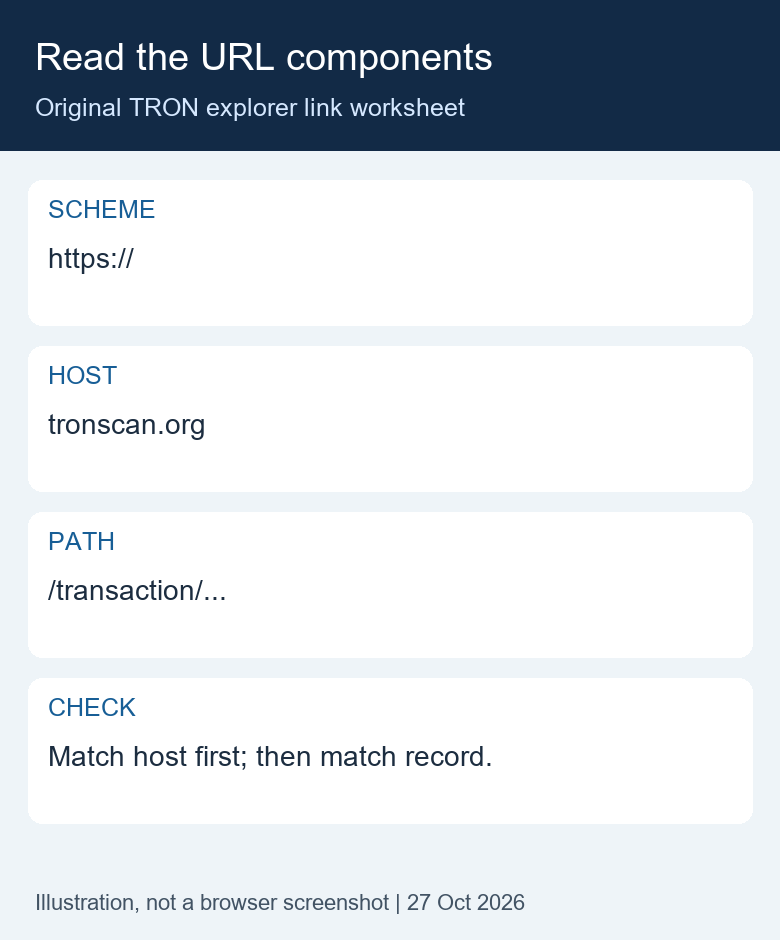
Start with a complete text URL, not the caption attached to it. In https://tronscan.org/transaction/..., the scheme is https, the hostname is tronscan.org, and the remaining transaction route is the path. The dots are a placeholder, not a usable transaction hash. The path does not establish the hostname and the hostname does not establish which transaction the path describes.
For a TRON explorer link supplied by another person, write these components on separate lines. This makes a long string easier to review on a phone. If the app truncates the host, the result is unresolved. Do not convert an incomplete view into a positive decision. Searching the original hash at an independently verified entry remains the next useful step.
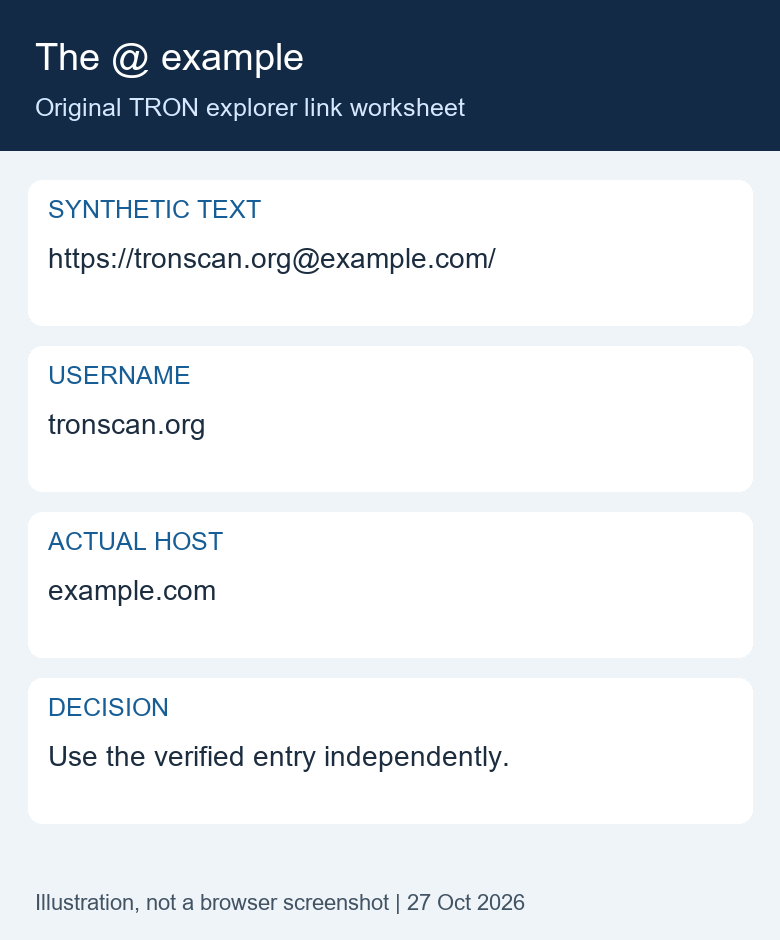
Worked TRON explorer link exercise: the @ sign
Suppose a message displays the synthetic text https://tronscan.org@example.com/. The familiar string before @ is the username component. The parsed hostname in our local exercise is example.com. This is different from our reference hostname. The correct conclusion is a destination mismatch for this workflow, not proof about the sender’s intent.
You can finish this TRON explorer link check without visiting the supplied destination. Keep the public identifier separately, open the verified entry, and search there. If no identifier was supplied, ask for it. Do not type a password into the username position or turn this example into a usable link. We show it as code text precisely so the exercise does not require navigation.
Worked TRON explorer link exercise: a correct host, wrong record
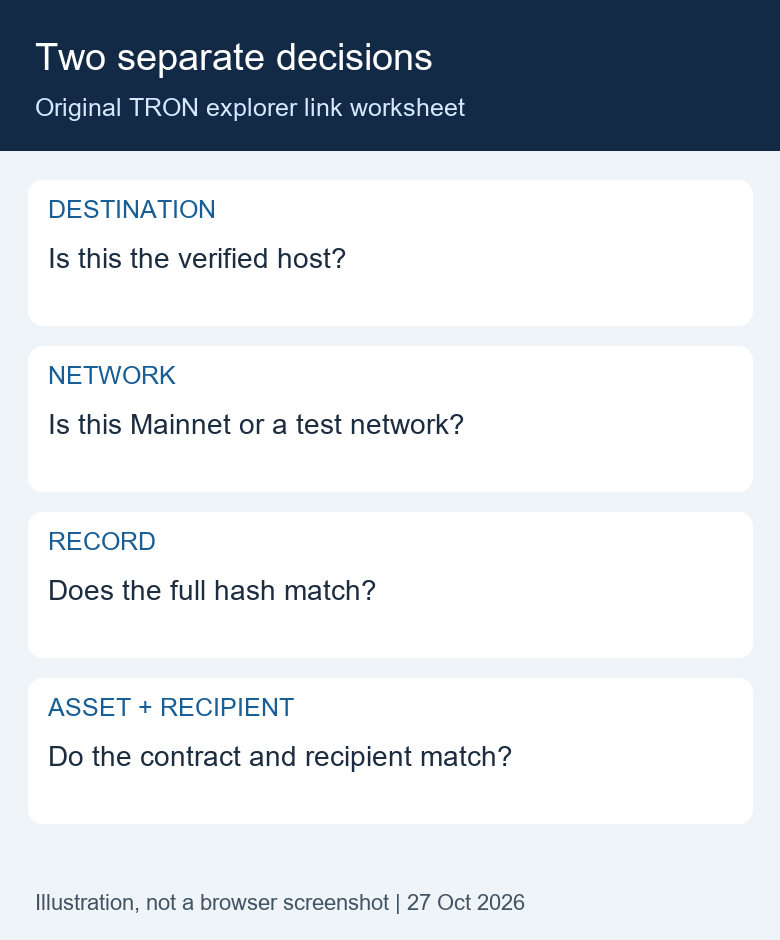
Now suppose the destination hostname matches the verified entry but the displayed transaction hash differs from your sending record. The host decision can pass while the payment question remains unresolved. These are independent comparisons. A success badge on that other record does not bridge the mismatch.
Record the two full hashes separately rather than trying to reconcile only their first and last characters. Check whether one value is a service reference instead of an on-chain hash. Then compare the network, token contract and intended recipient within the matching record. The task is complete only when each relevant comparison is either supported by the original evidence or clearly marked unresolved.
This TRON explorer link worksheet deliberately avoids a single green “safe” score. A destination result, a network result and a transfer result answer different questions. The distinction is useful when forwarding evidence to support: explain which comparison failed rather than forwarding a familiar-looking URL as proof that all stages succeeded.
An original hostname worksheet
These are synthetic text examples, not clickable recommendations and not reports about incidents. The example domains are reserved for illustration. None of the different-host destinations was opened during testing.
| URL text | Parsed hostname | Decision for this lookup |
|---|---|---|
https://tronscan.org/ |
tronscan.org | Matches the reference host; still check the record. |
https://TRONSCAN.ORG/ |
tronscan.org | Case alone does not create a different hostname. |
https://tronscan.org.example.com/ |
tronscan.org.example.com | Different host. Use the verified entry instead. |
https://example.com/tronscan.org |
example.com | The familiar name is in the path. |
https://tronscan.org@example.com/ |
example.com | The familiar name is a username before @. |
https://example.com/?next=https://tronscan.org/ |
example.com | The familiar name is in a query value. |
http://tronscan.org/ |
tronscan.org | Host matches, but the supplied scheme is HTTP. |
https://tronscan.org:8443/ |
tronscan.org | Host matches, but the explicit port is unexpected. |
Method: on 27 October 2026, we parsed these eight ASCII strings locally with Python’s urllib.parse.urlsplit and checked the expected hostname for each. All eight hostname assertions passed. The scheme, username and port were recorded separately. This is a reproducible explanation of URL structure, not a tested online link scanner.
The MDN hostname reference describes hostname as a component distinct from the rest of the URL. Its username reference explains another component illustrated by the @ example. The exact appearance of a link-information panel varies by browser and application.
Port interpretation needs its own check. As the MDN URL port reference explains, 443 is the default HTTPS port. An explicit default port is different from the non-default 8443 example in our table. That example flags a departure from this narrow lookup workflow; a non-default port alone is not proof of deception.
What this TRON explorer link check cannot prove
An exact hostname comparison answers a narrow destination question. It does not prove that the current content is uncompromised, that every script loaded by a page is appropriate, or that an account shown by the explorer belongs to the person messaging you. Do not turn a destination match into a payment instruction.
The offline cases do not cover Unicode lookalikes, internationalized hostname conversion, malformed URLs, encoded control characters, redirect chains or every browser’s parsing behavior. If a name contains unfamiliar characters or an address seems ambiguous, do not improvise a correction. Use the verified entry and search your original public identifier.
A testnet record can look plausible while describing assets on a different network. Likewise, the contract called by a transaction and the recipient of a token transfer serve different roles. Verify the asset and full recipient inside the relevant movement, rather than accepting a green success badge as proof of your payment.
Failure branches and the next useful step
The supplied TRON explorer link is shortened or redirects. You do not need to resolve every redirect to read a public transaction. Keep the hash separately and use the verified explorer entry. Do not guess that a short link’s destination remains the same because it worked previously.
The trusted entry cannot find the identifier. Recheck the complete hash and the sender’s stated network. Our TRON TxID identification guide helps distinguish a transaction hash from a withdrawal reference. A missing search result alone does not prove fraud or a failed transfer.
The destination is correct but the recipient differs. Preserve the hash and the intended destination separately. Do not replace your intended recipient with an address copied from unrelated history. The full-address comparison guide explains why shortened address matches are insufficient.
A page displays a certificate warning. Stop and do not bypass it for this lookup. Check the official entry independently and keep the observation in your record. A warning is not solved by entering wallet secrets or disabling browser protection.
You already opened an uncertain page. Stop interacting with it. Separate a page visit from permissions, software installation or a signature you may have approved. Record what actually occurred and follow your wallet provider’s official guidance for that specific action; this article cannot determine exposure from a URL alone.
Verify the reference before trusting the comparison
A reference copied from the same message as the questionable TRON explorer link is not independent evidence. If both links came from one unfamiliar sender, a matching name between them does not resolve the destination question. Start from a previously verified bookmark or navigate to the official developer documentation through a route you already trust. Check the hostname of that reference page as well as the entry it recommends.
A search-result title is another label, not the complete destination. Read the actual domain before treating a result as your reference. If you cannot establish an independent entry on the device you are using, leave the supplied link unopened and retain the public identifier for a later check. You have recorded a limitation, not confirmed that the transaction failed.
For a handoff to another reader, separate three lines: supplied destination, reference destination and comparison result. Add where the reference came from and when it was checked. This makes the reasoning reproducible without asking the next reader to trust a cropped address-bar image. The recipient should still verify their own navigation rather than treating your note as a permanent guarantee about the website.
Here is an original synthetic handoff example: “Supplied destination: example.com. Reference: tronscan.org, reached independently through the documentation. Host result: different. Transfer result: not checked because no full hash was supplied.” The host result does not establish an on-chain loss, and the missing hash does not justify inventing one. Ask for the missing public evidence while keeping any private account details out of the message.
A short record you can copy
Record: source of message; original public identifier; supplied hostname; independently verified entry; network checked; full record matched or unresolved; time checked; next step. Do not include private keys, recovery phrases, passwords or login codes. A public address may reveal financial activity, so share the note only with the appropriate recipient.
For example: “Synthetic exercise: supplied host example.com; reference host tronscan.org; no destination visit; original hash not supplied; outcome unresolved; ask sender for the complete public hash.” This describes a verification result without inventing an on-chain outcome or accusing the sender of fraud.
After the TRON explorer link check: choose the next action
This original decision table keeps a destination check from becoming blanket permission for whatever the page asks next. It applies to the public-record lookup described here. It does not classify every interactive explorer feature as unsafe or replace the review needed for another task.
| Request you see | What your current check establishes | Next step for this lookup |
|---|---|---|
| Search for a public transaction hash | You have independently checked the destination and selected the intended network. This still does not establish the contents or outcome of the record. | Search the original full hash and compare the actual transfer fields. |
| Connect a wallet | A hostname match does not establish that sharing a wallet address or establishing a connection is required for your question. | Continue with public search. Treat any connection as a separate decision. |
| Sign a message or approve a transaction | The link check has not reviewed the signing request, its contents, the permissions involved or its consequences. | Stop the signing flow for this read-only task. Do not approve an action merely to view a public record. |
| Install an extension or application | The reference-host comparison does not authenticate the offered software, its publisher or requested access. | Do not install it as a prerequisite to this lookup. Use the independently verified web entry. |
| Enter a recovery phrase, private key or login code | None of these secrets is part of a public transaction identifier. Your worksheet cannot validate a request for them. | Do not provide them. Keep the record investigation separate from account access. |
| Open a different external service | A link from a page is a new destination. Your earlier hostname comparison does not automatically extend to that service. | Identify the new purpose and independently verify its destination before continuing. |
Frequently asked questions
1. Is every TRON explorer link with HTTPS safe?
No. HTTPS is one connection property. Check the independently verified hostname and the intended record, then keep any wallet action separate from reading.
2. Does tronscan.org anywhere in a URL establish the hostname?
No. It can occur in a path, a query value or user information. The table shows locally tested examples with different actual hosts.
3. Must I connect a wallet to check a public transaction?
No. A public transaction lookup uses its hash. Connecting or signing belongs to a separate task that requires its own review.
4. Does this worksheet label every other explorer a scam?
No. It uses one documented reference entry. An alternative explorer, testnet subdomain or changed official entry requires independent verification and is outside this exact-host exercise.
5. Can a correct explorer link prove the recipient is my exchange?
No. Compare the full recipient with the deposit instructions in your own verified exchange session. A blockchain record does not establish a private customer-credit decision.
Sources, test scope and editorial note
Prepared by the Tronscan News editorial team with AI assistance and primary-source review on 27 October 2026. We tested only the eight local URL examples, not a malicious site, a live signature flow or every current browser interaction. The diagram and worksheet are original explanatory material. No wallet was connected and no transaction was signed for this article.
Visit the Tronscan News homepage for independent tutorials. Tronscan News is independent of TRONSCAN and does not provide a hosted link scanner or an on-chain lookup tool on this page. Corrections can be requested through the site’s About & Standards navigation.
Leave a Reply